
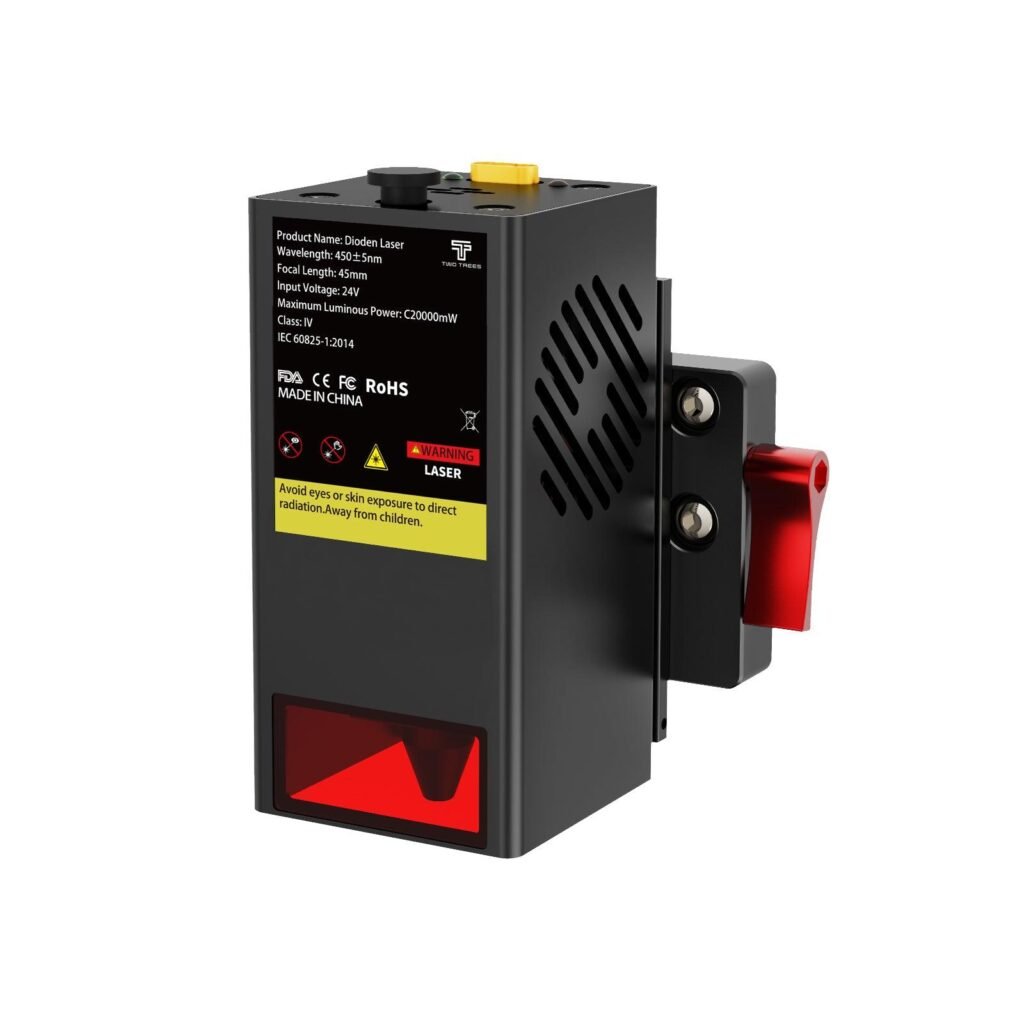
Twotrees TC20 Laser Module for TTC450 Pro /…
A 20W diode laser module designed to add precision engraving and cutting capability to compatible Twotrees CNC platforms.
Overview
The Twotrees TC20 is a 20W diode laser module designed as an official upgrade for a number of Twotrees desktop CNC platforms — specifically the TTC450 Pro, TTC450 Ultra, TTC6050 and TTC‑H40. Rather than buying a separate laser machine, the TC20 lets you add laser engraving and light cutting capability to a compatible Twotrees router, widening the kinds of projects you can tackle from precision graphics and signage to small production runs.
The module is pitched at makers, small businesses and educators who want the flexibility of a combined CNC/laser setup. The manufacturer highlights precision engraving, reasonable cutting power on thin to medium materials and straightforward mounting and connectivity with the supported machines. It ships with installation accessories and a user manual to help with fitting and initial setup.
Who is this best for?
The TC20 is aimed primarily at existing Twotrees owners who want to add laser capability without buying a separate machine. If you already have one of the supported models (TTC450 Pro, TTC450 Ultra, TTC6050 or TTC‑H40) and you want to expand into engraving, etching and cutting thin materials, the TC20 is a logical upgrade.
It’s also a sensible option for small businesses and educator environments that need a compact, multi-function tool. For hobbyists and makers who produce personalised gifts, small signage or prototypes, the module broadens the set of techniques you can offer. However, this isn’t a plug‑and‑play answer for everyone: if you need deep cuts, metal processing or higher industrial throughput, a dedicated laser or a different laser technology is likely a better fit.
Key features
- 20W diode laser output suitable for engraving and light cutting.
- Designed compatibility with Twotrees TTC450 Pro, TTC450 Ultra, TTC6050 and TTC‑H40 platforms.
- Suitable for a range of common materials including wood, plywood, leather, paper and acrylic (material-specific limits apply).
- Precision engraving capability for detailed artwork and small text.
- Includes the mounting accessories and user manual needed for installation on the supported machines.
- Official accessory — mounting and connectivity are expected to match the host machine’s mechanics and controls.
Practical evaluation
Because the TC20 is an add-on module, its real-world usefulness depends on how well it integrates with your existing machine, your chosen materials and how you plan to work. As an official Twotrees accessory it’s engineered to fit the supported platforms with minimum fuss: the package includes the brackets and cabling you’ll need and the manual explains the physical installation. That reduces the tinker time compared with a generic third‑party head, but you should still expect to spend time adjusting settings and learning safe operating routines.
Performance-wise, a 20W diode laser sits in a useful mid-range for hobbyist and light commercial use. It’s capable of precise engraving — fine lines, logos and lettering are realistic when you match the feed and power settings to the material — and it can cut through thin woods and acrylic at appropriate speeds. However, it’s not a substitute for higher‑powered CO2 or fibre lasers if you need thicker cuts or metal work. The TC20 is best thought of as a versatile tool for marking and light cutting rather than heavy production.
Another practical consideration is safety and extraction. Any laser of this class creates smoke and fumes when cutting, especially with plastics such as acrylic. You’ll need adequate ventilation or an extraction system and suitable eye protection for anyone in the area — an enclosed workstation with extraction is the safest arrangement. The product documentation emphasises these points, and you should follow both the Twotrees guidance and your local safety regulations when installing and operating the module.
From a workflow perspective, integration with your existing control software matters. Some machines accept the laser head as a straight replacement and use the router’s control signals (with PWM to modulate laser power), but in other cases a firmware or control change may be necessary to enable full laser control and safety interlocks. Before you buy, check whether your machine’s current controller supports laser use or whether you’ll need to update firmware or add a controller board that provides laser enable, PWM and emergency stop handling.
Strengths
- Adds laser capability without a second machine: If workshop space is limited or you want a flexible tool, the TC20 lets one machine do more — routing and laser work — rather than owning two separate units.
- Good power for everyday cutting and engraving: The 20W output gives enough headroom for clear, precise engraving and for cutting thin to medium‑thickness non‑metal materials when used with the right speed and power settings.
- Precision engraving: The module is suitable for fine graphics, logos and detailed text, which makes it useful for customised products, signage and model work.
- Official accessory, thought-through fit: Since this is an official Twotrees module, the mechanical mount and electrical connections are designed for the supported platforms, which reduces compatibility headaches versus generic heads.
- Package convenience: The inclusion of mounting accessories and a manual means you won’t be hunting for every tiny part during installation.
- Good for makers, small businesses and education: The module is well suited to those groups because it unlocks new project types without the cost and footprint of an additional dedicated laser machine.
Limitations
- Laser safety is essential: A 20W diode laser is powerful enough to cause permanent eye damage and fire risks. You must use appropriate shielding, eye protection and interlocks. This is not a presentational device — it’s workshop equipment that requires rigorous safety practice.
- Fumes and ventilation needed: Cutting and engraving produce smoke and potentially hazardous fumes depending on the material. Proper extraction and ventilation are required, and some plastics should be avoided entirely because of toxic by-products when lasered.
- Not suitable for metal cutting: Diode lasers of this class can mark metals in some circumstances (with pre-treatment or specialised settings) but they are not suitable for cutting or welding ferrous metals. If you need metal processing, you’ll need a CO2 or fibre laser solution.
- May need firmware or control changes: Not every host machine provides laser‑specific control by default. You should verify your controller supports PWM modulation and laser‑safe enable lines, or plan for a firmware update or additional controller hardware.
- Power can char thin materials: Correct settings are crucial. Thin woods, paper or leather can char or burn if feed rates and power are not matched to the material — a learning curve is part of the process.
- Premium upgrade price bracket: The TC20 sits in a higher price band than basic hobby modules. Whether it represents good value depends on how much you’ll use the laser capability and whether a standalone machine might be cheaper for your needs. Always check current pricing and offers before you buy.
Pricing and value
The TC20 is sold as a premium upgrade rather than a budget accessory. A guide price of USD 399.00 has been quoted, which places it in the mid-to-upper range for diode laser modules aimed at hobbyists and small shops. That guide price is useful for budgeting, but you should check the retailer page for current pricing, promotions or bundle offers before committing.
Whether the TC20 represents good value depends on a few practical questions: do you already own a compatible Twotrees platform, will you make regular use of engraving and cutting, and are you prepared to invest in the safety and extraction equipment a laser demands? If you answer yes to those questions, using an existing machine for both routing and laser work can be more cost-effective than buying and maintaining two separate machines.
On the other hand, if you don’t already have a supported Twotrees router or you primarily need large-format laser cutting, a dedicated laser machine (CO2 or higher-power diode) may deliver better cost-to-capability over time. Also factor in the cost of recommended safety upgrades such as enclosure panels, extraction fans and laser-rated eyewear — these are essential and add to the total investment.
Alternatives
It’s worth considering alternatives so you buy the right tool for your needs rather than simply the most convenient option.
1) Dedicated laser machines — If your work is primarily laser engraving and cutting and you require frequent or heavy-duty use, a dedicated laser engraver (CO2 or higher-power diode) will often be faster, more robust and purpose-built for laser workflows. CO2 lasers work well on a wide range of non-metal materials and provide better cutting depth than most diode options. They also typically come with enclosed cabinets and better integrated fume handling for workshop safety.
2) Lower-power diode modules — For beginners or very light hobby use, a lower-power diode module can be cheaper and easier to manage. These are less effective for cutting but are useful for marking, light engraving and learning the software and safety routines before moving up to a 20W device.
3) Rotary and other add-ons — If your goal is broader capability rather than specifically laser work, Twotrees and other vendors sell rotary attachments and spare motors that expand what a CNC/router can do. A rotary, for example, is essential for cylindrical engraving and may cover some use-cases that a laser would otherwise be used for.
4) Third‑party laser modules — There are many third‑party heads on the market that might be cheaper, but they can require more mounting work and less guaranteed compatibility. If you’re comfortable with mechanical adaptation and possible wiring or firmware changes, a third‑party head can be an option; if not, the official Twotrees module reduces that risk.
Buying considerations and checklist
Before you hit the buy button, run through this checklist to make sure the TC20 is the right fit for your workshop:
- Compatibility: Do you own one of the supported Twotrees platforms (TTC450 Pro, TTC450 Ultra, TTC6050 or TTC‑H40)? If not, will the module physically and electronically integrate with your existing CNC?
- Controller support: Does your machine’s controller support laser enabling and PWM modulation? If in doubt, check the manual or ask the vendor whether a firmware update or additional hardware is required.
- Space and enclosure: Can you provide a safe, enclosed workspace or retrofit an enclosure to contain stray beams and sparks? Enclosures also help with fume extraction and fire safety.
- Extraction and filtration: Do you have a plan for ventilation or fume extraction, especially when cutting plastics such as acrylic? Local extraction or a canopy system is strongly recommended.
- PPE and safety controls: Have you budgeted for laser-rated eyewear, interlocks, and fire-extinguishing measures for the workshop?
- Material plans: Which materials do you plan to work with regularly? Confirm that those materials are suitable for diode laser work and research any material‑specific hazards.
- Usage profile: Will you use the laser sporadically for personal projects, or will it be part of regular production? Heavier usage may justify the higher upfront cost and additional safety gear.
Final verdict
The Twotrees TC20 laser module is a strong recommendation for existing Twotrees owners who want to expand their router into a capable laser engraver and cutter. As an official accessory, it removes a lot of the guesswork around mechanical fit and electrical connections and gives you a 20W diode platform that’s capable of precise engraving and light cutting on popular materials such as wood, plywood, leather and acrylic.
It’s a particularly good choice for makers, small businesses and educational settings where flexibility matters and workshop space or budget makes a single multi-purpose machine appealing. The TC20 strikes a sensible balance between engraving precision and cutting capability for thin to medium materials, and the included mounting accessories and manual help smooth the installation process.
That said, this upgrade carries important responsibilities and limitations. A 20W laser is powerful and requires proper safety measures, ventilation and potentially controller or firmware adjustments. It is not suitable for thick materials or metal cutting, and incorrect settings can easily char or burn delicate substrates. Finally, it sits in a premium upgrade bracket, so consider whether the cost — plus the necessary safety and extraction equipment — is justified for the volume and type of work you plan to do.
If you already own a supported Twotrees router and you’re prepared to invest in safe operating practices, the TC20 is an efficient way to add robust laser capability without buying a second machine. If your needs lean more heavily toward deep cutting, metal work or high throughput, compare this option with dedicated laser systems before deciding.
Note: Prices and offers can change. Check the retailer page for the latest price and availability before buying.
Ready to check Twotrees TC20 Laser Module for TTC450 Pro / TTC450 Ultra / TTC6050 / TTC-H40 – AU / For TTC6050/TTC-H40?
Check the latest offer before buying, then return to the main comparison if you want to compare it against the other shortlisted options.
Compare this with the full shortlist
Return to the full comparison guide to see how this product compares against the other shortlisted choices.