
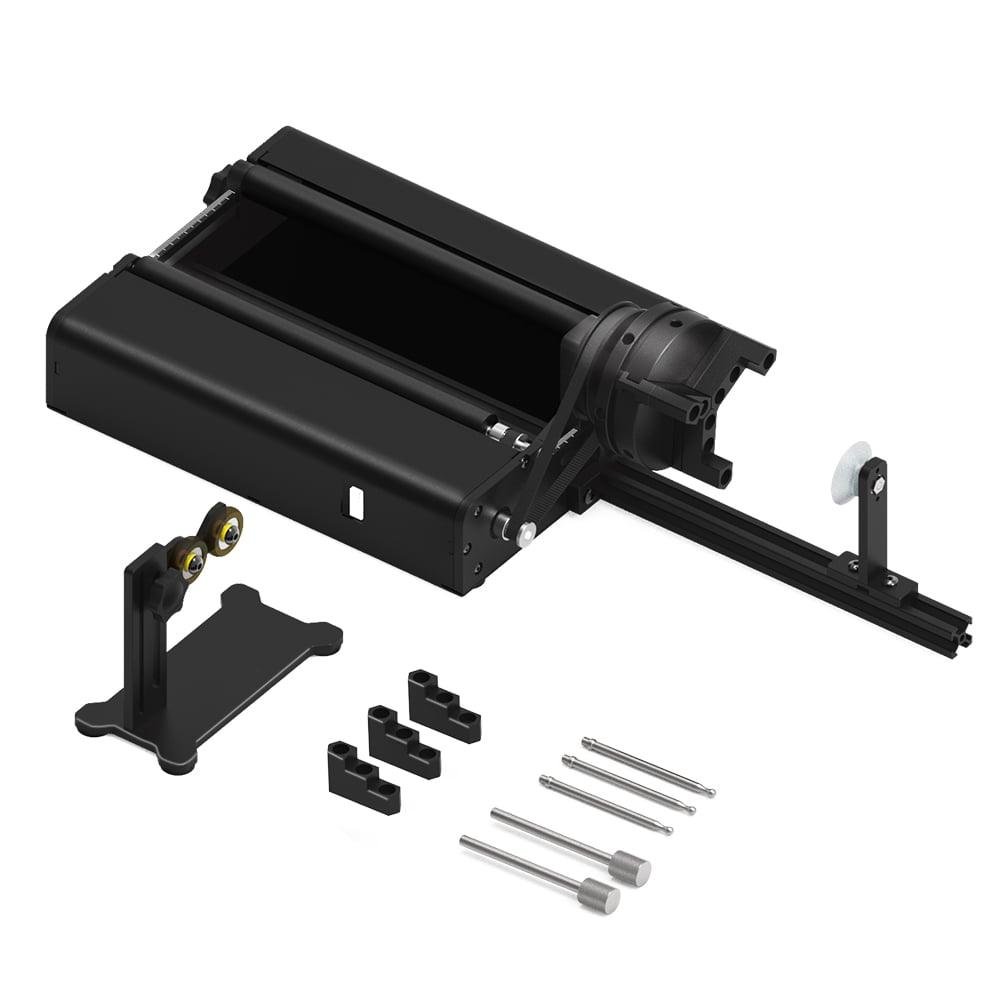
Twotrees TR2 PRO Rotary Attachment MIN 1 DIA…
A 4‑in‑1 professional rotary system for full‑rotation engraving on tumblers, bottles, rings and other curved objects.
Overview
The Twotrees TR2 PRO is a compact, modular rotary attachment designed to broaden what a desktop laser engraver can do. Instead of being limited to flat workpieces, a rotary gives you true 360° engraving so you can personalise tumblers, pens, rings and other cylindrical or spherical objects. The TR2 PRO’s key selling point is its 4‑in‑1 modular design: roller, chuck, sphere and ring modes are intended to handle a wide variety of shapes, and Twotrees states the unit can work on very small diameters — down to about 1mm — which makes it potentially useful for jewellery and miniature work.
On paper the TR2 PRO looks like an affordable way to add genuine rotary capability to a hobby or small workshop set‑up. That said, a rotary axis introduces a few extra practical complications: it needs machine and software support for an A (rotary) axis, careful calibration and steady fixturing for tiny or irregular parts. This review lays out what the TR2 PRO offers, where it shines, the trade‑offs to expect, and sensible alternatives if a rotary isn’t the right route for your workflow.
Who is this best for?
The TR2 PRO is aimed at makers, small batch producers and hobbyists who already own — or plan to own — a compatible desktop laser engraver and want to expand into true 360° engraving. It’s particularly relevant if you make personalised gifts and items such as stainless‑steel tumblers, wooden pens, keyrings, cylindrical ornaments and small jewellery pieces where wrapping a design around the object is essential.
This accessory also suits users who value flexibility. The modular 4‑in‑1 design means you can switch between rollers for tumblers, a three‑jaw chuck for rods and pens, a sphere mode for balls and toys, and a ring jig for bands. If you run mixed jobs where the shape of each piece changes frequently, the quick mode switching is a practical time saver.
On the other hand, it’s not the right choice for people who don’t want to manage extra mechanical setup, calibration or software configuration. If your work is strictly flat‑bed engraving or you need a heavy‑duty production rotary for continuous high‑volume jewellery turning, a dedicated lathe or turner may be a better investment.
Key features
Here’s a concise summary of what the TR2 PRO brings to the table. These are the verified product facts provided by the manufacturer or retailer and form the core of what buyers should expect:
- 4‑in‑1 modular design: roller, chuck, sphere and ring modes for different workpiece shapes.
- Supports very small diameters: claims a minimum working diameter of approximately 1mm, making precision pieces such as jewellery theoretically possible.
- Enables smooth 360° rotational engraving for cylindrical items — perfect for wrapping designs around a tumbler or pen.
- Quick mode switching to move between different types of objects with minimal downtime.
- Designed for wide compatibility with laser engravers — intended as an add‑on rather than a proprietary, single‑machine accessory.
- Target use cases: tumblers, rings, pens, bottles and spherical objects where full rotation is required.
Practical evaluation
Because this review relies on the supplied product information rather than direct hands‑on testing, the practical evaluation focuses on likely behaviour, common workflow considerations and how the TR2 PRO should integrate into a typical desktop laser set‑up.
First, plan for setup and calibration. Adding a rotary axis means aligning the rotary’s centreline with your laser’s focal plane and ensuring the machine’s A‑axis steps per millimetre (or steps per degree) are configured in your controller/software. Expect some initial fiddling: the chuck must be centred, the roller bearings aligned and any belt or coupling tension adjusted. For very small parts (the unit claims down to ~1mm) you’ll need reliable jigs or adhesive fixturing to prevent wobble — even the slightest run‑out will show up badly on fine engraving.
Second, software compatibility is essential. The TR2 PRO requires a machine and control software that can accept an A‑axis (rotary) input. Many popular controllers and engraving packages support a rotary axis but you’ll need to confirm your specific setup. When running a job, the software must convert horizontal movement into rotational motion correctly; otherwise the image will distort when wrapped around the object. If your controller doesn’t natively support a rotary axis, some programs can ‘simulate’ the behaviour by pre‑mapping designs, but that adds complexity.
Third, think about material choices and job speed. Rotary engraving tends to be slower than flat engraving for the same level of detail because the engraving head must be moved incrementally while the workpiece rotates. Materials also behave differently: metal tumblers and stainless surfaces may require higher power or pre‑treatment for good contrast, while wood and acrylic generally engrave cleanly. The TR2 PRO itself is not a power source — pairing it with a suitable laser module (and safe ventilation practices) is a separate consideration.
Finally, consider the practical range of objects. The modular modes are a strength: roller mode suits long, cylindrical parts; the chuck is ideal for shorter rods and pens; sphere mode lets you tackle balls and curved objects; and ring mode is geared at bands and flat circular shapes. Each mode will have its limits — for example, non‑symmetrical or highly irregular items will need custom fixturing to avoid slippage during rotation.
Strengths
- Expands a desktop laser into true 360° engraving: you can produce wraparound designs that are impossible on a flat bed alone.
- Modular system handles a wide range of object shapes: one accessory covers tumblers, pens, rings and spheres, reducing the need for multiple dedicated jigs.
- Small‑diameter capability: a claimed minimum working diameter of about 1mm makes the unit attractive for jewellery and small components where precision is needed.
- Quicker workflow for mixed jobs: the quick mode switching speeds up transitions between different object types in the same batch.
- Relatively affordable way to broaden services: compared with industrial rotary units or a separate lathe, the TR2 PRO is a lower cost route to adding rotary capability.
Limitations
- Requires software that supports a rotary (A) axis — not all desktop engraver controllers are set up for this by default.
- Mechanical setup and calibration can be fiddly at first; alignment and centration matter more than on flat work.
- May need additional mounts or adapters to secure non‑standard items; very small parts demand steady fixturing and patience.
- Not a substitute for a dedicated jewellery lathe or precision turner — if your core work is high‑volume, high‑precision turning, a purpose built machine could be a better choice.
- Handling very small or irregular pieces can increase job time and scrap rates until you develop reliable fixturing and workflows.
Pricing and value
The TR2 PRO is presented as a cost‑effective way to add rotary capability to a desktop laser setup. A guide price of USD 129.00 is given, but remember that prices and offers vary between retailers and over time. Also factor in any additional costs you may need to operate the rotary effectively: specialised jigs, small part fixtures, a compatible laser module (if you haven’t already got a suitable one), and possibly controller upgrades or software that supports an A‑axis.
Value depends on how often you’ll use the rotary and the kinds of projects you run. For occasional personalisation jobs and small batches, a single TR2 PRO will likely pay back quickly through added services such as tumblers, pens and ring engraving. For higher‑volume or precision jewellery production, the TR2 PRO can work as a versatile tool but might not match the speed and repeatability of a dedicated rotary lathe — in which case the total cost of ownership should be compared carefully.
One practical tip: if you’re buying a rotary and a laser module at the same time, think of the investment holistically. A modest spend on a better laser and secure fixturing will often deliver more consistent results than putting all the budget into the rotary unit alone.
Alternatives and complementary gear
If you’re considering a TR2 PRO, it’s sensible to think about alternatives and the other items you’ll use alongside it.
Complementary gear to consider:
- Laser module: Many users pair a rotary with an upgraded laser module for more consistent engraving on metal or deeper marking. If you run a Twotrees desktop machine, the Twotrees TC20 Laser Module (for TTC450 Pro / TTC450 Ultra / TTC6050 / TTC‑H40) is commonly recommended as an upgrade — check compatibility with your specific machine before buying. Always verify current prices and official compatibility information on the retailer’s product page.
- Fixturing and adhesives: For tiny objects you’ll likely need specialist fixtures, clamps or high‑holding adhesives to prevent run‑out. Magnetic chucks and soft jaws can also help for irregular shapes.
- Software with rotary support: Confirm that your engraving software can handle an A axis, or look for plugins/firmware that add the capability. Some packages include ‘wrap’ features to convert 2D designs into rotary outputs.
Direct alternatives:
- Other modular rotary attachments: Several manufacturers make similar multi‑mode rotary units. Their differences tend to be in build quality, precision of the chuck and bearings, ease of switching modes and price. Compare claimed minimum diameters and the quality of any included jaws or rollers.
- Built‑in or vendor‑specific rotary units: Some laser manufacturers offer proprietary rotary axes matched to their machines; these can simplify setup (designed mounting and control) but sometimes cost more.
- Dedicated jewellery lathe or micro turner: If your focus is consistent, high‑precision jewellery work, a small lathe or dedicated micro turner may deliver better repeatability and surface finish than a rotary add‑on to a laser engraver.
- Outsourcing: For occasional high‑precision runs, using a specialist workshop for rotary engraving or turning can be more economical than buying extra hardware and learning a new workflow.
Buying considerations and practical tips
Before you buy the TR2 PRO, run through a short checklist so you don’t get surprised after the parcel arrives:
- Confirm machine compatibility: Does your engraver’s controller and software support an A (rotary) axis? If not, are there firmware or software upgrades available?
- Plan fixturing: Think about how you’ll hold the smallest items you plan to engrave. Small rings and jewellery require secure, repeatable jigs to avoid wasted material and poor results.
- Check the mount: Verify the physical mounting method and dimensions on the TR2 PRO against your machine’s carriage or bed — you may need simple brackets or a custom plate to attach it solidly.
- Factor in ventilation and safety: If you plan to engrave metals or coatings, ensure you have suitable fume extraction and follow safety guidance for the laser power you use.
- Expect a learning curve: The first few jobs will take longer as you learn to centre items, set feed rates and dial in the software wrap settings. Budget time to practise on scrap before committing to final pieces.
Final verdict
The Twotrees TR2 PRO is a flexible, affordable route into genuine 360° engraving on a desktop laser. Its 4‑in‑1 modular design is the standout feature: with roller, chuck, sphere and ring modes you can tackle a broad range of shapes without buying multiple bespoke jigs. The claim that it can work down to about 1mm in diameter opens possibilities for jewellery‑style projects, though in practice that capability will depend heavily on your fixturing, skill and software setup.
Buy the TR2 PRO if you want to expand what your existing laser can do — particularly for personalised tumblers, pens, bottles, rings and spherical objects — and are willing to invest a little time in setup and calibration. It represents good value for makers and small workshops seeking low‑cost versatility. However, don’t expect it to replace specialist lathes for high‑volume or ultra‑precise turning: for those use cases a dedicated machine is still the better tool.
Finally, bear in mind that prices and offers can change, and you should check the retailer page for the latest availability and cost before buying. If you plan to buy both a rotary attachment and a laser upgrade, consider your purchase as a single workflow investment — a modest upgrade to your laser, firm fixturing and a reliable rotary will generally produce much better results than relying on the rotary alone.
Note: If you want a recommended laser module to pair with a Twotrees desktop machine, the Twotrees TC20 Laser Module (for TTC450 Pro / TTC450 Ultra / TTC6050 / TTC‑H40) is frequently suggested; verify compatibility and current prices with the retailer before you buy.
Ready to check Twotrees TR2 PRO Rotary Attachment MIN 1 DIA Engraving For Laser Engraver?
Check the latest offer before buying, then return to the main comparison if you want to compare it against the other shortlisted options.
Compare this with the full shortlist
Return to the full comparison guide to see how this product compares against the other shortlisted choices.