
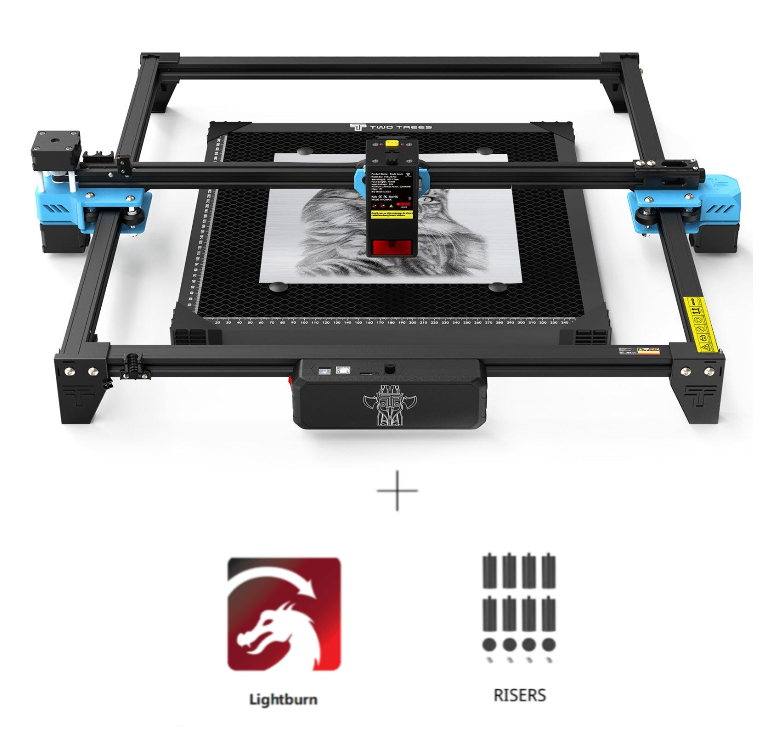
Twotrees TTS-20 Pro 20W Laser Engraver Machine -…
High-Power 20W Laser Engraver for Creative & Small Business Projects The Twotrees TTS-20 Pro 20W Laser Engraver Machine is a high-performance desktop laser engraver designed for m…
Overview
The Twotrees TTS-20 Pro is a desktop laser engraver built around a 20W diode laser and a sizeable 418×418mm work area. It’s marketed for creative use, prototyping and small-batch production — the sort of machine a maker, small workshop or classroom might keep on a sturdy table rather than in a factory bay. The spec sheet highlights high-speed engraving (up to 30,000mm/min), an ultra-fine laser spot for detailed work and compatibility with widely used control software such as LightBurn and LaserGRBL.
This review pulls those product details together and looks at how the TTS-20 Pro fits into real-world use: what it does well, where to watch for limitations, and who is likely to get the best value from it.
Who is this best for?
The TTS-20 Pro is aimed at a fairly broad group of users who want more capability than a hobby-level engraving module but don’t need (or can’t accommodate) a large, high-maintenance CO2 system:
- Makers and hobbyists who want to work on larger pieces — the 418×418mm bed will take many signs, plaques and panels in a single pass.
- Small businesses producing personalised gifts, signage or short production runs where speed and consistency matter.
- Educators and workshops that need an easy-to-integrate desktop unit for demonstrations and student projects.
- Designers and prototype developers who want the freedom to cut and engrave a range of materials without outsourcing.
If you’re primarily cutting very thick materials, need ultra-high-volume production throughput, or must engrave materials requiring specialised lasers (such as certain metals without prep), a different type of machine could be a better fit. Likewise, buyers seeking a truly lightweight, toy-like engraver for occasional crafts might find the TTS-20 Pro more machine than they need.
Key features
- 20W diode laser — offers more power than many hobby lasers, making cutting and engraving faster and able to handle a broader range of materials such as wood, leather and acrylic.
- 418×418mm working area — a noticeably larger bed than many desktop units, convenient for signs, larger panels and batch layouts.
- High-speed engraving — listed top speeds of up to 30,000mm/min to improve productivity on repetitive jobs.
- Ultra-fine laser spot — a 0.13 × 0.145mm spot size aimed at delivering crisp text and detailed graphics.
- Software compatibility — supports LightBurn and LaserGRBL on Windows and macOS, which gives you flexible workflow options and access to popular design and control features.
- Versatile material compatibility — designed for wood, leather, acrylic, paper/cardboard and similar substrates common to creative projects and small production runs.
Practical evaluation
Given the product information, here’s a practical view of what owning the Twotrees TTS-20 Pro will look like day-to-day, and the kind of workflows it supports.
Setup and workflow
The TTS-20 Pro’s compatibility with LightBurn and LaserGRBL is a strong practical advantage. LightBurn is widely used for professional workflows and offers features such as layout and nesting, material libraries, pass-based cutting and raster engraving controls. LaserGRBL gives a simpler, free option for basic jobs. Either way, you’ll be able to import vector and raster artwork from common design tools and control the machine with industry-standard software.
Expect a typical setup process to involve assembly, software installation and a short learning curve to dial in material-specific settings such as power, speed and focus. If you’re new to laser work, plan on a period of test cuts and engraves on scrap material to establish reliable settings before you touch final pieces.
Materials and capability
The 20W diode head makes the TTS-20 Pro capable for a wide variety of creative tasks. It’s suited to engraving and cutting softer materials — wood, plywood, MDF, leather, acrylic, paper and cardboard — and will be useful for producing signs, gift items, custom panels and prototypes. The relatively small laser spot cited in the specifications suggests fine detail is possible, which will help with text and intricate graphics.
Bear in mind the practical limits of a diode laser: thicker or denser materials are more challenging to cut cleanly compared with higher-power CO2 or fibre lasers. If your planned work frequently includes deep cutting through thick acrylic or metals, you should look at other technologies. For most decorative and light production tasks, though, a 20W diode is a good middle ground between hobby kits and heavier machinery.
Speed vs. quality
The stated 30,000mm/min maximum engraving speed indicates the machine can run very quickly, which is attractive for small-batch production. In practice, optimal speed will depend on material type, the level of detail required and the power settings. For detailed raster engraving you’ll trade off speed for finer resolution; for simple vector cutting or marking, you can push the machine harder to reduce cycle time.
One sensible approach is to create a material settings library: record the power, speed and passes for each commonly used substrate so you can reproduce results quickly without fresh tests every time.
Footprint and workshop considerations
The 418×418mm bed gives you room for larger items but also means the machine needs a stable workbench and sensible dust extraction or ventilation. Laser engraving generates fumes and particulates dependent on material — for instance, acrylic off-gassing needs attention — so factor in extraction, air filtration or at minimum a well-ventilated workspace.
Check the specifics of what’s included by the retailer: risers or an adjustable bed can make working with three-dimensional items easier, while accessories such as air assist, exhaust ports and safety covers change the practical usability and safety profile of a bench-top laser.
Strengths
- Commendable power for the class: A 20W diode gives better cutting and faster engraving than the low-watt hobby machines, broadening the range of usable materials.
- Large working area: The 418×418mm bed is roomy for a desktop unit and can accommodate bigger signs and multi-piece layouts, which is handy for short production runs.
- Software flexibility: LightBurn and LaserGRBL support offers both professional and entry-level software paths, making workflow integration straightforward.
- Precision potential: The quoted ultra-fine laser spot suggests good detail resolution for text and intricate graphics.
- Versatile use cases: Practical for personalised products, home décor, prototyping and creative projects that require both engraving and light cutting.
Limitations
- Price and availability may vary: The guide price is shown as USD 527, but live retailer pricing and stock can change. Always check the seller page for current offers and shipping details.
- Not a fit for heavy-duty cutting: While 20W is capable for many tasks, it won’t match the cutting depth and material range of mid- to high-power CO2 machines or fibre lasers used for metalwork.
- Specification details may need confirming: Some accessory and warranty details, delivery contents and exact performance under load are best checked with the retailer before purchase.
- Ventilation and safety considerations: Users must provide appropriate ventilation, and some materials (or finishes) may require special handling to avoid hazardous fumes.
- Potential learning curve: Although software compatibility is good, getting repeatable, high-quality results demands time spent on test cuts and setting up a reliable material library.
Pricing and value
The Twotrees TTS-20 Pro sits in the segment where hobbyist-level engravers meet light-production machines. At the guide price cited, it offers a strong set of features — notably the large bed and 20W diode — that would normally require a larger investment if you were to step up to a new CO2 system.
Value depends on how you intend to use the machine. For makers who will use the full bed, produce multiple personalised items, or need quicker turnaround on engraving jobs, the TTS-20 Pro should repay its cost through time saved and the scope of projects it enables. If you only need occasional small engraves, a cheaper unit might make more sense.
Because prices and stock can change, and because what’s included in the box can vary between offers, check the retailer’s page for current pricing, shipping and what accessories (such as risers or air assist) are supplied.
Alternatives to consider
If you’re evaluating this Twotrees model there are a few alternative directions to explore depending on priorities:
- Higher-power CO2 systems: If you regularly need deeper cuts, larger acrylic work or a broader material range (including some chemical-assisted metal marking), a CO2 machine offers increased capability — but expect larger size, higher cost and additional infrastructure requirements such as ventilation and maintenance.
- Lower-cost diode engravers: For very occasional hobby use, lower-wattage machines are cheaper and simpler to run, though they won’t match the speed, cut depth or large bed size of the TTS-20 Pro.
- Enclosed or commercial desktop units: Some enclosed desktop lasers prioritise integrated extraction, safety and turnkey operation — a better choice for education settings or environments where ventilation is restricted.
- Service or outsourcing: If you have very occasional needs for large or difficult cuts, contracting work to a local laser service can be cost-effective versus buying a new machine.
Final verdict
The Twotrees TTS-20 Pro 20W Laser Engraver is a solid proposition for creatives, small businesses and workshops that need a capable, larger-than-average desktop laser without moving up to industrial equipment. Its 20W diode laser and 418×418mm work area give real flexibility for signage, personalised items, prototyping and small-batch production. Broad software compatibility with LightBurn and LaserGRBL makes it practical to integrate into existing design workflows.
Buyers should be clear about their material needs and workspace setup: diode lasers have physical limits compared with CO2 or fibre systems, and effective ventilation and safe operating practice are essential. Also check the retailer listing for definitive details about included accessories, warranty and the current price — these can affect the overall value.
Overall, if you want a step up from hobby engravers with a roomy bed and a focus on detailed, quicker production work, the TTS-20 Pro is worth considering alongside similarly specced desktop lasers. It’s particularly attractive if you value software flexibility and a balance of speed and precision for everyday maker and small-business tasks.
Note: offers, prices and availability can change. Check the retailer page for the latest information before buying.
Also featured in
This product also appears on these price comparison pages:
Compare this with the full shortlist
Return to the full comparison guide to see how this product compares against the other shortlisted choices.