
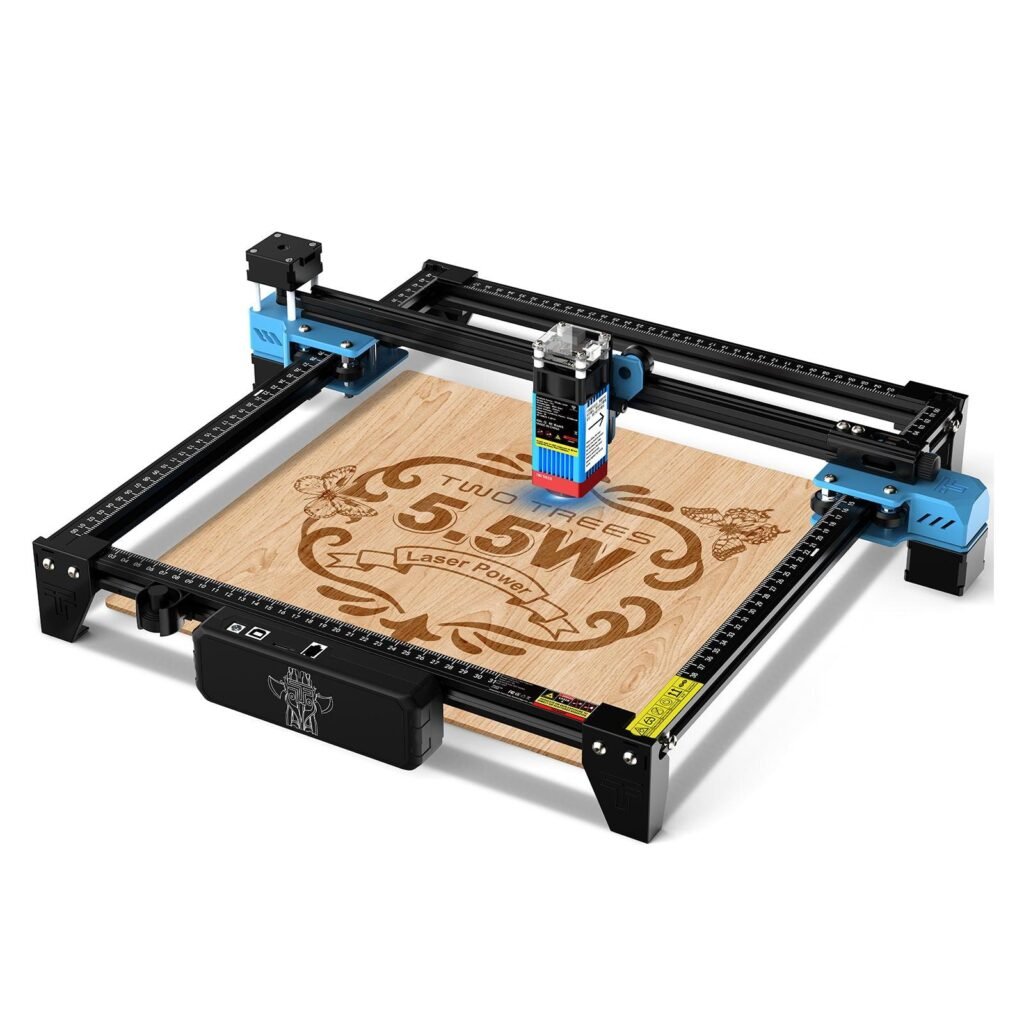
Twotrees TTS-55 Pro Diode Laser Engraver – EU…
Product Description Desktop 5.5W Diode Laser Engraver for DIY & Creative Projects The Twotrees TTS-55 Pro Diode Laser Engraver is a compact desktop laser engraving machine designe…
Overview
The Twotrees TTS-55 Pro is a desktop diode laser engraver aimed at hobbyists, educators and makers who want a capable, compact machine for engraving and light cutting. Equipped with a 5.5W diode laser module, a 300×300mm working area and a claimed engraving speed of up to 30,000mm/min, it promises fine detail and reasonable throughput for personalised gifts, signage, crafts and small prototypes.
From the product description this unit sits squarely in the affordable desktop category: not an industrial cutter, but a flexible tool for people learning laser work or producing small batches. It supports popular engraving software such as LightBurn and LaserGRBL, which helps if you want to integrate it into an existing workflow.
Who is this best for?
The TTS-55 Pro is broadly targeted at:
- Beginners who want to learn laser engraving on a compact, straightforward machine.
- Hobbyists and makers making personalised gifts, small signs, leather goods or wooden crafts.
- Educators running workshops or demonstrations where a classroom-friendly, tabletop-sized unit is needed.
- Prototype developers or small businesses that need light-duty cutting and high-detail marking, without the footprint or cost of a professional laser cutter.
It is less suitable for heavy production environments, large-format projects or users who need powerful CO2 laser cutting through thick materials. If you require continuous high-power cutting of thick acrylic, metal cutting (beyond surface marking) or very large working areas, a different class of machine would be a better fit.
Key features
Here are the main features highlighted in the product description:
- 5.5W diode laser module – intended for precise engraving and light-duty cutting across a range of compatible materials.
- 300×300mm working area – a useful size for many small projects while remaining compact enough for a tabletop.
- High-speed engraving – claimed speeds up to 30,000mm/min for faster project turnaround.
- Fine laser spot – a 0.08×0.08mm spot size for fine detail, crisp text and accurate graphics.
- Wide material compatibility – options include wood, plywood, leather, paper, cardboard, acrylic, bamboo and stainless steel for marking.
- Software compatibility – works with LightBurn and LaserGRBL, two widely used tools for controlling hobbyist lasers.
Those features make the TTS-55 Pro a balanced package for people who want both ease of use and adequate capability for detailed engraving work.
Practical evaluation
Because the product information comes from descriptive material rather than hands-on testing, this section focuses on practical considerations you should expect when using a desktop diode laser like the TTS-55 Pro.
Setup and workspace: The 300×300mm bed keeps the unit compact enough to live on a workbench, desk or classroom table. Expect some basic assembly and calibration on arrival—desktop diode lasers commonly require mounting the gantry, connecting the laser module and performing focus tests. Make sure you have a stable, well-ventilated workspace and safety equipment such as eye protection and a smoke extractor or good extraction fan if you’ll be cutting materials that produce fumes.
Software and workflow: Compatibility with LightBurn and LaserGRBL is a strong point. LightBurn is a feature-rich commercial package popular for layout, vector cutting and raster engraving; LaserGRBL is a useful free alternative for simpler tasks. Both allow you to import vector files and images, control power and speed, and preview jobs before sending them to the machine. If you already use those programs, integration should be straightforward. If not, expect a short learning curve to get the best results from settings such as power, speed and number of passes.
Materials and capabilities: A 5.5W diode laser is capable of crisp engraving across a broad range of materials listed in the product description—wood, leather, cardboard and acrylic are typical. Light-duty cutting is possible on thin materials such as thin plywood, cardboard and some plastics, but thicker materials and heavy cutting jobs will be slow and may require multiple passes. The mention of stainless steel suggests surface marking rather than cutting; diode lasers typically mark metal surfaces that are pre-treated or anodised rather than cutting through them.
Precision and speed: The small laser spot size promises fine detail. In practical terms, that means sharp text and well-defined graphics for small signs and labels. The top speed figure helps for throughput, but real-world speed also depends on the material, desired depth and number of passes—faster isn’t always better if it sacrifices contrast or depth.
Strengths
- Accessible spec sheet for comparison – The 5.5W laser and 300×300mm bed make it easy to compare this unit against rival desktop engravers when choosing the right machine for your needs.
- Good material flexibility – The list of compatible materials covers most hobby and classroom projects, from wood and leather to acrylic and cardboard.
- Software support – Compatibility with LightBurn and LaserGRBL is a practical advantage that reduces friction when getting started.
- Compact but capable – The desktop footprint and claimed high precision make it a practical tool for makers with limited space.
- Value proposition – Positioned as an affordable, entry-level to mid-range desktop laser, it should appeal to people who want reasonable capability without stepping up to a much larger or costlier machine.
Limitations
- Not for heavy production – This is a hobbyist/educational level unit. If you plan continuous, high-volume work or need to cut thick materials quickly, consider a more powerful CO2 or fibre laser system.
- Material limits – Diode lasers have limits on what they can cut. Claims of stainless steel compatibility generally mean surface marking rather than cutting through metal.
- Price and stock may vary – The guide price is given, but current offers, availability and included accessories can change. Check the retailer page for up-to-date information.
- Accessories and support vary by seller – Warranty terms, delivery contents and after-sales support can differ between retailers. Confirm what’s included—spare parts, power supply, protective goggles and assembly tools—before you buy.
- No hands-on performance claims – This review is based on the supplied product details. For real-world impressions such as engraving contrast on specific materials, consult detailed hands-on reviews or user forums.
Pricing and value
The product description lists a guide price of USD 159.00. That positions the TTS-55 Pro as an affordable option within the entry-level and light‑duty desktop laser market. For buyers on a budget who need the features this machine offers—a 5.5W diode module, a 300×300mm bed and LightBurn/LaserGRBL compatibility—it represents a sensible value proposition.
As with all purchases of this type, value depends on the whole package: what accessories are included, the quality of build and documentation, and the retailer’s shipping and support terms. If the unit arrives with a solid set of accessories (goggles, power supply, cables and basic tools) and clear setup instructions, that improves the overall value considerably.
Always check the retailer page for the latest price, stock status and any bundle deals or promotions that might be available. Price fluctuations are common, and a nearby discount or added accessories can tip the decision in favour of one model over another.
Alternatives to consider
If you’re shopping for a desktop laser, it’s worth comparing the TTS-55 Pro against machines with different strengths so you can match the tool to your use case:
- Lower-power diode lasers – If your projects are mostly decorative engraving on thin materials, cheaper, lower-power kits may be adequate and easier on the budget.
- Higher-power diode or hybrid machines – For faster cutting of slightly thicker materials, look for models with higher diode power or hybrid setups; they can reduce the number of passes required.
- CO2 laser cutters – If you need to cut thicker wood, acrylic or fabrics at scale, a CO2 laser (with a larger bed and stronger tube) will be more suitable—though it costs more and takes up more space.
- Professional fibre lasers – For metal cutting or heavy industrial marking, fibre lasers are the right class of equipment—but they are specialised and far more expensive.
Within the desktop diode category, compare bed size, laser power, software compatibility and user feedback on build quality and support. Popular software compatibility (LightBurn, LaserGRBL) is a big plus because it reduces friction and opens up broader community support resources.
Final verdict
The Twotrees TTS-55 Pro presents a sensible, compact option for people entering the world of laser engraving or for makers who want a capable desktop machine for personalised items, small signs and light-duty cutting. Its combination of a 5.5W diode laser, a 300×300mm working area and compatibility with well-known control software makes it easy to compare with rival machines and to slot into a hobbyist or educational workflow.
It’s not intended for heavy industrial use or continuous high-volume production, and the usual caveats about diode lasers apply—limits on cutting thickness and the need to treat metals for marking rather than cutting. Before you buy, confirm the latest price, availability and what the retailer includes with the machine (safety goggles, power cables, documentation and warranty). Those details can influence the overall value and your out‑of‑the‑box experience.
All in all, for makers, educators and hobbyists looking for a compact, relatively affordable engraver with good software support and fine-detail capability, the TTS-55 Pro is a practical choice worth considering—provided its working area and material limits match your projects.
Note: offers, prices and stock can change. Check the retailer page for the latest information before buying.
Also featured in
This product also appears on these price comparison pages:
Compare this with the full shortlist
Return to the full comparison guide to see how this product compares against the other shortlisted choices.