
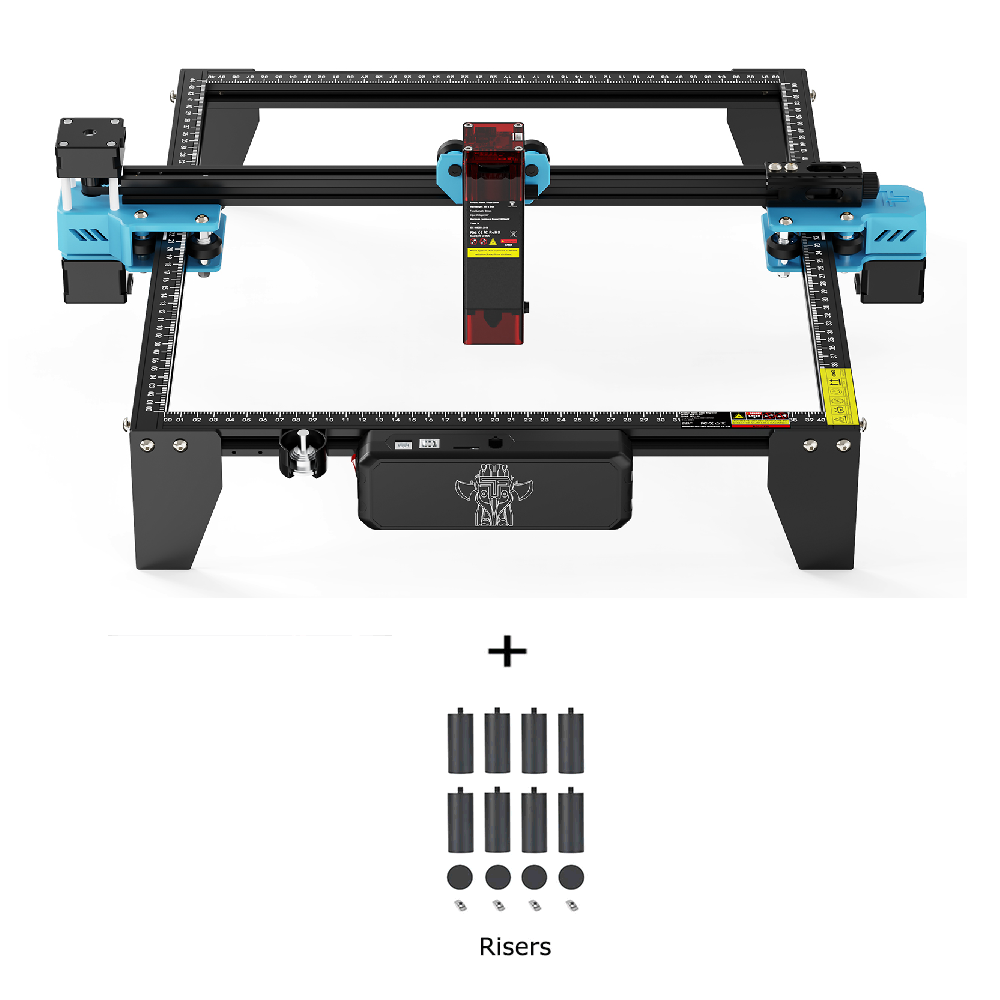
Twotrees TTS-10 Pro Diode Laser Engraver – EU…
The same 10W TTS‑10 Pro core machine with risers included but no Air Assist — a lower cost option for those who don’t need extra accessories.
Overview
The Twotrees TTS-10 Pro Diode Laser Engraver is a desktop engraving machine built around a 10W diode laser and a 300×300mm working area. It’s pitched at makers, hobbyists, educators and small businesses who need a compact, reasonably powerful tool for engraving and light cutting. The machine emphasises speed and precision — a claimed high-speed engraving capability, a fine laser spot and compatibility with familiar software such as LightBurn and LaserGRBL are central to the proposition. It also uses a modular design so owners can add accessories and extensions later.
Who is this best for?
This model will suit several types of users:
- Hobbyists and makers who want a step up from entry-level lasers and need a larger working area for personalised projects such as signs, gifts and craft items.
- Educators and workshops looking for a desktop engraver that’s relatively easy to integrate into classes and demonstrations; compatibility with mainstream software is helpful in this setting.
- Small businesses and side-hustles needing a compact machine capable of faster throughput than low-power alternatives for producing engraved merchandise or custom items.
It may be less suitable for those who need heavy-duty cutting through thick materials, very large format work, or an out-of-the-box industrial solution with full service and warranty assurances. If you require detailed information about delivery, included accessories or warranty, check the retailer’s page before buying — these details can vary by seller.
Key features
- 10W diode laser — higher power than many basic hobby lasers, intended to offer faster engraving and improved cutting capability across a range of materials.
- 300×300mm working area — a useful size for most desktop projects, allowing several items or a larger single piece to be worked on without repositioning.
- High-speed engraving — designed for faster operation to improve productivity on repeat jobs; the machine supports rapid engraving modes to reduce job time.
- Ultra-fine laser spot (LD+C lens technology) — a small spot size helps deliver finer detail and crisper text and graphics when engraving.
- Multiple connectivity options — supports Wi‑Fi, USB, TF card and mobile app control, offering both online and offline workflows depending on your preference.
- Modular expansion design — optional extensions such as rotary attachments, air assist and extension kits can be added to broaden the machine’s capabilities.
- Software compatibility — works with LightBurn and LaserGRBL, two common tools in the DIY and small-business engraving community.
Practical evaluation
From the specification set, the TTS-10 Pro aims to bridge the gap between entry-level diode engravers and more capable hobby-class machines. A 10W diode laser is a meaningful step up from the lower-power 2–5W class that many casual hobbyists use. That extra power usually means faster rastering and the ability to cut or score thinner woods, leather and acrylic more effectively. The 300×300mm bed is also a practical compromise: large enough for a variety of jobs while still small enough to fit comfortably on a desktop or workshop bench.
Precision is supported by the mention of an ultra-fine laser spot and dedicated lens technology. That should translate into cleaner detail on intricate designs and small text, provided the rest of the mechanical platform — motion control, belts or rails and frame rigidity — is up to the job. The inclusion of common software compatibility (LightBurn and LaserGRBL) is a real plus; these programs are widely used and well supported, making it easier to import vector artwork, set up cutting paths and tune parameters.
Another practical advantage is the range of connection options. Being able to run jobs from a TF card or via an offline app is helpful for classrooms or situations where you don’t want to keep a PC attached. Wi‑Fi connectivity simplifies sending jobs from a laptop or mobile device, though real-world reliability can vary between networks and firmware versions. The modular approach is useful long-term: if you start with engraving and later want to add a rotary for cylinders or air assist for cleaner cuts, those options are available without replacing the entire machine.
It’s worth noting what the specifications don’t say in detail: exact accessory inclusion (for example, whether protective goggles, risers, or an air-assist kit are bundled), the particulars of the warranty and shipping, and how assembly and initial setup are handled. For buyers new to lasers, those are important practical considerations. Check the retailer listing for current information on what’s in the box and any additional costs for upgrades or consumables.
Strengths
- Stronger laser power than many beginner models, which helps with speed and basic cutting tasks.
- Generous work area that is versatile for most desktop projects without taking up too much space.
- Good software compatibility — LightBurn and LaserGRBL are industry-standard tools, so you aren’t locked into obscure proprietary software.
- Flexible connectivity — multiple connection methods make the machine adaptable to different working styles and environments.
- Expandable platform — modular design lets you add practical accessories later, which can extend the machine’s usefulness as needs change.
- Compared positioning in the market — as a product from Twotrees Store within the Marking Tools category, it’s easy to compare against rivals when choosing the best fit.
Limitations
- Price and stock can change — the guide price is listed as a reference; always confirm current price and availability on the retailer page before purchasing.
- Incomplete specification details — some important practical points (included accessories, warranty length, shipping and returns) may vary by seller or region and should be checked directly with the retailer.
- Not an industrial cutter — while 10W is powerful for a hobby diode laser, it’s not comparable to professional CO2 or fibre laser systems for heavy-duty cutting or production-level throughput.
- Potential assembly and setup — many desktop lasers require assembly and tuning; if you’re inexperienced you may need time to learn safe operation and optimised settings for different materials.
Pricing and value
The guide price provided with this listing is USD 266.66, which positions the TTS-10 Pro in the mid-range of hobby diode engravers. Price is only one factor in value — consider the machine’s power, work area, expandability and software compatibility alongside the seller’s warranty, support and shipping terms.
For buyers who plan to grow their skill set or add accessories over time, the modular design can improve long-term value because it reduces the need to upgrade the entire unit. Conversely, if you need a plug-and-play, fully supported commercial system with long warranties and on-hand service, a higher-cost industrial option may be a better fit.
Always check the retailer listing for the latest price, any bundle offers, and what exactly is included in the box. Accessories such as rotary attachments, air assist pumps, or protective enclosures may be sold separately and add to the total cost.
Alternatives to consider
When choosing a desktop laser, think about your priorities: raw power for cutting, bed size for larger items, ease of use for beginners, or expandability for future projects. If you want a similar-size machine but with different trade-offs, consider models with either higher power (if you need thicker cutting capability) or smaller, simpler units if budget and space are tight.
Also look at the software and community around a product. A machine that works well with LightBurn will benefit from a broad range of tutorials and user-created settings, which helps when you’re learning different materials and techniques. If you plan to engrave cylindrical objects regularly, check whether a compatible rotary attachment is available and how easy it is to fit.
Safety and practical tips
Laser engraving carries risks, so treat the TTS-10 Pro like any other laser tool: use appropriate eye protection when needed, ensure adequate ventilation when cutting materials that produce fumes (for example, plastics or treated wood), and never leave the machine unattended while it’s running a cut. Confirm the recommended materials and settings in your manual or software and start with conservative speed and power settings to avoid fires or permanent damage to materials.
Spend time learning the basics of image preparation and vector cutting if you want crisp results. For beginners, there’s a learning curve in converting artwork, setting line and fill parameters, and choosing the right material feeds. Support communities and software documentation for LightBurn or LaserGRBL are valuable resources here.
Final verdict
The Twotrees TTS-10 Pro Diode Laser Engraver is a solid option for makers, educators and small businesses who want a desktop laser with more punch than entry-level models and the flexibility to expand later. Its 10W diode, 300×300mm bed and compatibility with well-known software make it a capable, adaptable tool for personalised engraving and light cutting tasks.
It’s not a substitute for industrial laser cutters, and buyers should confirm details such as included accessories, warranty and shipping before committing. If you value a balance of power, work area and upgradeability — and are prepared to handle basic setup and safety procedures — the TTS-10 Pro is worth considering when comparing marking tools in this class.
Please note: offers, availability and prices can change. Check the retailer’s page for the latest information before you buy.
Also featured in
This product also appears on these price comparison pages:
Compare this with the full shortlist
Return to the full comparison guide to see how this product compares against the other shortlisted choices.