
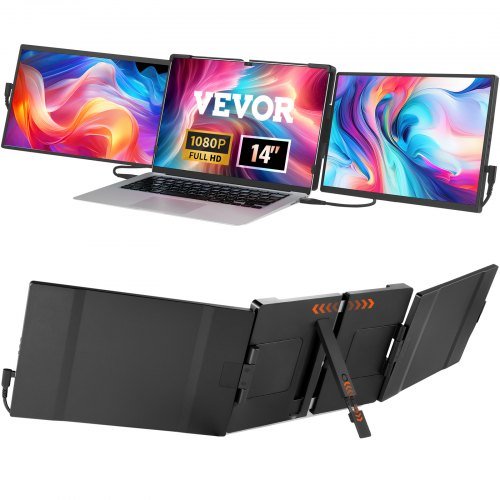
VEVOR Portable Laptop Screen Extender
VEVOR Portable Laptop Screen Extender, 14" FHD 1080P IPS Triple Extended Monitor for 13"-17" Laptop, Swivel Portable Monitor USB-C/USB-A/Mini HDMI Port, Compatible with Mac/Wins/A…
Overview
The VEVOR Portable Laptop Screen Extender is a 14-inch IPS monitor designed to attach to most 13–17-inch laptops and add a third screen without a full docking setup. With a 1920 × 1200 resolution, 300cd/m² brightness and a 60Hz refresh rate, it’s pitched at people who want more screen real estate for spreadsheets, web research, coding or multi-tasking on the move. The unit includes two USB‑C ports and a mini HDMI input, offers 210° rotation for different orientations and comes as a ready-made accessory package for portable use.
That compact size and the clip-on approach make the VEVOR extender an attractive option for laptop users who find a single external monitor too bulky, or who want to maintain a truly portable workstation. In this review I’ll walk through who will get the most from it, the key features, practical considerations when using it day to day and whether it represents sensible value as a productivity accessory.
Who is this best for?
If you regularly work away from a desk but still need extra screen space, this kind of clip-on extender is aimed squarely at you. Typical candidates include:
- Business travellers who use a laptop in trains, hotels or client sites and need to run several apps side-by-side.
- Hybrid workers who move between office and home and prefer a lightweight, attach-and-go solution rather than carrying a full second monitor.
- Students and creative professionals who benefit from a narrow, portable extra display for reference material, chat apps or secondary timelines.
- Gamers who want to add a small display for chat, maps or streaming info while gaming on their main laptop or console.
This product is less well suited to users who need large, colour-critical displays for photo and video editing (it uses a 72% NTSC gamut) or those expecting a high refresh rate for competitive gaming. It’s also not a replacement for a full-sized desktop monitor if your work demands a large physical workspace.
Key features
- 14‑inch IPS panel with 1920 × 1200 resolution — offers a slightly taller 16:10 aspect ratio compared with common 16:9 portable monitors, which helps with vertical content.
- 300cd/m² brightness and 1000:1 contrast ratio — decent on a portable, though not class-leading for HDR or very bright outdoor use.
- 60Hz refresh rate — standard for productivity tasks.
- Two USB‑C ports and one mini HDMI — gives flexible connection options for modern laptops, phones and consoles.
- Swivel and 210° rotation — allows the display to be used vertically or horizontally and to be angled for a clip-on setup.
- Designed to clip to 13–17-inch laptops — intended to form a triple-display arrangement together with the laptop’s built-in screen and a separate external monitor.
- Portable and lightweight — net weight around 2 kg; dimensions when attached span roughly 955–1055 mm in length when opened, with a slim 20 mm panel depth.
- Speakers noted as “NG” in the product brief — expect basic built-in audio rather than anything suited to media-heavy use.
Practical evaluation
What makes a clip-on screen extender genuinely useful is how well it integrates with your existing laptop and workflow. The VEVOR unit’s 14-inch size is a reasonable compromise: large enough to give meaningful extra space for documents and reference windows, yet small and light enough to carry with a laptop bag. The 16:10 resolution provides a little extra vertical space compared with 16:9 models, which is welcome for reading, coding and working on long documents.
Connection options are sensible. Two USB‑C ports increase compatibility with laptops that supply video over USB‑C — as well as allowing one port to handle power and data while the other stays free for peripherals. The mini HDMI port is a useful fallback for older machines or for connecting consoles such as the Nintendo Switch or a PS5, provided the host device supports the monitor’s resolution and refresh rate. Do check your laptop’s ports and whether they provide power-delivery and DisplayPort Alt Mode if you want single-cable operation.
The 60Hz panel and 300cd/m² brightness are perfectly acceptable for office work and travelling, though they’re not targeted at gamers chasing ultra-smooth motion or content creators who need wide colour coverage. The listed 72% NTSC colour gamut suggests average colour reproduction — fine for everyday tasks and general multimedia but not for professional photo or video grading without external calibration and a larger gamut monitor.
The swivel and rotation capability is a practical advantage. Being able to tilt and rotate the extender makes it easier to align with your laptop’s screen and to change orientation for long web pages or code lists. The clip system is designed for 13–17-inch laptops, so it’s worth checking the exact fit and balance on your machine: clamped attachments can behave differently depending on laptop lid stiffness, hinge strength and case shape.
One area to keep in mind is built-in audio. The product brief lists speakers as “NG”, which implies audio performance should not be relied on for meetings or media playback; plan to use your laptop’s speakers, a headset or external speakers for anything critical.
Strengths
- Designed specifically to extend laptops into a triple-screen setup — useful for multitasking without carrying a full-sized monitor.
- Reasonable resolution and 16:10 aspect ratio give extra vertical workspace, which is helpful for documents and coding.
- Flexible connectivity with two USB‑C ports and mini HDMI increases compatibility across modern laptops, phones and consoles.
- Rotatable design and clip-on form factor suit mobile users who need a fast, portable solution.
- Lightweight and slim profile makes it easier to carry alongside a laptop than a conventional accessory monitor.
- Offers a clear comparison point within the Computer Monitors category when weighing up portable monitor options.
Limitations
- Colour gamut is average (72% NTSC) — not aimed at colour-critical professional work where wider coverage and calibration matter.
- 60Hz refresh rate limits appeal for high-frame-rate competitive gaming; the monitor is primarily productivity-focused.
- Speakers are not a selling point — plan to use separate audio if sound quality is important.
- Fit and clamping stability can vary between laptops; the clip-on mechanism may not perform identically on every model.
- As with any product sourced from retailers, warranty, delivery terms and included accessories may differ by seller — check the retailer page for specifics before buying.
Pricing and value
The VEVOR Portable Laptop Screen Extender sits in the portable monitor segment where price and features vary quite a lot. A guide price has been noted, but actual prices and stock can change frequently, so it’s important to check the retailer page for the latest deal and availability. Value comes down to how much you need the particular clip-on form factor and whether the feature set — resolution, panel type and connectors — matches your workflow.
If you primarily want additional space for spreadsheets, browser tabs and messaging windows while travelling, this monitor can offer solid value compared with the cost and bulk of carrying a larger external monitor. If you need high colour accuracy, higher refresh rates or a more robust desktop setup, a different class of monitor is likely to be a better investment.
Alternatives to consider
When comparing the VEVOR extender with other portable monitors, keep these differences in mind:
- Other portable monitors may offer larger panels (15.6in) or slimmer bezels if you want a wider viewing area; these tend to be heavier and bulkier to carry.
- Some competitive models prioritise colour accuracy with wider gamuts and factory calibration, which is worth choosing if you do creative work on the move.
- If gaming is a priority, look for portable displays with higher refresh rates (90Hz or 120Hz+) and lower input latency instead of the 60Hz typical of productivity extenders.
- For users who want a permanent dual- or triple-monitor desktop arrangement, a conventional desktop monitor or a VESA‑mountable ultrawide may be a better long-term solution than a clip-on portable.
When models, check connection options carefully — single-cable USB‑C operation can be very convenient, but only if your laptop supports DisplayPort Alt Mode and provides enough power through its ports.
Final verdict
The VEVOR Portable Laptop Screen Extender is a practical, purpose-built accessory for anyone who needs to increase laptop screen space while staying mobile. Its 14-inch 1920 × 1200 IPS panel and rotatable clip-on design make it a sensible choice for business travellers, hybrid workers and students who want a straightforward way to create a triple-screen workflow without hauling a full external monitor.
It isn’t aimed at colour-critical professionals or high-frame-rate gamers, and buyers should be aware that clip-on fit and stability will depend on the laptop model. The monitor’s average colour gamut and standard 60Hz refresh rate keep it firmly in the productivity-focused camp rather than the creative or gaming niches.
Overall, if the concept of a clip-on third screen appeals to you and your work is centred on documents, browsing, spreadsheets and multiple apps, the VEVOR extender is worth considering alongside other portable monitors. Before buying, check the retailer page for the latest price, availability and precise accessory or warranty details, and confirm your laptop’s port capabilities if you want single-cable operation.
Note: Offers and prices can change frequently — always check the retailer page for the most up‑to‑date information before making a purchase.
Ready to check VEVOR Portable Laptop Screen Extender, 14" FHD 1080P IPS Triple Extended Monitor for 13"-17" Laptop, Swivel Portable Monitor USB-C/USB-A/Mini HDMI Port, Compatible with Mac/Wins/Android/Switch/PS5?
Check the latest offer before buying, then return to the main comparison if you want to compare it against the other shortlisted options.
Also featured in
This product also appears on these price comparison pages:
Compare this with the full shortlist
Return to the full comparison guide to see how this product compares against the other shortlisted choices.