
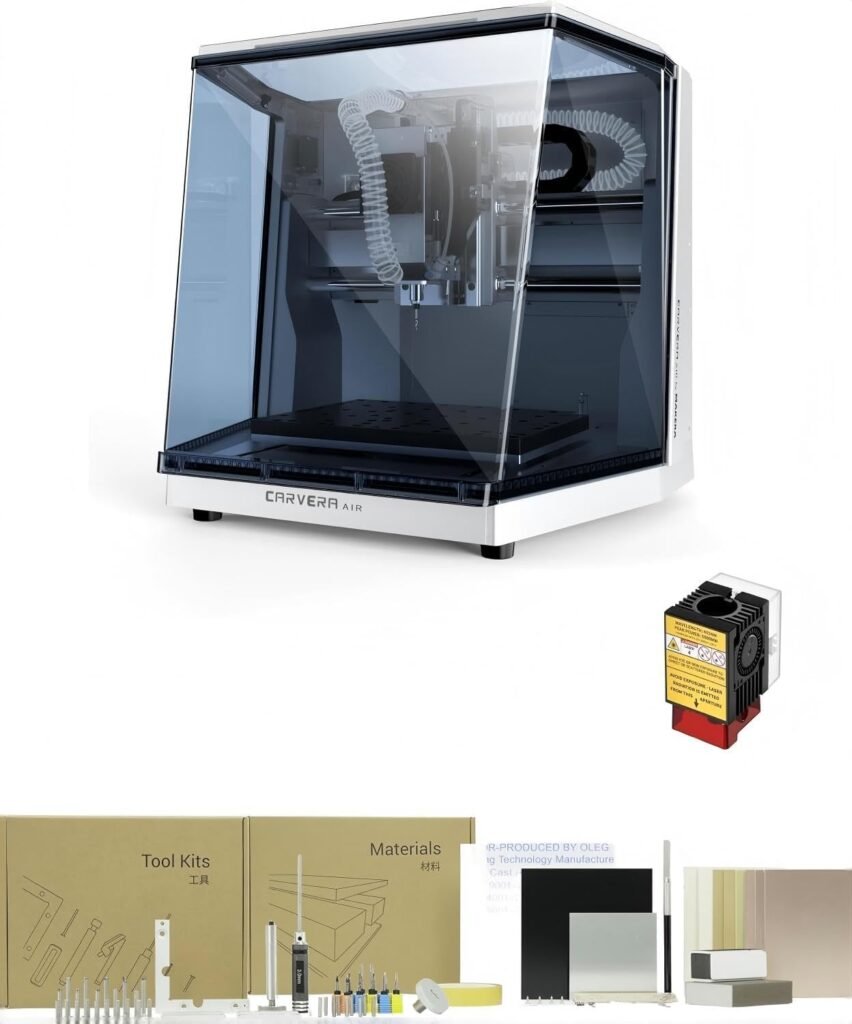
MAKERA Carvera Air Desktop CNC Machine with 5W…
One Machine, Two Worlds of Making — The Carvera Air is no ordinary desktop CNC. With the optional 5W laser module, you can switch between precision milling and laser engraving in …
Overview
The MAKERA Carvera Air positions itself as a two-in-one desktop maker: a CNC milling machine with the option to add a 5W laser module for engraving and light cutting. The idea is straightforward — swap tools quickly, use the same frame and workflow for both milling and laser tasks, and benefit from automated probing and leveling to reduce setup fuss. That mix of versatility makes it interesting for hobbyists, small design studios and anyone who wants to centralise light CNC work and engraving without buying two separate machines.
This review unpacks what the Carvera Air promises, how those features translate to real-world projects, and which buyers are most likely to get value from it. Where details are not fully specified here, the retailer page is the definitive source and should be checked for current stock, accessories and terms.
Who is this best for?
The Carvera Air is aimed at makers who want a compact, flexible machine rather than an industrial-grade CNC. It suits:
- Hobbyists and makers who create personalised items such as signs, gifts, small furniture components and custom tooling.
- Small businesses or designers who need occasional precision engraving on wood, leather, acrylic and anodised metal as well as light cutting of thin materials like paper, card and balsa.
- Workshops that value a single machine that handles both milling and laser engraving without permanent modifications or complex wiring.
- Users who appreciate automated setup features — auto-probing and auto-leveling reduce the guesswork involved in getting the tool tip and workpiece aligned.
It may be less suitable for those who require heavy-duty milling capacity, high-speed production runs, or deep cutting on thick metals — the Carvera Air is described as a desktop unit and its laser is specified for precision engraving and light cutting rather than industrial metal cutting.
Key features
Based on the product description, these are the key features that define the Carvera Air:
- 2-in-1 capability: A desktop CNC milling machine with an optional 5W 445nm laser module for engraving and light cutting. Tool changes are quick and require no permanent modifications.
- 5W laser module: Semiconductor diode laser (445nm) intended for crisp engraving on wood, leather, acrylic, fabric and anodised metal, and for light cutting of thin materials such as paper, cardboard and balsa.
- Quick tool change: Laser module installs like a milling bit — insert into the collet, secure to prevent rotation, and plug the 3‑pin cable into the spindle casing. No complex wiring or tools required.
- Integrated air assist: Helps keep the lens clean and reduces smoke marks during laser engraving, which should lead to tidier results on many materials.
- Auto-probing and auto-leveling: Built-in systems for probing and leveling that work with the laser module — intended to eliminate manual focusing and reduce setup guesswork.
- Material versatility: The combination is pitched to work across wood, metal (anodised), plastic, leather and PCBs, depending on material thickness and task.
Practical evaluation
From a practical buyer’s perspective, several aspects of the Carvera Air stand out beyond raw features. First is the workflow simplicity: installing the laser module is described as essentially the same as inserting a milling bit, and the 3-pin connection eliminates fiddly wiring. For users who want to switch between milling and engraving frequently, that simplicity reduces downtime and makes experimentation more inviting.
The inclusion of auto-probing and auto-leveling is another practical plus. Manual focusing and bed levelling are common pain points with desktop CNC and laser systems; a reliable auto-probing system can save time and reduce the risk of ruined workpieces. That said, the description does not list the exact probing accuracy or how the system handles unusually shaped or soft materials — so buyers who need very fine tolerances should confirm those details with the retailer or manufacturer.
The 5W 445nm diode laser is a sensible choice for detailed engraving on organic materials and coated metals. Diode lasers in this power and wavelength range typically produce good surface marking and fine detail on wood, leather and acrylic, and can mark anodised aluminium effectively. For cutting, the description is clear: the module is suitable for light cutting on thin substrates such as card, paper and balsa. Expect deeper or faster cutting on thicker materials to require multiple passes and slower feed rates, and remember that cutting performance depends heavily on the material and the design.
Safety and cleanliness also get some attention with the integrated air assist and the provision of laser safety goggles included with the module. Air assist helps to keep the lens free from residue and reduces scorch marks, which should improve both consistency and lens lifetime. Laser safety equipment is essential; anyone using the module should follow safe operating practices and local regulations for laser use.
Finally, the compactness implied by the “desktop” label means the Carvera Air will appeal to users with limited workshop space. However, potential buyers should check the machine’s actual working area and footprint on the retailer page to ensure it matches their intended projects, particularly if they plan to work on larger panels or sheets.
Strengths
- Versatility: Two distinct toolsets (milling and laser) in one package make it a flexible choice for makers who want to avoid buying separate machines.
- Ease of tool changes: The plug‑and‑play nature of the laser module reduces setup friction and encourages experimentation.
- Auto-probing and auto-leveling: These features reduce manual setup time and help achieve more consistent results across projects.
- Air assist and supplied safety gear: Practical additions that improve engraving quality and promote safer operation out of the box.
- Material range: The machine targets a broad set of materials — wood, leather, acrylic, fabric, anodised metal and PCB — making it attractive to a wide audience of creators.
- Compact desktop form: Works well for home workshops, studios and small business spaces where floor space is at a premium.
Limitations
No single machine is perfect for every job, and the Carvera Air has a few limitations worth noting before you buy:
- Not for heavy industrial cutting: The machine is a desktop unit, so it is unlikely to match the capacity or durability of professional, floor-standing CNC routers for large-scale or heavy cutting tasks.
- Laser cutting limits: The 5W diode laser is optimised for engraving and light cutting of thin materials. Don’t expect high-speed, deep cutting of hardwoods or thick plastics without many passes and slow feeds.
- Specification gaps: Some important details — such as exact working envelope, spindle power for milling, repeatability figures and supported file formats — are not provided in the summary here. Those specifics should be confirmed on the retailer page before purchase.
- Accessories and warranty vary: What’s included in the box, delivery terms and warranty length can vary by retailer; check the offer page for the latest information.
Pricing and value
The guide price listed for the Carvera Air is GBP 2,599.00. That positions it above entry-level hobby desktop units but below larger professional CNC systems. Whether it represents good value depends on how much you value the two-in-one capability and the time saved by quick tool changes and auto-levelling.
For someone who needs both clean engraving and light milling, the Carvera Air could be a cost-effective way to cover both use cases with a single machine. For users whose work is primarily one discipline (for example, heavy milling of hardwoods or industrial metal cutting) a specialised machine targeted at that task may offer better long-term value. As with any tool purchase, factor in potential additional costs such as tooling, consumables, extraction/ventilation for laser use, and any software licences you may need.
Note: offers and prices change. Check the retailer page for the latest price, availability and any bundled accessories or service options.
Practical buying guidance
If you’re considering the Carvera Air, here are some practical steps and questions to guide your decision:
- Confirm the working area and machine footprint so you know whether your planned projects will fit the bed and whether you have sufficient workshop space.
- Ask the retailer about the included toolkit and consumables: collets, end mills, laser mounting parts, extra protective gear, and any starter materials can save you immediate additional purchases.
- Clarify the milling spindle specifications (speed range and torque) if you intend to do a lot of milling work — these influence what materials and cutter sizes you can use effectively.
- Check what file formats and software the machine supports and whether any software licences are included or sold separately. Compatibility with commonly used CAM/CAD tools will streamline workflow.
- Consider ventilation and extraction when using the laser. Although air assist helps reduce smoke marks, proper fume extraction and filtration are important for health and finishing quality, especially with plastics and treated materials.
- Verify warranty terms and what support is available locally should you need parts, service or technical help.
Alternatives to consider
Although this review focuses on the Carvera Air, it’s sensible to consider whether a single-purpose machine or another multi‑tool system might better suit your needs. If your work is predominantly engraving and light cutting, a dedicated laser engraver might offer faster throughput and deeper material support for laser tasks. Conversely, if milling is your priority, a purpose-built router with a larger table and stiffer frame will outperform a compact desktop system for heavy-duty work.
Other dual-function systems exist on the market, but you should compare practical factors such as ease of swapping tools, included safety features, probing/leveling capabilities, working area, and the level of community or manufacturer support. Always check live retailer pages for specification sheets and accessory bundles when weighing alternatives.
Final verdict
The MAKERA Carvera Air is an appealing proposition for makers and small businesses that need both precision engraving and light CNC milling from a single, compact machine. Its plug‑and‑play laser module, auto‑probing and auto‑leveling, and air assist make it user-friendly and well-suited to rapid project turnaround and experimentation. The included laser safety goggles and simplified installation are practical touches that reduce the barrier to getting started.
That said, the Carvera Air should be considered with its limitations in mind. It is a desktop machine built for moderate tasks rather than heavy industrial work. The 5W diode laser will excel at detailed engraving and cutting thin materials but is not a substitute for high-power CO2 or fibre lasers in industrial applications. Important technical specs and the exact list of included accessories are not fully detailed here, so prospective buyers should review the retailer’s product page for the most up-to-date information on dimensions, capabilities and warranty.
If you value the convenience of one machine that swaps quickly between milling and laser engraving, the Carvera Air is worth serious consideration. Verify the working envelope and milling spindle details against your project needs, factor in extraction and consumables for laser work, and check the current price and stock before buying.
Note: offers and prices change — check the retailer page for the latest price, availability and any bundled accessories or service options.
Ready to check MAKERA Carvera Air Desktop CNC Machine with 5W Laser Module, Quick Tool Change, Auto Probing&Leveling, 2-in-1 CNC Milling, Laser Engraving&Cutting for Wood, Metal, Plastic, Leather & PCB?
Check the latest offer before buying, then return to the main comparison if you want to compare it against the other shortlisted options.
Also featured in
This product also appears on these price comparison pages:
Return to the saved price comparison
Go back to the saved comparison page to see this product alongside the other saved search results and current deal options.