
xTool F2 5W IR & 15W Diode Dual…
Dual-source (5W IR + 15W diode) enclosed system designed for professional commercial use, with high-precision camera alignment and accessories for jewellery and batch work.
Overview
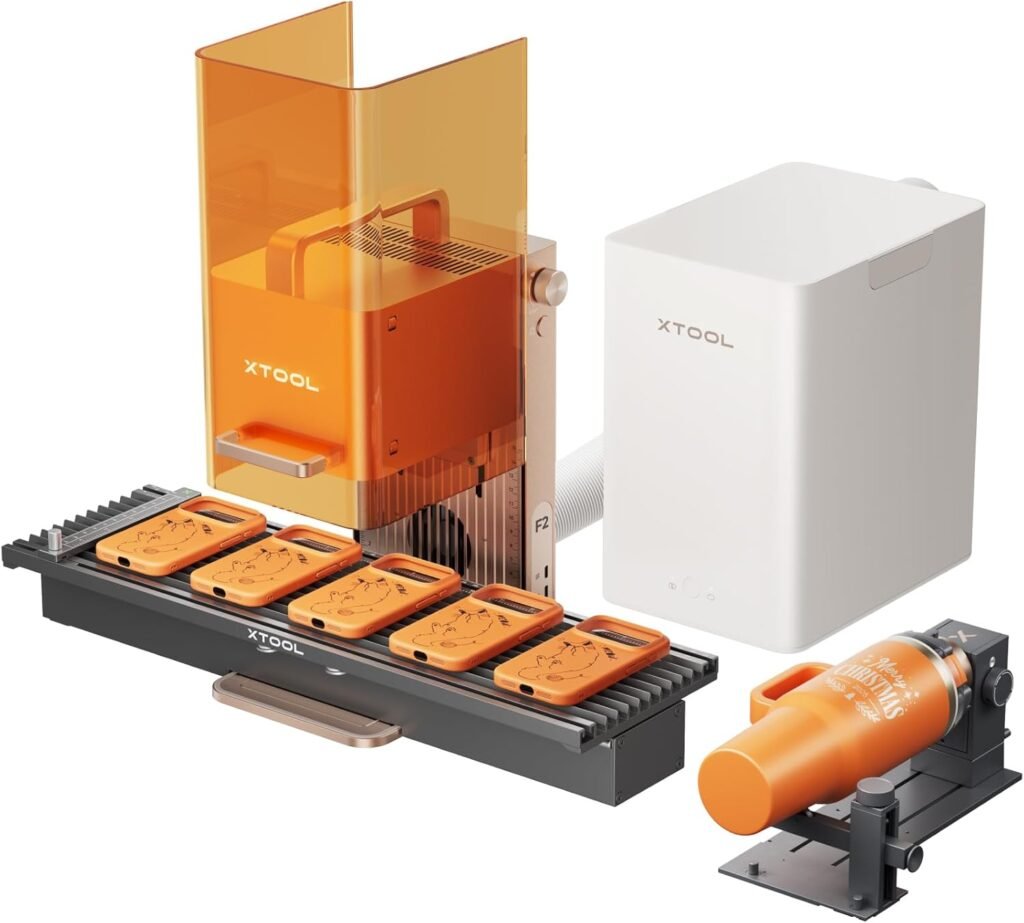
The xTool F2 is a professional laser engraver that combines two different laser types — a 5W infrared laser and a 15W diode laser — in one machine. That dual‑laser arrangement is designed to broaden the range of materials and processes you can handle without swapping equipment. On top of that, the F2 offers a slide extension to accommodate longer pieces, an optional RA3 rotary for cylindrical work, a built‑in 50MP camera for alignment and preview, an integrated air purifier to reduce fumes and a motion system that xTool quotes as capable of very high speeds and 3D embossing.
From the product positioning and listed features, the F2 is clearly aimed at commercial shops and professional users rather than casual hobbyists. It’s pitched as a production tool: faster, more flexible and more configurable than entry‑level desktop engravers, but also more demanding in terms of setup, ventilation and operating costs.
Who is this best for?
The xTool F2 is best suited to small to medium businesses, makerspaces and professional workshops that need a single machine able to do a variety of laser jobs at reasonable throughput. It’s a sensible option if your work regularly moves between tasks that benefit from different laser wavelengths — for example, finer infrared engraving and deeper diode cutting/marking — and you want to avoid keeping separate machines.
Consider the F2 if your priorities include: speed for higher volumes, the ability to handle longer or larger pieces without custom fixturing, a need to mark or engrave cylindrical items (with the RA3 rotary), and reduced material waste thanks to camera alignment. If you’re running a small business that sells engraved gifts, signage, promotional drinkware, or lightweight parts, the F2’s feature set aligns well with those use cases.
However, for hobbyists, weekend makers or casual users who only occasionally engrave small items, the F2 is likely to be overkill. Its commercial focus means higher purchase and operating costs, a larger footprint and more complex setup and maintenance than typical desktop cutters.
Key features
- Dual‑laser head: A 5W infrared (IR) laser and a 15W diode laser in the same frame to broaden material compatibility and process options without swapping machines.
- Slide extension: A mechanical extension that increases the usable work area along one axis, useful for longer pieces or batch runs of longer parts.
- RA3 rotary support (optional): Compatibility with an optional rotary accessory for engraving bottles, tumblers and cylindrical items.
- Built‑in 50MP camera: High‑resolution camera for job previewing, alignment and positioning to reduce mistakes and material waste.
- Integrated air purifier: On‑board extraction/filtration intended to reduce fumes and airborne particles compared with running the machine without any purifier.
- High‑speed motion and 3D embossing: A quoted top motion speed (up to 6000 mm/s) and capability for fine 3D embossing work, aimed at users requiring both speed and detail.
Practical evaluation
Because this review is based on the product information provided rather than hands‑on testing, the practical observations below are drawn from the feature set and typical behaviours of similar commercial engravers. They are intended to help you decide whether the F2 will fit your workflow and what to expect when integrating it into a professional environment.
Versatility is the F2’s headline benefit. Having both an IR and a diode laser in one frame means you can tune jobs to the laser type most appropriate for the material. In practice, that should reduce handling time and avoid the downtime involved in swapping optics or moving work between different machines. For a production line or a boutique workshop taking a range of commissions, that convenience translates directly into less hassle and fewer opportunities for alignment errors.
The slide extension is a practical addition for many businesses. If you produce long signage, wooden rulers, elongated ornaments or batch pieces that exceed a standard bed, a sliding bed avoids the need for custom jigs. It also makes continuous feed style workflows easier: you can run longer pieces through without stopping to reposition the workpiece as often.
The 50MP camera should speed up setup and help avoid waste. High‑resolution job previewing lets you position artwork precisely and check alignment visually before firing the laser. That’s especially useful on expensive or pre‑finished materials where a misaligned pass would ruin the workpiece. Paired with the rotary accessory, accurate camera alignment can also reduce fiddly adjustments when working on curved surfaces.
An integrated air purifier is a welcome inclusion, but it’s not a substitute for proper workshop ventilation. The purifier will help reduce particulate and odour close to the machine, which is beneficial in small shops or demonstration spaces, but depending on the materials you work with and the local regulations you must still consider external extraction or additional filtration for continuous operation.
On the subject of throughput, the stated top speed and 3D embossing capability point to a machine built for production. High motion speed is valuable when you have many small jobs to process each day. That said, raw top speed figures don’t always translate into faster production unless the rest of the workflow — loading/unloading, fixturing, and software setup — is also optimised.
Strengths
- Outstanding material flexibility — The dual‑laser approach means you can engage the wavelength and power suited to a particular material or finish without changing equipment. That reduces downtime and opens up a wider range of applications from marking and surface engraving to cutting thin substrates.
- Production friendly — High quoted travel speeds and a slide extension make the F2 a better fit for shops that need higher throughput than a hobby desktop engraver can offer.
- Rotary capability — Support for an RA3 rotary expands the range of sellable products to include tumblers, bottles and other cylindrical items with neat, repeatable results when set up correctly.
- Camera alignment reduces waste — The integrated 50MP camera simplifies placement and previewing, which means fewer scrapped pieces and quicker setup for complex jobs.
- On‑board air purification — Improves local air quality compared with running no filtration at all and is helpful in smaller workspaces where full extraction might be impractical.
Limitations
- Commercial focus may be excessive for hobbyists — If you’re an occasional user or only need a small desktop engraver, the F2’s features and cost will likely be more than you need.
- Higher operating requirements — Continuous or heavy use requires careful consideration of duty cycles, a reliable power supply and good workshop ventilation. The built‑in purifier helps, but it won’t remove the need for compliant extraction for certain materials or regulatory environments.
- Optional accessories increase total cost — Important extras like the RA3 rotary are sold separately. Factor accessory costs into your budget rather than assuming the base machine covers all use cases.
- Learning curve and setup complexity — The broader feature set and production capabilities mean more to learn. Expect a steeper ramp‑up time compared with entry‑level machines, particularly if you’re new to rotary work or dual‑laser workflows.
- Maintenance and consumables — Filters, optics cleaning and potential replacement parts add ongoing costs. Professional use increases the cadence of maintenance compared with light hobby usage.
Pricing and value
Official channels list the F2 with variable configurations and optional accessory bundles, so final cost depends heavily on how you build your setup. The base machine includes the core features described, but adding the RA3 rotary, extra optics, enhanced ventilation or longer warranties will increase the total spend.
Value should be judged against what the machine saves you in time, space and operational complexity. If you would otherwise need two separate machines to cover the same range of materials — or if faster production speeds and reduced rework lead to noticeably higher throughput — the F2 can represent good value for a commercial buyer. For a hobbyist, the purchase price, plus ongoing operating and maintenance costs, will usually make smaller single‑laser units a better return.
When budgeting, remember to include the cost of a suitable workshop environment: extraction or additional filtration (beyond the on‑board purifier), a stable power supply, safe mounting and perhaps a dedicated table or enclosure depending on local safety guidance. Also account for consumables such as replacement filters and any recommended optical maintenance items.
Note: offers and prices can change — check the manufacturer site or authorised resellers for the latest pricing and available bundles before buying.
Alternatives and buying considerations
If you’re considering the xTool F2, it helps to be clear about the jobs you expect to do and how often. Ask yourself these questions before committing:
- How often will I need the extra speed and dual‑laser flexibility?
- Do I have a workshop space that meets the electrical and ventilation needs for prolonged use?
- Will I need the rotary accessory for cylindrical work, and is that accessory within my budget?
- Do I have the in‑house skills (or access to training) to get the most from features like 3D embossing and high‑resolution camera alignment?
For buyers who need similar functionality but want to explore other options, consider the following broad alternatives (note: these are suggested use cases rather than specific product endorsements):
- Single‑laser commercial engravers — If your work is concentrated on one type of material or process, a single‑laser production model might offer comparable throughput at a lower initial purchase and operating cost.
- Desktop diode lasers — For hobbyists or small businesses with limited space and lighter workloads, a less powerful diode‑only machine delivers much of the core engraving capability for a lower cost.
- CO2 laser systems — For cutting and engraving certain materials (like thicker acrylics or deep cuts in wood), CO2 lasers remain a strong option. They do, however, have their own ventilation and regulatory needs.
Comparing machines, make sure you account for real‑world operating expenses and the availability of local support or authorised service channels. The cost of downtime or having to send a machine away for maintenance can outweigh a small price saving at purchase time.
Final verdict
The xTool F2 reads as a thoughtfully designed production tool that brings meaningful flexibility to a workshop: two laser types in one frame, fast motion for higher throughput, a slide extension for longer pieces, camera alignment and on‑board purification. For small businesses and professional users that routinely switch between materials and need the option to add a rotary for cylindrical work, the F2 will likely be a practical and productive choice.
That capability does come with trade‑offs. The machine’s commercial focus means a higher purchase price, greater setup and maintenance demands, and the need to plan ventilation and duty cycles carefully. Optional extras such as the RA3 rotary add to the final cost, and the broader feature set brings a steeper learning curve than entry‑level alternatives.
In short: if you run a commercial operation and need one engraver that can stretch across a range of materials and product types, the xTool F2 is worth serious consideration. If your needs are modest, infrequent or narrowly focused, a simpler and less expensive machine may be a better fit.
Remember to verify current pricing, available bundles and support options from the manufacturer or authorised resellers before buying, as offers and configurations can change.
Ready to check xTool F2 5W IR & 15W Diode Dual Laser Engraver Only for Professionals in Commercial Use, with Slide Extension, RA3 Rotary, Air Purifier, Built-in 50MP Camera, 6000mm/s Ultra Fast, 3D Embossing?
Check the latest offer before buying, then return to the main comparison if you want to compare it against the other shortlisted options.
Compare this with the full shortlist
Return to the full comparison guide to see how this product compares against the other shortlisted choices.