
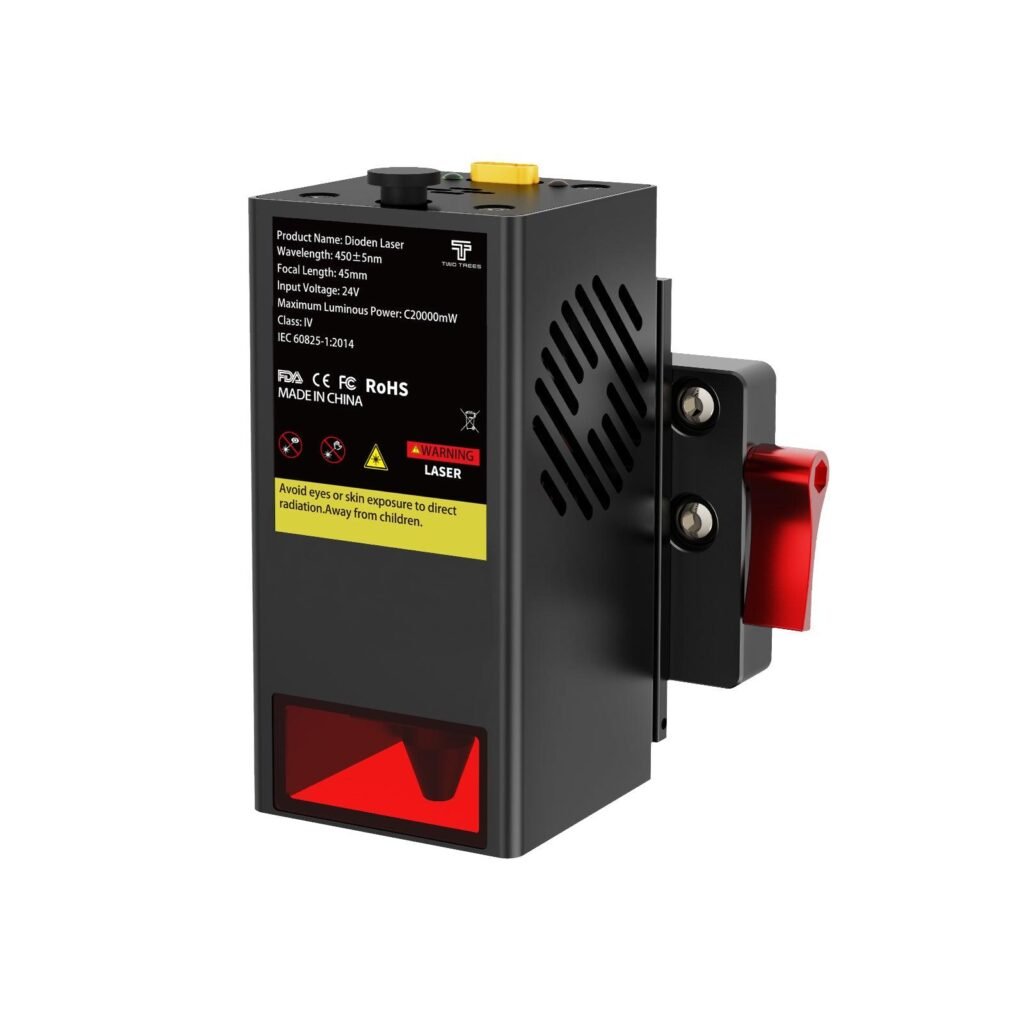
Twotrees TC20 Laser Module for TTC450 Pro /…
A 20W laser module that converts compatible TTC machines into a capable laser engraver/cutter for thin materials and detailed work.
Overview
The TwoTrees TC20 is a manufacturer‑made laser module intended to expand a compatible TwoTrees router’s capabilities. Rather than replacing or modifying the host machine with a third‑party attachment, the TC20 is designed to mount to the factory mounting points and plug into the router’s existing controller. That makes it a tidy option if you already own one of the supported routers and want to add engraving and light cutting for thin materials.
TwoTrees promotes the TC20 as a compact OEM accessory that preserves the original equipment ecosystem. It’s not a universal laser topper — it’s made for specific TwoTrees models (TTC450 Pro, TTC450 Ultra, TTC6050 and TTC‑H40) — so it’s worth confirming compatibility before you buy. Because this is a laser tool, you also need to treat it with the usual safety caution: protective eyewear, ventilation and correct material selection are essential.
Who is this best for?
The TC20 is aimed at TwoTrees owners who want to keep their workflow consolidated: one machine that does routing, milling and light laser engraving or cutting. It’s particularly suitable for hobbyists, makers and small workshops that already use one of the supported TwoTrees routers and want to add functionality without buying a separate laser cutter or fabricating a custom mount.
If your projects include signage, personalised gifts, prototype marking, or occasional thin‑material cuts and shallow engravings, the TC20 provides a straightforward way to broaden what you can do with your existing router. It’s less appropriate if you need deep cutting, industrial throughput, or a laser for standalone production work — the TC20 isn’t intended for heavy cutting or for operating independently of the host router.
Key features
- OEM fit: Designed to mount to the dedicated mounting points on supported TwoTrees routers for a neat, integrated look.
- Controller integration: Connects to the router’s existing controller so machine control stays centralised rather than running a separate unit.
- Compact form factor: Small and space‑saving, it preserves the router’s footprint and doesn’t require a lot of extra bench space.
- Engraving and light cutting: Adds the ability to engrave and cut thin materials — ideal for surface marking, decorative work and thin ply or card cutting.
- Preserves ecosystem: Intended to work with TwoTrees hardware and firmware flow, avoiding the need for third‑party mounts or complicated wiring.
Practical evaluation
Because the TC20 is an add‑on module designed by TwoTrees for specific machines, the practical benefits come from the ease of integration and a consistent control experience. Instead of mounting a generic laser and adapting wiring and firmware, you fit the TC20 to the router’s mounting points and plug into the existing controller — in principle this reduces the tinkering required and keeps everything within the same ecosystem.
Installation will still need some care. The manufacturer advises checking compatibility and following safety guidance; expect some basic configuration in the router’s control software or firmware settings to define laser behaviour (power control, PWM or software gating, and axis synchronisation). If you’re comfortable with CNC settings and a little configuration, this should be straightforward. If you’ve never worked with laser modules before, plan time to read the manual and follow safety steps carefully.
Use cases are what you’d expect from a compact laser fitted to a router: detailed surface engraving on wood, leather, acrylic or coated materials; marking for prototypes; cutting very thin materials such as thin plywood, veneer, cardboard or paper. It’s useful for personalisation tasks — names, logos and simple fill patterns — and as a complementary tool to routing: you can mark out patterns before routing or add engraved detail after a run.
Material choice matters. Lasers can produce hazardous fumes when cutting or engraving certain plastics or treated materials, so good ventilation and knowledge of what you’re processing are essential. The TC20 isn’t designed to be a high‑power cutter, so you should treat it as a supplementary tool for light work rather than a replacement for a dedicated laser cutter if you need to cut thicker materials regularly.
Strengths
- Integrated fit and wiring: Designed to mount and connect cleanly to supported TwoTrees routers, reducing the need for custom brackets or rewiring.
- One‑machine workflow: Because the laser uses the router’s controller, you keep a single control surface for routing and engraving tasks rather than juggling separate devices.
- Compact and unobtrusive: The module’s OEM form factor keeps the machine footprint small and avoids bulky attachments that get in the way.
- Good for light engraving and thin cutting: Perfect for decorative work, marking and occasional thin‑material cuts — useful for makers and hobbyists expanding what they can create on one machine.
- Ecosystem coherence: Using a TwoTrees‑made accessory can be more straightforward than adapting third‑party lasers, especially for those who prefer not to modify firmware or hardware extensively.
Limitations
- Compatibility is restricted: The TC20 only fits the listed TwoTrees models (TTC450 Pro, TTC450 Ultra, TTC6050 and TTC‑H40). It’s not a universal laser module.
- Not for heavy cutting: This module is intended for engraving and thin materials. Expect limited cutting depth and a focus on surface detail rather than throughput or thick material cutting.
- Safety and ventilation required: Laser work requires correct protective eyewear and good ventilation. Some materials produce toxic fumes and must not be lasered.
- Dependent on host controller: The TC20 doesn’t operate standalone — it relies on the router for power and control, so controller limits or firmware could affect functionality.
- Possible configuration work: You may need to tweak settings or firmware to get the best results. Some buyers less familiar with CNC/laser parameters might find this adds complexity.
Installation and setup guidance
The TC20 is designed for tidy installation, but plan to do a sensible setup routine rather than expecting a plug‑and‑play miracle. Before you begin, confirm your router model is explicitly listed as compatible. Check the manufacturer’s instructions for safety, mechanical fit and wiring.
Key setup steps to expect:
- Mechanical mounting to the router’s designated points. Ensure secure fixation so the laser stays aligned with the spindle axes.
- Electrical connection to the router’s controller. This centralised setup keeps control in one place but means you should be comfortable with the declared connector and any pinouts.
- Control/firmware configuration. Depending on the router, you may need to enable or configure laser PWM control or set up safe speed and power limits in the control software.
- Alignment and focus. As with any laser, correct focus distance and alignment with the workpiece are crucial for crisp engraving and repeatable cuts.
- Safety checks. Fit appropriate laser safety eyewear for the module’s wavelength and power, and ensure good ventilation or an extraction system for fumes.
If you’re new to lasers on CNC machines, research safe operating procedures, take small test runs on scrap material and work through recommended settings methodically rather than starting at high power or speed.
Materials and use cases
The TC20 is well suited to common maker materials: softwoods, hardwood veneers, leather, cardboard, paper, anodised aluminium for marking, and some acrylics for shallow engraving. It’s a tool for detail rather than heavy removal — think decorative panels, nameplates, inlay marking, prototype labelling and scoring cut paths you’ll later route.
A key limitation is plastics and coated materials: some emit hazardous gases when lasered (for example, PVC) so they must be avoided. The right approach is to check material safety data sheets and manufacturer guidance before attempting any cut or engraving. When in doubt, test on a small scrap in a well‑ventilated space and wear suitable protection.
Pricing and value
The TC20 is sold separately from the router; check the official TwoTrees store for current availability and shipping to the UK. As an OEM accessory, its value comes from the integration benefits: direct mount, single controller connection and a neat fit that preserves the host machine’s look and workflow. If you already own a supported TwoTrees router and need occasional engraving or thin cutting, the TC20 can be a cost‑efficient way to extend your machine’s usefulness without buying a separate laser system.
However, value depends on what you need. If you require deep cutting, high throughput, or standalone laser operation, a dedicated diode or CO2 laser cutter may deliver a better return despite a higher initial cost. For hobbyists and light‑use small businesses who prize simplicity and tidy integration with existing TwoTrees equipment, the TC20 is an attractive option.
Remember that prices and shipping may change; check the official store for the latest availability and any import or delivery costs to the UK before purchasing.
Alternatives to consider
If you’re deciding whether to buy the TC20, it helps to consider alternatives that may better suit different needs:
- Dedicated desktop laser cutters: If you need deeper cutting or standalone operation, small desktop diode or low‑power CO2 units are built specifically for laser work. They often include enclosures, built‑in ventilation or fume extraction options, and software tailored to laser cutting.
- Third‑party laser modules and mounts: More generic laser heads and universal mounts can work with a variety of CNC machines and sometimes offer different power options. You’ll likely need to fabricate or buy a mount and do more wiring and firmware work, but you gain flexibility if you change machines down the line.
- Professional engraving-only solutions: For high‑volume marking or precision engraving, pros may prefer a dedicated engraver with higher power and specialised control software. These are pricier but offer better throughput and support for production environments.
Which route to take depends on how frequently you’ll use the laser, how deep you need cuts to be, and whether you prefer a single consolidated machine or separate specialised tools.
Final verdict
The TwoTrees TC20 laser module is a sensible, well‑targeted accessory for people who already own one of the supported TwoTrees routers and want to add engraving and light cutting without rebuilding the machine or juggling a separate device. Its clear strengths are the OEM fit, controller integration and compact design — all of which reduce the friction that often comes with adding a laser to a CNC router.
It’s not a universal or heavy‑duty solution: compatibility is limited to specific TwoTrees models, cutting capability is shallow, and safe laser operation brings responsibilities for eyewear, ventilation and careful material selection. If those constraints match your intended use — intermittent engraving, marking and occasional thin cuts — the TC20 is a tidy, practical upgrade. If you need deeper cuts, standalone laser workflows, or industrial throughput, look to dedicated laser machines instead.
Before buying, confirm compatibility with your specific router model and review TwoTrees’ installation and safety guidance. Also check the official store for current pricing and shipping to the UK, as offers and availability can change.
Note: Prices and availability can change — always check the TwoTrees official store or authorised resellers for the latest information before you buy.
Ready to check Twotrees TC20 Laser Module for TTC450 Pro / TTC450 Ultra / TTC6050 / TTC-H40 – UK / For TTC6050/TTC-H40?
Check the latest offer before buying, then return to the main comparison if you want to compare it against the other shortlisted options.
Compare this with the full shortlist
Return to the full comparison guide to see how this product compares against the other shortlisted choices.