
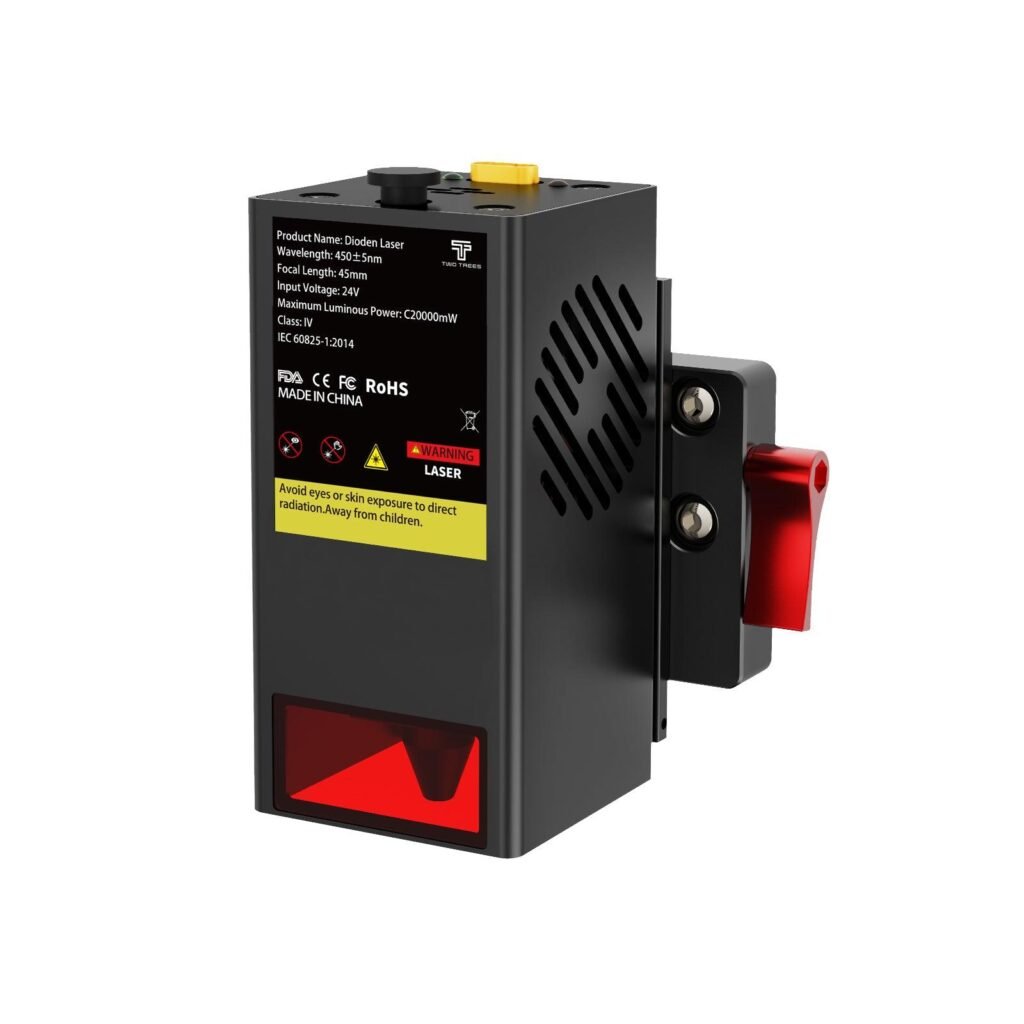
Twotrees TC20 Laser Module for TTC450 Pro /…
Same TC20 20W laser module packaged/marketed for TTC6050 and TTC-H40 compatibility — adds cutting and higher-detail engraving.
Overview
The Twotrees TC20 laser module for TTC6050 and TTC‑H40 is a 20W upgrade option intended to convert compatible Twotrees CNC frames into capable cutters and detailed engravers. Supplied with mounting hardware and a user manual, the module is aimed at makers and small businesses that want to expand what their existing machine can do without buying a separate dedicated laser system.
Twotrees markets the TC20 as a high‑power accessory that fits directly to supported platforms. It’s specified for common workshop materials such as wood, acrylic and leather, and is promoted as a way to improve engraving resolution while also handling deeper cuts. Before you buy, though, you’ll want to check mechanical fit, the electrical and cooling demands of a higher‑power laser, and any local rules that apply to powerful laser modules.
Who is this best for?
The TC20 is primarily for owners of the Twotrees TTC6050 and TTC‑H40 who already have the frame and control electronics and want to add a laser capability. Typical users who could benefit include hobbyist woodworkers who want finer engraving detail, small design businesses that need to produce cut or engraved goods without buying a separate laser machine, and makers who appreciate the space and cost savings of a single multi‑purpose device.
It isn’t aimed at absolute beginners who’ve never worked with lasers before. Installation and configuration are likely to require some mechanical assembly, firmware or controller tweaks and an understanding of ventilation and safety. If you lack the confidence to install and configure a higher‑power laser safely, you should budget for professional help or choose a lower‑power, factory‑integrated laser option.
Key features
- 20W high‑power laser module designed for cutting and engraving.
- Made specifically to mount on Twotrees TTC6050 and TTC‑H40 platforms.
- Includes mounting and installation hardware plus a user manual.
- Suitable for typical workshop materials: wood, acrylic, leather and similar.
- Aims to increase engraving detail and enable deeper cuts without a separate laser unit.
Practical evaluation
Because this review is based on the product information published by Twotrees rather than hands‑on testing, practical observations are framed by what you should expect and what to check when integrating the TC20 into an existing machine. The module’s 20W rating puts it in a category where it can handle moderate cutting tasks and fine engraving, but performance depends heavily on the host machine’s rigidity, motion control, and cooling.
Start by verifying mechanical compatibility. Even though the TC20 is marketed for TTC6050 and TTC‑H40, there are several generations and optional configuration changes to the frames that might affect fit. Check that the supplied mounting brackets align with your carriage and that the module’s weight won’t stress belts, motors or the frame. If your machine uses weaker gantry components, consider reinforcing the mount points to preserve positional accuracy during cutting.
Electrical requirements are the next area to confirm. A 20W laser head draws more current and can demand better power delivery and, in some cases, dedicated cooling. The TC20 is supplied with the hardware and a user manual but you should check whether your machine’s controller board provides the necessary laser enable/drive signals and whether your power supply has the headroom for the additional load. If firmware changes are needed to adjust PWM or laser‑control behaviour, be prepared to make those changes or seek support from Twotrees or an experienced community member.
Work ventilation and fume extraction are not optional with higher‑power lasers. Materials like acrylic, PVC and some composite laminates produce hazardous fumes when cut. Plan for an extraction system that pulls fumes away from the work area and filters them appropriately, and ensure the room has good general ventilation. Likewise, don’t underestimate the need for laser‑rated safety goggles and interlocks or enclosures that prevent accidental exposure to the beam.
Finally, consider the software side. Engraving detail depends on motion control, acceleration, belt tension and the software toolchain. You’ll get best results by calibrating the machine after mounting the module — check focus height, run test engraves at different speeds and power settings, and refine passes for clean cuts. Expect an initial learning curve as you tune parameters for each material.
Strengths
- Adds substantial cutting capability to compatible Twotrees CNCs, making the frame more versatile without purchasing a separate laser machine.
- 20W power level is a useful step up from lower‑power modules, enabling deeper cuts and finer engraving when paired with a stable machine.
- Supplied with mounting hardware and a user manual, which helps reduce guesswork during installation.
- Good option for makers and small businesses that need space‑efficient equipment and want to broaden their service offering.
- Integration with existing Twotrees frames can simplify workflow and tooling: use the same motion system for routing, drilling and laser work.
Limitations
- Price: at the guide price it sits well above simple spare parts and lower‑power modules; it’s an investment rather than a minor upgrade.
- Installation can be technical: mechanical fit, electrical connections and possible firmware tweaks may be required.
- Safety and compliance: higher‑power lasers are regulated in many regions and require appropriate protective measures and, in some cases, certification or registration.
- Host machine considerations: not every TTC6050 or TTC‑H40 will have the power, cooling or structural rigidity to get the best from a 20W laser without additional upgrades.
- Material limits: while the TC20 handles many common workshop materials, some plastics and treated woods are unsafe to cut; you must verify compatibility for each material.
Installation and setup: what to plan for
Putting a 20W laser on an existing CNC frame is more than a mechanical swap. Plan for a focused session to prepare the machine and workspace:
- Check the manual and Twotrees support resources. Confirm the exact mounting steps and whether any optional parts are necessary for your frame iteration.
- Inspect the carriage and gantry for stiffness. If the laser module adds weight, check belt tension, motor current and whether the gantry flexes under load — flex will reduce engraving accuracy.
- Confirm the controller board’s laser PWM and enable signals. If your board can’t handle the new head’s drive method, you might need an additional driver or a firmware update. Research the community forums for configuration tips for your controller model.
- Set up adequate cooling. Some higher‑power modules generate heat that cooling fans alone can’t handle; verify the module’s cooling requirements and ensure continuous operation won’t overheat the head or your machine’s electronics.
- Prepare the workspace with proper fume extraction and laser safety measures: goggles, enclosures or interlocks, and clear signage. Treat the workspace as a hazardous area while operating the laser.
Materials and applications
The TC20 is described as suitable for wood, acrylic, leather and other common materials often used in hobby and small business applications. In practice, that means it’s a practical choice for creating personalised wooden signs, small acrylic components, leather goods with engraved detailing, and prototypes or one‑off projects where cutting depth and engraving resolution matter.
However, success with different materials depends on feed rates, power settings, focus, and the mechanical precision of your host machine. Expect to do material tests for thickness, number of passes, and post‑processing needs. Avoid cutting PVC or materials that release toxic gases — check material safety data sheets before processing anything unknown.
Safety and legal considerations
High‑power laser modules are regulated in many jurisdictions because of the serious eye and skin hazards they pose and the potential to start fires. Make sure you understand and comply with any local rules or restrictions that apply to lasers of this class. Your responsibilities include:
- Using appropriate laser safety eyewear rated for the laser’s wavelength and power.
- Implementing enclosures, interlocks, or other engineering controls to prevent accidental exposure to the beam.
- Ensuring adequate fume extraction and filtration to remove hazardous vapours produced by cutting materials.
- Checking whether any registrations, markings or certifications are required in your country before operating the device commercially.
Pricing and value
Twotrees lists the TC20 with a guide price of USD 399.00, but prices and offers can change, so check the official product page for up‑to‑date pricing and any installation notes. At that price point the TC20 sits between low‑cost hobby laser modules and more expensive, fully integrated laser systems.
Value depends on your starting point. If you already own a compatible TTC6050 or TTC‑H40 and your machine’s electrical and mechanical systems are adequate, the TC20 can be a cost‑effective way to add real cutting and engraving capability without the footprint or expense of a second machine. For small businesses, the ability to offer new services such as deeper cuts or higher‑resolution engraving can help the module pay for itself.
On the other hand, if your machine needs additional upgrades — a more powerful power supply, cooling, or structural reinforcement — those costs must be factored in. Also consider time invested in setup, safety compliance and learning to dial in settings. For users who want a plug‑and‑play laser with factory safety features and local certification, a dedicated laser cutter or an integrated Twotrees unit might be a simpler, though typically more costly, route.
Alternatives to consider
If you’re exploring laser upgrades or attachments, think about the following alternatives and when they might be a better fit:
- Lower‑power laser modules (fewer watts) — cheaper and easier to integrate, suitable when you only need surface engraving or thin material cutting and have stricter safety or regulatory constraints.
- Higher‑end integrated laser machines — more expensive but built around laser safety, extraction and thermal management from the outset; these are better for production environments where uptime and compliance are priorities.
- Other Twotrees laser variants — if you need a different mounting style or power level for another Twotrees platform, check the manufacturer’s range for a variant built for your specific frame or workflow.
- Separate dedicated cutter/engraver — if you need simultaneous routing and laser capabilities or you want to avoid frequent tool changes, owning two machines may be preferable despite the larger footprint.
Final verdict
The Twotrees TC20 laser module for TTC6050 and TTC‑H40 platforms is a sensible option for owners who already have the compatible frame and want to extend its functionality. With a 20W output it brings meaningful cutting power and the potential for finer engraving detail, and Twotrees includes the mounting hardware and manual to support installation.
However, this is an upgrade that requires realistic planning. Check fitment and mechanical compatibility, confirm your machine’s electrical and cooling capacity, and be prepared for firmware or controller configuration. Safety is non‑negotiable: extract fumes, use appropriate eyewear and comply with local regulations for higher‑power lasers. If you’re willing to make those preparations, the TC20 can be a space‑efficient, versatile way to broaden your capabilities. If you prefer a plug‑and‑play, fully certified laser solution, or if you cannot easily adapt your current machine, a dedicated laser machine or a lower‑power module may be a better match.
Note: Offers and prices can change. Check the official product page for the latest price, availability and any additional installation or safety notes before buying.
Ready to check Twotrees TC20 Laser Module for TTC450 Pro / TTC450 Ultra / TTC6050 / TTC-H40 – EU / For TTC6050/TTC-H40?
Check the latest offer before buying, then return to the main comparison if you want to compare it against the other shortlisted options.
Compare this with the full shortlist
Return to the full comparison guide to see how this product compares against the other shortlisted choices.