
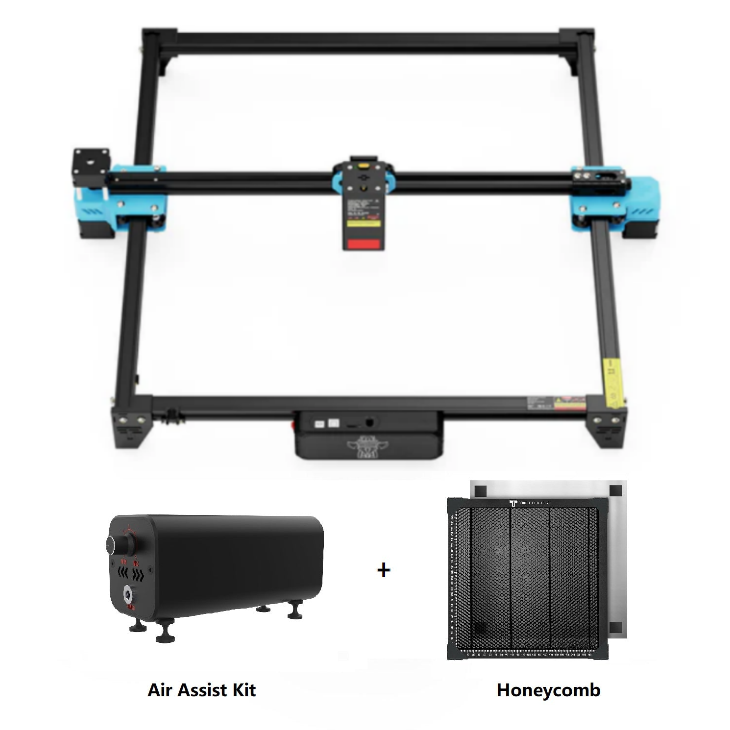
Twotrees TTS-20 Pro 20W Laser Engraver Machine +…
Same TTS-20 Pro bundle with honeycomb panel and air-assist, listed through an AU regional shop for local buyers.
Overview
The Twotrees TTS-20 Pro (AU bundle) pairs a 20W diode laser module with a 418 × 418mm work area and a couple of useful accessories — a honeycomb support panel and an air-assist kit. Functionally this is the same core machine you’ll find elsewhere in Twotrees’ range, but the AU-listed bundle aims to simplify buying for Australian customers by addressing regional shipping, support and electrical considerations.
On paper this is a roomy desktop engraver: the work area is large enough for signs, giftware, inlaid panels and small production batches while remaining compact enough for a workshop bench. The included honeycomb bed helps reduce back-side burning and improves airflow under cut pieces, and the air-assist kit is intended to push smoke away from the laser head and the cutting path for cleaner edges. The machine works with common engraving software such as LightBurn and LaserGRBL, which many hobbyists and small businesses already use.
Because this is a diode laser of modest continuous power, it’s most useful for engraving and light cutting of softer materials; denser or thicker materials will push its limits. As with any desktop laser, safe operation, ventilation and careful material selection remain critical.
Who is this best for?
The Twotrees TTS-20 Pro AU bundle is aimed at makers, crafters and small workshop owners who want a relatively large, ready-equipped desktop laser without immediately buying multiple accessories. It suits anyone producing personalised items, signage, small wood or acrylic parts, or prototype pieces where a 418 × 418mm bed is sufficient.
Specifically, this listing will appeal to:
- Australian buyers who prefer a regionally listed product to simplify shipping, potential returns and local support.
- Hobbyists and part-time makers who want a machine that’s usable straight away thanks to the included honeycomb bed and air-assist kit.
- Small businesses or Etsy sellers producing batches of engraved goods where the larger work area speeds throughput compared with smaller desktop lasers.
It is less suited to those who need to cut or engrave very thick or very dense materials (metals, thick hardwoods, certain composites) at scale — a more powerful CO2 or fibre laser would be necessary for heavy-duty cutting. It’s also not a completely plug-and-play solution for absolute beginners: there’s setup and calibration to do, and a sensible fume extraction system is essential for safe operation.
Key features
- 20W diode laser module — Adequate for engraving and light cutting on common materials such as wood, acrylic, leather and coated metals.
- 418 × 418mm working area — A generous desktop footprint that accommodates larger designs and multiple smaller pieces for batch work.
- Honeycomb support panel — Helps reduce back-side burn and supports delicate pieces with better airflow underneath.
- Air-assist kit — Designed to blow away smoke and debris from the cutting path, improving edge quality and reducing residue on optics.
- Software compatibility — Works with LightBurn and LaserGRBL for control and job setup, both popular choices among hobbyists and pros.
- Packaged for workshop use — Marketed to makers, prototypers and small businesses rather than casual toy-grade desktop units.
Practical evaluation
Buying this bundle is primarily about convenience: you get the machine plus two meaningful accessories that reduce the amount of additional shopping required to start working. The honeycomb bed and air-assist kit are practical inclusions that many users add shortly after buying a plain engraver, so having them in the box cuts initial setup time and cost.
Software support is a real plus. LightBurn is widely used because it balances layout tools, vector handling and direct laser control in one app; LaserGRBL is a common free alternative for simpler workflows. Compatibility with these packages means you can prepare projects with established tools rather than learning proprietary or clunky software.
However, realistic expectations are important. A 20W diode is capable, but it isn’t a substitute for higher-power CO2 systems when it comes to thicker cuts or industrial throughput. The “20W” rating refers to the diode module’s electrical or optical class specification and does not directly translate to cutting performance in millimetres per second; material, focal settings and duty cycle all influence real-world capability.
Safety, ventilation and consumables are ongoing considerations. Laser-processed materials can give off hazardous gases and particulates, so a reliable extraction path and filtration are essential if you intend to run the machine in an enclosed workshop. Consumables such as replacement lenses, mirrors (if fitted) and covers will add to long-term costs, and replacement parts or service options depend on the retailer’s local support and warranty terms.
Strengths
- Ready-to-use bundle: The included honeycomb bed and air-assist kit reduce the number of separate purchases needed to start engraving and cutting, saving time for hobbyists and new small-business owners.
- Large desktop work area: The 418 × 418mm bed gives greater room for larger items or multiple pieces at once, which is helpful for small-batch production and multi-part projects.
- Common software support: Compatibility with LightBurn and LaserGRBL means you can use familiar, well-documented control software with a broad user community for tips and templates.
- Cleaner cuts with air-assist: The air-assist kit helps push smoke away from the cutting zone and reduces residue on optics, which improves edge quality and reduces cleaning frequency.
- Honeycomb bed benefits: The honeycomb support reduces back-side burning and improves airflow, which is particularly helpful when cutting or engraving thin or delicate pieces.
- Regional listing for AU buyers: Having an AU-specific bundle may simplify shipping, customs and support enquiries compared with buying from overseas listings.
Limitations
- Power limits for thick or dense materials: A 20W diode laser can struggle with dense hardwoods, thick acrylics or metals. Expect to use multiple passes or reduced cutting depth compared with higher-power systems.
- Ventilation required: The machine doesn’t remove or neutralise fumes — a reliable extraction and filtration setup is a hard requirement for safe, legal indoor use, especially when cutting plastics, vinyl or coated materials.
- Consumables and maintenance: Further costs for replacement parts, optics cleaning and consumables should be factored into ownership. Availability of spares depends on the retailer’s supply chain and local stock.
- Initial setup and calibration: While the bundle reduces accessory shopping, you’ll still need to assemble, level and focus the system and learn software workflows. Beginners should allow time to learn safe settings and material testing.
- Potential regional specifics: Despite being an AU listing, check whether plugs, documentation and warranty terms are fully localised; some sellers ship units with universal accessories but without country-specific paperwork.
Pricing and value
The TTS-20 Pro AU bundle is offered as a premium package compared with bare-bones models because it includes the honeycomb bed and air-assist kit. Bundles of this nature can deliver genuine value if you would otherwise purchase those accessories separately, especially when those add-ons are hard to source locally or attract extra shipping costs.
Value assessment comes down to three questions:
- Do you need the larger 418 × 418mm bed? If you routinely work on larger panels or prefer to nest multiple designs in one run, the larger bed can be a time-saver.
- Will the included accessories save you time and money? If you’d buy a honeycomb bed and air-assist anyway, a bundled price is often a better proposition than adding them afterwards.
- Does the retailer provide clear, local warranty and support? Regional listings can be more valuable if they reduce friction for returns, spare parts and advice.
Bear in mind that price guides can change frequently. Check the latest offers, delivery costs and local support before committing — what looks like a good bundle in one month may be matched by another seller or single-piece bundle at a different price later on.
Alternatives to consider
There are a few alternative directions to consider before you decide.
- Bare machine + third-party accessories: If you already own a honeycomb bed or an air-assist kit, buying a plain TTS-20 (or similar) without extras can be cheaper. This works if you can source reliable local parts or want to customise your setup.
- Higher-power CO2 systems: If your work routinely requires cutting thick acrylic, hardwoods or non-ferrous metals, a CO2 laser with higher cutting power will be more efficient. Expect higher initial and running costs, and different ventilation requirements.
- Smaller desktop diode lasers: If you’re tight on bench space or only plan to engrave small items, a smaller machine with a reduced footprint can be cheaper and easier to manage, but you lose the 418 × 418mm capability.
- Professional service or maker spaces: For occasional users, outsourcing engraving or cutting to a local maker space or commercial service can be more cost-effective than buying hardware and dealing with ventilation and maintenance.
Choosing between these depends on volume, material needs and whether you want to keep the work in-house. The TTS-20 Pro bundle comfortably fits the profile of a growing maker or small business that needs larger format capability without stepping up to industrial systems.
Final verdict
The Twotrees TTS-20 Pro 20W AU bundle is a practical and well-considered package for makers, crafters and small businesses in Australia who want a generous desktop working area plus a couple of accessories that genuinely matter. The honeycomb bed and air-assist kit reduce the friction involved in getting started and improve cut quality compared with a bare machine. Compatibility with LightBurn and LaserGRBL is another point in its favour because both packages are widely used and supported.
That said, it’s important to be realistic about the limits of a 20W diode laser. It’s excellent for engraving and light cutting of many common materials, but it isn’t a replacement for higher-power CO2 or fibre lasers when depth, speed and material range matter. Ventilation and consumable costs are ongoing responsibilities, and setup takes time if you’re new to lasers.
If you want a roomy, capable desktop engraver and prefer a bundled starter kit — and if your projects match the scope of a 20W diode — the TTS-20 Pro AU bundle is a compelling option to consider. Double-check the retailer’s current pricing, delivery terms and local warranty details before buying, and plan for a suitable ventilation and safety setup in your workspace.
Note: Offers and prices can change. Always check the retailer page for the latest shipping, warranty and price information before purchase.
Ready to check Twotrees TTS-20 Pro 20W Laser Engraver Machine + Honeycomb + Air Assist Kit – AU?
Check the latest offer before buying, then return to the main comparison if you want to compare it against the other shortlisted options.
Compare this with the full shortlist
Return to the full comparison guide to see how this product compares against the other shortlisted choices.