
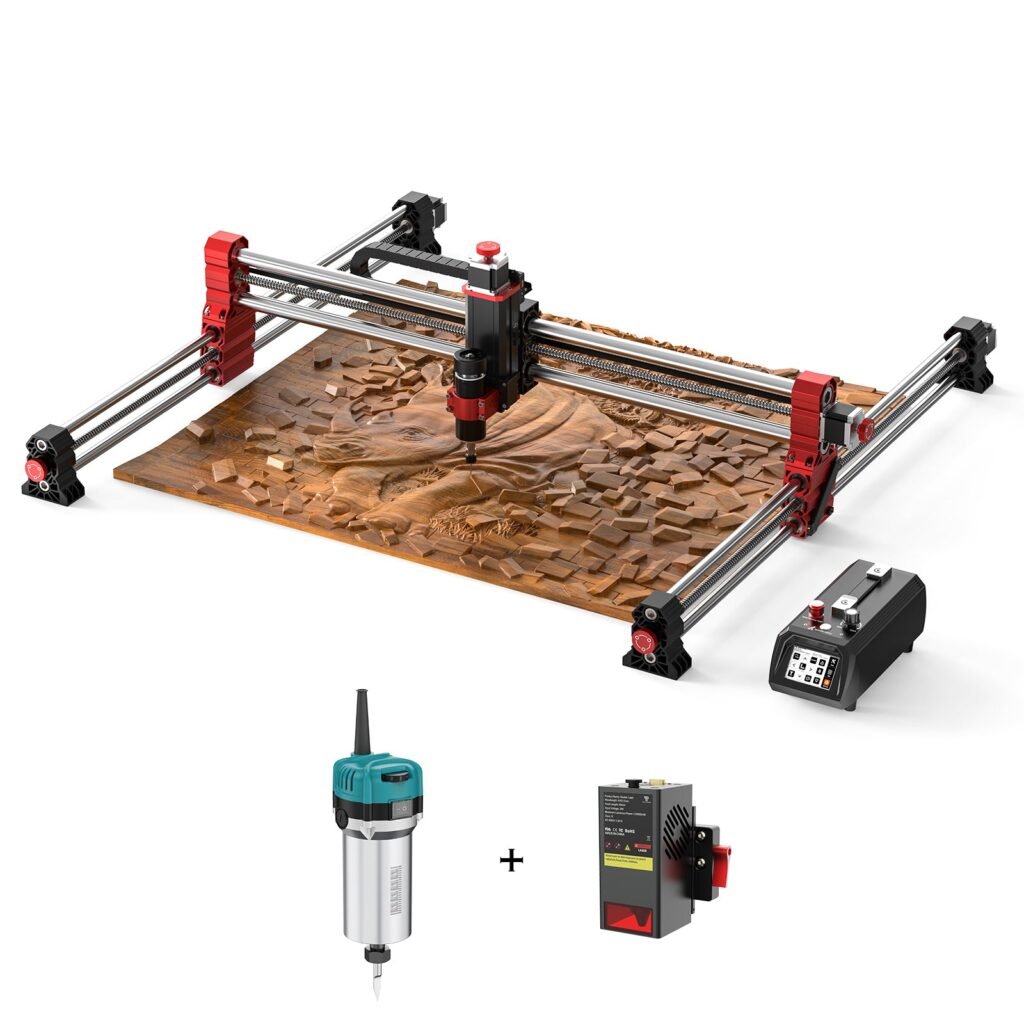
Twotrees TTC-H40 CNC Router Machine – H40 /…
Large 1000×1000×100mm bed, 500W spindle and one‑step CNC/laser switching for bigger workshop projects.
Overview
The Twotrees TTC‑H40 Ultra sits at the top end of Twotrees’ hobby‑friendly router line‑up. With a 1000×1000×100mm working area it’s aimed at makers who want to cut larger panels for furniture, signage and light commercial runs without moving to a full industrial machine. Mechanically it uses ball screws and linear guides, and it ships with a 500W spindle that spans a wide RPM range. The Ultra also includes a 5‑inch offline touchscreen controller and a one‑step tool change mechanism that swaps between CNC and laser heads, giving the machine some versatility for different types of projects.
This review covers the H40 Ultra’s main features, the kinds of work it’s suitable for, and the practical considerations you should weigh before buying. I’m using the manufacturer’s published specifications and typical workshop realities as the basis for the evaluation — I haven’t carried out hands‑on testing of this unit.
Who is this best for?
The H40 Ultra is best suited to makers, hobbyists and small business owners who need a larger work area than what smaller desktop routers provide, but don’t have the space or budget for a true industrial CNC. If you make custom furniture, cut acrylic signage, build larger scale models, or want to mill light metals occasionally, the H40’s 1m square bed makes it possible to work with full‑size panels and larger components.
It’s also a reasonable choice for workshops that value offline operation — the 5‑inch touchscreen lets you run jobs without a dedicated PC attached, which simplifies workshop workflows and improves safety when you don’t want a computer near dust and debris. If you plan to switch between engraving/laser work and conventional routing, the one‑step CNC/laser change is a neat time saver.
Key features
- Large working area: 1000×1000×100mm bed — big enough for furniture panels, multiple sheet pieces or larger prototypes.
- Spindle: 500W unit with a wide RPM range (8000–30,000 RPM) and optional higher‑power spindles available as upgrades.
- Mechanical drive: Ball screws and linear guides designed to improve positional accuracy and reduce vibration versus acme screws or cheaper rail systems.
- Offline control: 5‑inch touchscreen with emergency stop for standalone operation; useful if you don’t want a permanently connected PC.
- Tool switching: One‑step switching between CNC and laser heads for multi‑material workflows.
- Software compatibility: Works with common CAM packages such as Vectric (VCarve), Fusion 360 and EASEL — these are widely used by hobbyists and small shops.
Practical evaluation
Mechanically, the H40’s ball screws and linear rails put it a step above many low‑cost hobby routers that still use lead screws and cheaper guides. Ball screws reduce backlash and help keep motion smoother under load, which matters when you’re cutting larger panels or light metals where precision and repeatability are important. The larger bed also reduces the need to stitch multiple passes or re‑fixturing, saving time and lowering the risk of alignment errors.
The 500W spindle covers a wide RPM range suitable for routing wood, plastics and softer non‑ferrous metals like aluminium (with the right tooling and feeds). However, a 500W spindle is not in the same class as higher‑power industrial units for heavy machining: if you plan frequent, aggressive metal milling you should consider higher‑power spindle options or a dedicated machine. Twotrees does offer higher‑power spindles as optional upgrades, which preserves an upgrade path.
Offline control via the 5‑inch touchscreen is a practical benefit. In many hobby workshops, a dedicated PC in the same space is inconvenient — dust and vibration can shorten a computer’s life and clutter bench space. Being able to load jobs via USB and run them from the machine simplifies the setup. The presence of an emergency stop on the controller is also important for safety and quick shutdowns during cutting mishaps.
The one‑step CNC/laser switching feature adds versatility, letting you switch between routing and laser engraving without a lengthy teardown. That’s attractive if you do varied work — for example, routing signage and then doing engraved labels or fine detail on the same piece. Bear in mind that laser attachments usually vary in power and capability; the H40’s swapping mechanism makes the transition straightforward, but the laser’s performance will still depend on the specific laser module supplied.
On the software side, compatibility with Vectric, Fusion 360 and EASEL means you can use pro‑grade CAM workflows or easier browser‑based tools depending on your skill level. Vectric’s VCarve is popular with sign‑makers and cabinet makers for 2D and 2.5D work, while Fusion 360 gives more advanced 3D toolpaths if you want to tackle sculpted parts. This range of options keeps the H40 useful as your skills and project complexity grow.
Strengths
- Generous bed size: The 1000×1000mm work area is one of the H40’s biggest selling points. It enables full‑sized panels, multi‑piece nests and larger prototype pieces without time‑consuming re‑fixturing.
- Stiffer mechanicals: Ball screws and linear guides give better positioning and lower vibration, which helps with surface finish and repeatability.
- Offline operation: A compact touchscreen with emergency stop keeps the machine usable without a PC, which is practical in a dusty workshop environment.
- Tool versatility: One‑step switching between spindle and laser heads expands what you can do with a single machine.
- Software flexibility: Works with widely used CAM packages so you won’t be locked into a niche workflow as projects evolve.
- Upgradeable: Optional higher‑power spindles offer an upgrade path if you later need more machining capability.
Limitations
No machine is perfect for every workshop. The H40’s most obvious limitation is its size. A true 1m by 1m bed requires a dedicated floor space and a stable support table — this is not a compact bench‑top tool for tight garages. Before buying, confirm you have the physical room to manoeuvre sheets of material and place dust extraction nearby.
While the 500W spindle is versatile for wood and light metal work, it’s not a substitute for larger industrial spindles when aggressive metal removal is needed. If your projects include deep cuts in steel or heavy aluminium stock, you’ll either need to upgrade the spindle or accept reduced feed rates and shallower passes. The product does offer optional higher‑power spindles, but these are an extra cost and may require additional electrical/setup considerations.
Assembly and setup can be non‑trivial. Large‑format CNCs often require careful squaring, belt tensioning (if applicable), and calibrating motion systems. If you’re new to CNCs, budget time to assemble, configure and dial‑in the machine; some mechanical aptitude and basic workshop tools are necessary. Also plan for dust extraction — routing large wood panels creates a lot of chips, and an effective extraction system will make the difference between tidy work and a very dusty workshop.
Shipping, warranty and accessory inclusions vary depending on where you buy. The product’s guide price is published, but actual offers may bundle different accessories or service terms. Always check what’s included with the seller before purchase.
Pricing and value
The H40 Ultra is positioned higher than compact hobby routers because it provides a larger work area, stiffer mechanicals and added conveniences like an offline controller and quick‑swap tooling. For buyers who need the extra bed size, these are features with genuine, tangible value — they save time, reduce workarounds and open new project types that smaller machines can’t handle.
That said, the machine is more expensive than entry‑level desktop routers. If you only occasionally cut small pieces, or if your projects fit comfortably within smaller beds, you may get better value from a smaller, less costly machine. Conversely, if you anticipate growing into furniture work, needing single‑piece nesting for cabinetry panels or wanting to do consistent light commercial runs, the H40’s cost starts to look reasonable compared with the time and complexity saved.
One final pricing note: Twotrees lists a guide price for the H40 Ultra, but prices, bundles and promotions change. Check the official product page or your seller for current pricing, shipping and what accessories are included before buying.
Alternatives and how to choose
When evaluating the H40 Ultra against alternatives, focus on three core questions: bed size, spindle power and workshop footprint. If you don’t require a full 1m×1m bed, smaller Twotrees models — or other desktop routers — will be less costly and easier to accommodate. If you plan heavy metal cutting, prioritise machines with higher‑power spindles or easily fitted spindle upgrades.
Consider the workflow you prefer. If you want to avoid a dedicated PC in the workshop, a machine with an offline controller like the H40 is more convenient. If you rely on a particular CAM package, make sure the machine supports it or that you can export compatible G‑code. Twotrees lists compatibility with Vectric, Fusion 360 and EASEL, which covers most hobby and semi‑professional workflows.
Also weigh support and parts availability. Machines that use standard components (common spindles, stepper/servo motors and well‑documented controllers) tend to be easier to maintain or upgrade. If you’re buying online from a distance, confirm warranty terms, expected delivery and whether the seller provides assembly support or setup guides — these can matter when tackling a large, multicomponent machine for the first time.
Practical buying checklist
- Measure your workshop space and ensure you can safely handle 1m panels and the machine’s footprint.
- Decide whether 500W spindle power meets your needs; if not, check costs and compatibility of higher‑power spindle upgrades.
- Plan for dust extraction and a solid worktable capable of supporting the machine and material loads.
- Confirm what accessories and documentation are included with the seller’s offering (tooling, clamps, endmills, laser head, etc.).
- Verify software compatibility for your preferred CAM package and whether you need additional licences (for example, Vectric VCarve is commonly used but is licensed separately).
- Allow time for assembly, calibration and learning the CAM/CNC workflow if you’re new to this class of machine.
Final verdict
The Twotrees TTC‑H40 Ultra is a compelling option for hobbyists and small workshop owners who need a genuine large‑format CNC without moving to an industrial footprint. Its 1000×1000×100mm bed, ball‑screw/linear‑guide mechanics and offline touchscreen give it practical advantages for furniture makers, sign makers and anyone working with larger panels. The one‑step CNC/laser switching and software compatibility add useful flexibility for mixed workflows.
It’s not the right choice for every maker. The 500W spindle is excellent for wood and softer metals, but not the best choice for heavy, aggressive metal cutting unless you opt for a higher‑power upgrade. The machine’s size, assembly requirements and need for dust extraction also mean you should plan your workshop layout and time investment before buying.
In short, if you regularly work with larger panels or expect to scale projects up from small hobby pieces to larger, semi‑commercial work, the H40 Ultra offers a sensible mix of bed size, mechanical quality and workflow convenience. If your projects are small, or if you need sustained high‑power metal machining, look at smaller, cheaper routers to save cost or at higher‑end industrial machines for heavy metal work.
Note: offers and prices can change — always check the current product page or authorised seller for the latest price, bundle content and warranty terms before purchasing.
Ready to check Twotrees TTC-H40 CNC Router Machine – H40 / AU / Ultra?
Check the latest offer before buying, then return to the main comparison if you want to compare it against the other shortlisted options.
Compare this with the full shortlist
Return to the full comparison guide to see how this product compares against the other shortlisted choices.