
Estlcam
A lightweight CAM package with straightforward milling workflows and simple machine control features suitable for hobby routers.
Overview
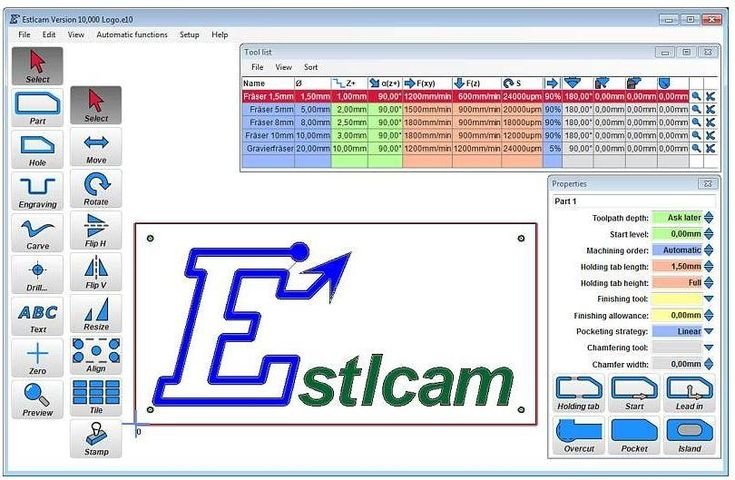
Estlcam is a compact CAM application aimed squarely at users who want a straightforward route from design files to cutting without wading through a complex interface. The software produces the standard toolpaths you need for profiling, pocketing and drilling, includes simple nesting and part layout tools, and offers basic support for laser and engraving workflows in certain setups. It also handles G‑code generation and can directly control machines, making it an attractive one‑stop option for makers who value speed and simplicity.
Where Estlcam stands out is in its pragmatic approach. The interface is functional rather than glossy, the installation is lightweight and it has modest system requirements, so it will run happily on ageing workshop PCs. Toolpath calculation is quick for straightforward jobs, and the overall package is positioned as an affordable option compared with larger, more feature‑heavy CAM suites. That combination makes Estlcam a practical choice if your projects are mostly 2D or simple 2.5D work and you want a low‑friction workflow.
Who is this best for?
Estlcam is primarily aimed at hobbyists, makers and small workshop owners who cut simple parts and want to move from design to machine with the least possible fuss. If you make signs, simple furniture components, small enclosures, prototypes or decorative pieces that require profiling, pockets and drilling, Estlcam will likely cover your needs. Its quick toolpath generation and straightforward controls suit people who want to spend more time cutting and less time learning a complex software package.
It’s also a good fit for newcomers to CNC who may be intimidated by the depth of larger CAM suites. The practical interface is easy to pick up for basic jobs, and because the program is lightweight it won’t demand a powerful workstation. Small workshops that run occasional production batches can use Estlcam for simple part layouts and nesting, but if you need extensive automation, advanced nesting algorithms or heavy duty batch production controls, you may find it limiting.
Finally, if you’re exploring laser engraving alongside milling, Estlcam’s basic support for laser and engraver workflows can be useful. That said, this support is described as basic and dependent on particular setups, so double‑check compatibility with your hardware before committing.
Key features
Estlcam keeps the feature set focused and practical. Rather than offering an exhaustive list of advanced machining tools, it concentrates on the functions most hobbyists and small shops actually use.
- Simple CAM toolpaths: Profiling, pocketing and drilling are all covered, which is enough for many 2D and 2.5D jobs.
- Basic nesting and part layout: Arrange and nest parts on a sheet to reduce waste; the tools are not exhaustive but meet the needs of straightforward runs.
- Straightforward G‑code generation and machine control: Estlcam generates G‑code and can drive machines directly, removing the need for separate machine control software in many cases.
- Some laser/engraver support: There’s basic support for laser workflows in certain configurations, which can be handy if you use both tools.
- Lightweight installation and modest system requirements: The software doesn’t demand a high‑spec PC and installs quickly.
- Fast toolpath generation for simple jobs: Toolpaths for uncomplicated parts appear rapidly, speeding up the transition from design to cutting.
Each of these features is geared towards reducing friction. Estlcam does not try to be every tool at once; instead it focuses on doing the common tasks quickly and reliably.
Practical evaluation
Estlcam’s appeal becomes obvious when you look at how a typical workflow would run. You import your design (commonly simple 2D or 2.5D geometry), choose the relevant toolpaths — profiling to cut outlines, pocketing to clear areas, drilling for holes — set basic feeds, speeds and depths, then generate the G‑code. For users who want to get cutting quickly, that minimal chain is attractive.
The G‑code generation and built‑in machine control also simplify the process. Rather than exporting G‑code and switching to a separate controller, some users can load and run jobs directly from Estlcam. That directness reduces the number of moving parts in your workflow and is particularly useful in a home or small shop environment.
Because the application is compact, you won’t find many of the automated conveniences present in larger CAM suites. Nesting, for example, is basic: fine for optimising a few parts on a sheet but not sophisticated enough for complex, irregular shapes or highly optimised material use in production runs. Similarly, if your work demands advanced multi‑axis 3D finishing, complex surface machining or specialised toolpath strategies, Estlcam’s capabilities will feel limited.
The interface is practical rather than polished. Some users will appreciate the straightforward layout and lack of clutter; others who prefer a modern, highly visual UI with lots of wizards and automated helpers may find it a bit old‑school. Documentation and community resources appear smaller than those available for mainstream packages, so you may need to rely on the vendor’s documentation and the broader maker community for troubleshooting and tips.
On the plus side, the lightweight nature of Estlcam means it runs well on modest hardware and gets toolpaths calculated rapidly for simple jobs. That responsiveness is a real benefit when you’re iterating on designs or producing many small parts. Its support for laser/engraver workflows adds flexibility if you run multiple tool types, though this support is described as basic and can depend on your specific hardware and controller.
Finally, compatibility and post‑processing deserve attention. Estlcam covers common needs but may lack some post‑processors for specialised controllers. Before you buy, check that the software can output G‑code compatible with your machine, and whether you need a custom post‑processor or additional configuration. The vendor’s site is the best place to confirm licence details and availability of trials so you can verify compatibility in your setup.
Strengths
- Practical and easy to learn: Estlcam is deliberately simple, which reduces the learning curve for beginners and hobbyists. The core tasks are straightforward to set up and use.
- Good value for straightforward jobs: Positioned as an affordable CAM option, it gives you the essentials without the overhead of a full‑blown CAM suite.
- Fast toolpath generation: Toolpaths for common operations calculate quickly, helping you get from design to cut in minimal time.
- Compact, no‑frills interface: The interface is functional and focused on utility — ideal if you want to avoid the complexity of larger packages.
- Suitable for small workshops and makers: The combination of machine control, G‑code generation and modest system requirements works well in a home or small business environment.
These strengths make Estlcam a solid daily driver for anyone doing straightforward routing or milling work and who values speed and simplicity over advanced tooling.
Limitations
- Limited advanced 3D machining: If your work involves complex surface finishing, sculpted parts or multi‑axis 3D strategies, Estlcam does not offer the depth you’ll need.
- Interface is functional but less modern: The UI gets the job done, but it lacks the polish and visual guidance of the pricier, more mainstream CAM packages.
- Fewer automation and nesting options: The nesting tools are basic and won’t replace dedicated nesting or production workflow automation for medium‑ to high‑volume runs.
- Potential post‑processor gaps: For specialised controllers you may need a custom post‑processor or additional setup, as Estlcam may not include every controller out of the box.
- Smaller community and tutorial base: There’s less official and community‑produced learning material than for the most popular CAM products, which can make solving edge‑case issues a little harder.
These limitations don’t make Estlcam a poor product — they simply help define where it is best used. For simple to moderate tasks it performs well, but it isn’t built to replace an advanced CAM package in a professional production environment.
Pricing and value
Estlcam is typically positioned as an affordable CAM option. Rather than packing in every advanced feature, it focuses on delivering the essentials at a lower cost than full‑featured CAM suites. That makes it a sensible value pick for hobbyists, makers and small workshops that do straightforward milling and routing.
That said, pricing, licence models and trial availability can change, so check the vendor’s website for up‑to‑date information before buying. If you’re comparing value, the key question is whether Estlcam’s feature set aligns with the work you actually do. For users who need only profiling, pocketing, drilling and simple nesting, the lower cost will likely represent good value. If your work requires advanced 3D strategies, extensive automation or industrial‑grade nesting, the cost savings may be outweighed by the need to upgrade to a more capable package.
When assessing value, also consider the indirect costs: time spent configuring custom post‑processors (if needed), hunting down documentation, or integrating Estlcam into a larger production workflow. For a one‑person shop or a hobbyist, these costs are often small compared with the money saved on licence fees. For a larger operation, the productivity advantages of a more automated tool may justify a higher upfront cost.
Alternatives
If you need a step up from Estlcam, or you expect your work to grow into more complex 3D machining and production workflows, consider a more feature‑rich CAM package. Vectric Aspire is often recommended for users who want a more polished interface, advanced 2.5D‑to‑3D capabilities and a broader set of finishing and toolpath options. Aspire brings stronger support for decorative 3D jobs, more advanced nesting and a larger community of users and tutorials, which can speed up learning and troubleshooting.
On the other hand, if your priorities remain simplicity and cost, but you want to explore additional functionality gradually, Estlcam remains a reasonable starting point. It lets you get cutting quickly and evaluate whether you’ll need to invest in more advanced software later.
Final verdict
Estlcam is a clear and practical choice if you run a small workshop, are a maker or hobbyist, or simply want a lightweight CAM that gets profiling, pocketing and drilling jobs done quickly and without complexity. Its fast toolpath generation, straightforward G‑code output and basic nesting tools make it an efficient option for everyday projects where cutting speed and ease of use matter more than advanced surface finishing or complex automation.
However, Estlcam is not aimed at professional high‑volume production or advanced 3D machining. If your shop needs multi‑axis strategies, sophisticated nesting, extensive automation or a large library of post‑processors, you’ll want to consider a more fully featured CAM package. Vectric Aspire is the usual recommendation for users who need that extra capability, thanks to its richer feature set and broader support resources.
In short, choose Estlcam if you want a budget‑friendly, no‑frills CAM that handles the common routing and milling tasks quickly and reliably. Check the vendor site for current licence and trial information, and make sure the software can generate compatible G‑code for your controller before purchasing. Offers and prices can change, so it’s worth confirming the latest details before you buy.
Ready to check Estlcam?
Check the latest offer before buying, then return to the main comparison if you want to compare it against the other shortlisted options.
Compare this with the full shortlist
Return to the full comparison guide to see how this product compares against the other shortlisted choices.