
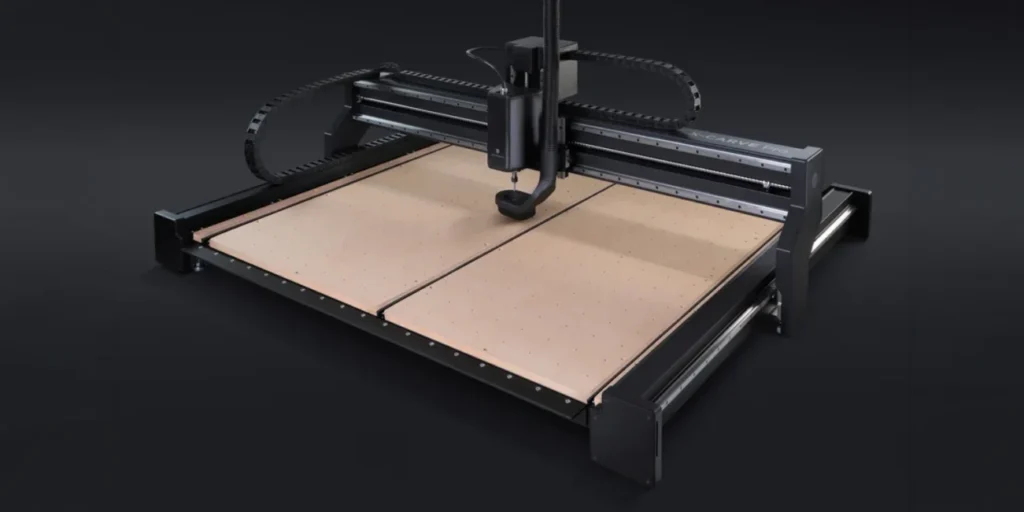
Inventables X-Carve
A widely distributed desktop-style router platform with a strong ecosystem and options for customisation and larger work areas.
Overview
The Inventables X‑Carve is one of the more recognisable names in hobby and light‑production CNC routing. Designed as a desktop/router‑based platform, it has been adopted by makers, small studios and hobbyists who want a system that’s easy to expand and that plays well with common CAM and G‑code workflows. The X‑Carve comes in several work‑area sizes and is sold as a configurable platform rather than a single rigid product — that flexibility is both a strength and something to be aware of when budgeting and planning a purchase.
Rather than focusing on being the toughest machine on the block, the X‑Carve aims to give users an approachable route into routed projects: furniture components, signs, inlays, prototypes and light metal parts. It benefits from an active community, a wide choice of third‑party accessories and multiple software options, which together make it one of the easier entry points if you expect to customise or upgrade over time.
Who is this best for?
The X‑Carve is aimed at makers and small businesses who want a configurable, well‑supported CNC router that can grow with their needs. If you value being able to swap spindles, add accessories, or tap into user‑generated projects and mods, it’s a good match. It’s also attractive to hobbyists who are stepping up from small benchtop mills and want more working area for signs, furniture parts or larger prototypes.
This isn’t a machine aimed at heavy industrial cutting or continuous multi‑shift production of hard metals. It’s best where woodworking, plastics and light aluminium or similar materials are the primary use cases. If your projects demand constant heavy cutting or extremely tight production tolerances out of the box, a more industrial router or a purpose‑built production router would be a better fit.
Key features
Rather than one definitive specification, the X‑Carve is best understood as a platform with a set of characteristics that recur across the range:
- Multiple work‑area sizes: The X‑Carve is available in different table sizes, which makes it suitable for a range of project scales — from small signage to furniture parts.
- Open ecosystem: The platform supports numerous third‑party parts and accessories, so you can adapt the machine to your workflow and materials rather than being locked into a single vendor setup.
- Strong community and project resources: There’s a large user base creating and sharing project files, setup tips and upgrades, which shortens the learning curve and increases the options for getting more from the machine.
- Designed for wood, plastics and light metals: It’s commonly used for woodworking, signage and prototyping, and it can handle light aluminium when set up appropriately.
- Works with common CAM and G‑code workflows: If you already use standard CAM packages and generate G‑code, the X‑Carve will fit into your pipeline.
- Scalable from hobby to light production: With the right configuration and upgrades you can move from one‑off projects to small production runs, though with the practical limits mentioned later.
Practical evaluation
Because the X‑Carve is a configurable platform rather than a sealed, single‑spec machine, its real‑world behaviour depends heavily on the choices you make when ordering and later upgrading. That flexibility is useful — you can select a work area that suits your projects, install a lighter router or a heavier spindle depending on materials, and take advantage of dozens of aftermarket parts — but it also means you need to plan the build around the work you want to do.
For woodworking and signmaking, most users will be satisfied with a basic setup and a quality router or small spindle. The machine’s kinematics and firmware are designed to work with standard G‑code, so it slots into common CAM workflows. If you want to cut plastics cleanly, you’ll want to pay attention to feeds and speeds, tooling and chip evacuation — the X‑Carve’s openness makes it straightforward to install a dust shoe or a vacuum table, but these are typically extra.
Working with aluminium or other light metals is possible, but it’s where the machine’s limitations become clearer. For reliable metal work you’ll need to choose a stiffer gantry, a more rigid spindle and suitable fixturing, and even then expect to tune feeds and toolpaths carefully. The X‑Carve isn’t intended to replace dedicated industrial metal routers; rather, it gives a maker‑friendly route to occasional light‑metal work.
Setup and calibration are important. Accurate results depend on careful belt tensioning, squaring the frame and choosing appropriate toolpaths and tooling for the job. The community resources are valuable here — many users share detailed setup guides, fixtures and materials libraries — so if you prefer learning from others rather than starting from scratch, the X‑Carve’s ecosystem helps a lot.
Strengths
Where the X‑Carve shines is in its flexibility and community support. A few practical strengths stand out:
- Flexible upgrade path: Because the platform is open and supported by many third‑party parts, you can gradually improve stiffness, add a better spindle, or install dust collection accessories as your needs grow.
- Choice of sizes: Multiple table sizes mean you don’t pay for space you don’t need, and you can pick a model that fits your workshop and typical projects.
- Community and resources: For a new user, having access to thousands of user projects, mods and troubleshooting threads shortens the learning curve. Shared CAM profiles and tooling tips are particularly helpful.
- Software compatibility: The X‑Carve’s support for common CAM tools and G‑code workflows makes it easy to integrate with existing design and production processes.
- Good entry point for makers: If you value being able to tinker, swap parts and learn from others, the X‑Carve provides a balanced starting point between closed, consumer devices and fully bespoke industrial machines.
Limitations
No product is perfect, and the X‑Carve’s open, configurable nature comes with trade‑offs you should consider before buying.
- Higher cost as you scale: The base price depends on the chosen size, and adding a stiffer spindle, better controller or upgraded frame can increase the total cost significantly. For larger work areas and production setups the overall investment can approach that of more purpose‑built machines.
- Careful setup required for accuracy: Out of the box you’ll need to spend time squaring, tuning and testing. For users who want high accuracy immediately without tinkering, this may be a downside.
- Additional accessories often extra: Dust collection, vacuum tables, better spindles and many useful fixtures usually cost extra; factor these into your budget when comparing machines.
- Not for heavy industrial cutting: If your workflow includes heavy continuous cutting of hard metals or multi‑shift production, shop‑grade routers with heavier frames and industrial spindles are a better fit.
- Noise and dust: As with any router‑based machine, expect significant noise and chip production. You’ll need a dust extraction plan and hearing protection for more intensive use.
Buying considerations and practical tips
If you’re considering an X‑Carve, here are practical points to help you decide and plan your purchase:
- Choose the right size for your typical projects: A larger table gives flexibility but takes up more space and increases cost. Think about the largest pieces you’ll make and whether you need full‑sheet capacity.
- Plan your spindle/router choice: A quality router will be fine for most woodwork. If you expect to cut aluminium, budget for a stiffer spindle and consider its mounting and cooling needs.
- Factor in fixturing and hold‑down: For accurate cutting you’ll need good workholding — clamps, vacuum tables or T‑slot fixtures are commonly used and may be sold separately.
- Dust and chip management: Routing produces a lot of chips and dust. Plan for a dust shoe, extractor or enclosure to protect electronics and make cleanup practical in a small workshop.
- Software workflow: Confirm the CAM software you plan to use is compatible with the X‑Carve’s output. Most mainstream CAMs that produce G‑code will work, but some users prefer community‑shared profiles to speed setup.
- Expect a learning curve: Even with a large community, expect to spend time learning feeds, speeds, tooling and maintenance. If you prefer a turn‑key industrial experience, consider that the X‑Carve rewards those who like to tinker.
Pricing and value
The X‑Carve’s value depends on the configuration you choose and how much you intend to add later. Its open platform and accessory ecosystem mean the base machine can be an economical entry point, but as you add upgrades — better spindles, dust collection, fixturing and frame reinforcements — the total cost rises. That’s not unusual for modular platforms: you pay for flexibility rather than a fixed, fully‑featured package.
When comparing value, consider the lifetime costs of the machine for your specific use cases. If you’re a hobbyist who will mainly cut wood and occasional plastics, a modest configuration will likely deliver strong value. If you anticipate regular light‑metal work or small‑batch production, factor in the costs of upgrades required to reach the reliability and accuracy you need.
Finally, check current offers and bundle contents before buying. The X‑Carve has been sold with a variety of bundles and optional extras over time, and prices and included accessories can change. A bundle with a suitable spindle, dust extraction accessories or a starter tooling kit can be good value if it matches what you need, but don’t assume every package contains the same items — verify the contents and any additional shipping or import costs that might apply in your region.
Note: prices and offers change frequently — check the latest bundle details and availability before making a purchase.
Alternatives
When choosing a desktop or light production CNC router, it’s useful to weigh the X‑Carve against other approaches. Your alternative choices broadly break down into several categories:
- Compact hobby routers: If space and budget are the main constraints, smaller benchtop mills or hobby routers provide excellent value for simple projects but typically lack the working area and upgrade paths of an X‑Carve.
- Higher‑rigidity production routers: For continuous cutting or tougher materials, more industrial machines with heavier frames and industrial spindles are a better fit but come at a higher price and generally less scope for tinkering.
- DIY or custom builds: Makers who want complete control sometimes build up a machine from components. That can deliver a precisely tailored machine but requires time, knowledge and sourcing parts.
- Recommended pick from this guide: Twotrees TTC450 Ultra — if your priorities are different from the X‑Carve’s mix of openness and community support, the Twotrees TTC450 Ultra is highlighted elsewhere in this review as our recommended choice. Compare specifications, your materials list and bundle contents carefully to decide which platform matches your needs best.
Choosing between these options comes down to priorities: if you want an approachable, expandable machine with a strong user community, the X‑Carve will be attractive. If you need out‑of‑the‑box industrial performance, look at heavier‑duty routers or production machines. And if budget is the top concern, a smaller benchtop router may be the right first step.
Final verdict
The Inventables X‑Carve is a compelling option for makers and small shops who value flexibility and a supported, open ecosystem. Its multiple size options, wide aftermarket support and strong community resources make it an excellent platform for woodworking, signmaking and light prototyping. It rewards users who enjoy configuring and upgrading their tools — that’s where the platform’s strengths really show.
That flexibility is also the X‑Carve’s main caveat: getting the best performance requires thoughtful choice of spindle/router, fixturing and accessories, and accuracy depends on careful setup and tuning. It isn’t intended to replace industrial routers for heavy metal cutting or continuous high‑throughput production, but for the majority of hobby and light commercial projects it offers an adaptable, well‑documented route into CNC routing.
If you’re building a workshop around routed parts and want a machine that can evolve with your skills and projects, the X‑Carve deserves serious consideration. If you want a plug‑and‑play industrial experience or plan heavy metalwork, look at stiffer, purpose‑built machines instead. And if you prefer a different entry point, compare specs, included bundles and the alternatives mentioned here — in particular our recommended pick, the Twotrees TTC450 Ultra — to decide which machine best matches your workshop, materials and budget.
Remember to check current offers and bundle contents before buying, as prices and included accessories can change.
Ready to check Inventables X-Carve?
Check the latest offer before buying, then return to the main comparison if you want to compare it against the other shortlisted options.
Compare this with the full shortlist
Return to the full comparison guide to see how this product compares against the other shortlisted choices.