
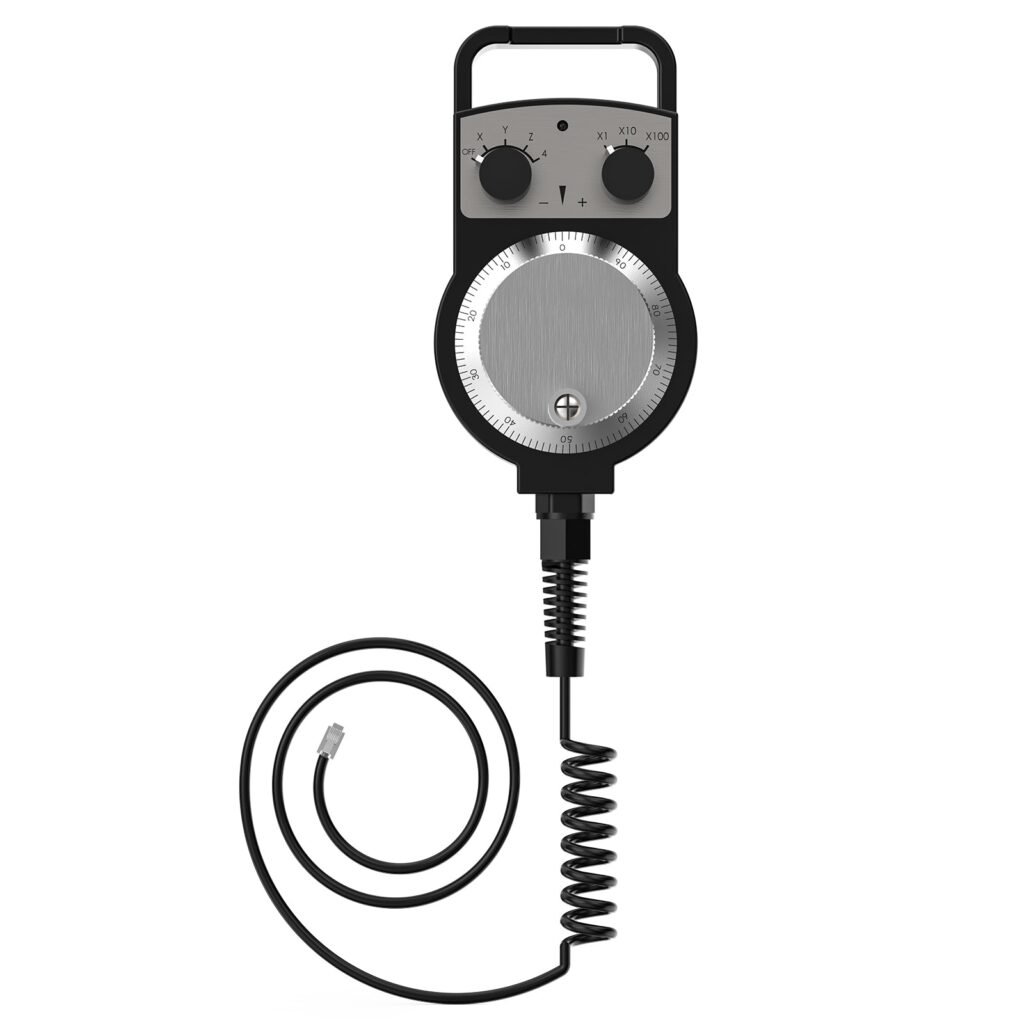
Twotrees CNC MPG Handwheel for TTC Series
A compact, industrial‑style manual pulse generator that gives precise, incremental axis control for setup and fine adjustments.
Overview
The Twotrees CNC MPG Handwheel is a manual pulse generator (MPG) designed for use with Twotrees’ TTC450 Pro and higher TTC series CNC routers. It promises industrial‑grade construction, four‑axis control and selectable step magnification (×1, ×10, ×100) so you can make coarse moves or fine increments while setting tools or aligning workpieces. The unit is described as plug‑and‑play for compatible Twotrees machines and is aimed at operators who want a more tactile, accurate way to jog axes than keyboard or touchscreen controls alone.
Who is this best for?
This MPG is primarily aimed at people who already own a Twotrees TTC450 Pro or a later TTC series router. If you frequently perform manual tool setting, fine alignment or incremental jogging, an MPG can speed up those tasks and reduce the risk of overshoot when working at close tolerances.
Specifically, it will suit:
- Hobbyists and small workshop owners who want improved manual control without changing their controller electronics.
- CNC operators who set tools and fixtures by hand and need repeatable, small increments for finishing passes.
- Anyone using a TTC450 Pro or higher TTC machine who prefers a physical handwheel for precise positioning instead of relying on the machine control panel.
Key features
- 4‑axis control: independent selection for X, Y, Z and A axes so you can manually jog any axis as required.
- Multiple step magnification: three step ranges (×1, ×10 and ×100) to switch between fine and coarse movement quickly.
- Industrial‑grade aluminium dial: a robust metal dial intended to stand up to workshop use and provide a comfortable grip.
- Improved tool setting accuracy: described as reducing positioning errors to give more consistent results when setting up jobs.
- Plug‑and‑play compatibility with Twotrees TTC450 Pro and higher TTC series: designed to integrate with those controllers without complex wiring or configuration.
Practical evaluation
The supplied information sketches a useful picture of what the Twotrees MPG brings to the bench: tactile, stepped control with selectable magnification and multi‑axis coverage. In everyday use an MPG handwheel is primarily a convenience and precision tool. When you’re moving to a tool or edge at sub‑millimetre increments, being able to rotate a metal dial and change the step size is quicker and less error‑prone than tapping a touchscreen or issuing multiple jog commands from a keyboard.
Because the unit is built from industrial‑grade aluminium, it should offer a reassuringly solid feel compared with plastic handwheels. That matters if you use it regularly: a firm, well‑damped dial reduces accidental slips and makes precise micro‑moves easier to judge. The four‑axis control means you won’t need to cycle through software menus to select the axis you want to jog, which simplifies common workflows like squaring a part or setting a tool height.
Step magnification is another practical benefit. Being able to switch between ×1, ×10 and ×100 allows you to cover distance quickly with coarse steps and then switch to fine mode when you’re near the point you want. How this maps to actual movement on your machine depends on the controller settings (microstepping, steps/mm and feedrate limits), so it’s worth checking those values in your controller documentation to understand the exact travel per click. That said, the general idea—larger steps for rough positioning, smaller for fine adjustments—is the same across most MPGs.
Compatibility is central with any manufacturer‑specific accessory. The marketing calls this unit “plug‑and‑play” for the TTC450 Pro and later TTC series, which is convenient if you already have one of those machines. If you use a different controller or an earlier TTC model, you’ll need to confirm whether the connectors and signal mappings match, or whether an adapter or configuration change is required.
Finally, consider the intended tasks. An MPG like this is excellent for routine tool setting, zeroing, and small adjustments during a run. It is not a substitute for remote‑control features such as feed override knobs or full pendant functionality found on some larger control systems, but it complements those controls well by offering fine manual control when you need it.
Strengths
- Precision control: the step magnification and four‑axis selection give fine, repeatable manual positioning for tool setting and part alignment.
- Workshop‑friendly build: metal dial and industrial design suggest better durability than lower‑end plastic alternatives.
- Simplicity: described as plug‑and‑play for compatible Twotrees machines, which lowers the barrier to installation and use.
- Helpful for a wide range of manual operations: especially helpful for small CNC shops, hobbyists and anyone doing frequent setup work.
Limitations
- Compatibility limited to Twotrees TTC450 Pro and higher TTC series as supplied — owners of other controllers may not be able to use this without checking connector and signal compatibility first.
- Information supplied doesn’t mention additional pendant features such as an integrated display, emergency stop, feed override or customisable buttons. If you need those functions, you should confirm whether the MPG supports them or consider a more feature‑rich pendant.
- Exact travel per click depends on controller setup and isn’t published, so you may need to do a little calibration to know precisely how much movement each click produces on your particular machine.
- As with any accessory, physical installation considerations such as cable length, mounting position and connector routing are important — they’re not detailed in the product summary, so you’ll want to verify them before purchase.
Pricing and value
The supplied guide price for the Twotrees MPG is USD 49.00. For a simple, metal‑bodied MPG that integrates with a specific range of routers, that sits in a reasonable price bracket for hobbyist and light commercial use. Value depends on how often you’ll use it: if you frequently set tools, perform delicate alignments or value faster manual control, an MPG can pay for itself quickly through time saved and fewer mistakes.
When assessing value, consider the cost relative to alternatives — generic MPGs, more feature‑rich pendants or the latent cost of slower setups without a handwheel. Also factor in any potential additional costs: if your particular TTC model requires an adapter or a longer cable, that will affect the true price. Finally, check the seller’s page for current availability and offers, as prices and stock levels change.
Note: offers and prices can change — check the retailer page for the latest price and availability before you buy.
What to check before you buy
Before ordering, it’s sensible to verify a few practical points so you don’t run into compatibility or installation surprises:
- Compatibility: confirm your machine is a Twotrees TTC450 Pro or a later TTC model as stated. If you have a different controller, ask the seller or check technical documentation about connector pinout and signal compatibility.
- Connector and cable length: check whether the unit comes with the cable you need and whether it reaches your control enclosure comfortably without stressing the connector.
- Mounting options: consider where you’ll install the handwheel — some users prefer a fixed bracket while others want a removable pendant. If the product page doesn’t list mounting accessories, you may need to fabricate a bracket or buy a third‑party mount.
- Controller settings: know your controller’s steps/mm and microstepping values so you can translate the MPG step magnifications into real movement and calibrate accordingly.
- Function set: if you require extra functions (feed override, spindle control buttons, display), confirm whether the MPG supports them or whether you’ll need a different pendant or additional controls.
Alternatives
If you’re not tied to the Twotrees ecosystem or you need extra features, there are a few alternative directions to consider:
- Generic MPG handwheels: many independent manufacturers make MPG handwheels with similar basic functionality (multi‑axis selection and step magnification). These can work across controllers if the pinout is compatible or if you use an adapter.
- Feature‑rich pendants: some aftermarket pendants add functions such as feed and spindle overrides, an LCD or LCD‑style readouts and programmable buttons. They are useful if you want more than basic jogging and tool setting.
- Controller upgrades: if you’re near the limits of your machine’s control capability, upgrading the controller to a model that supports a wider range of pendants and accessories may be worth considering rather than buying a single add‑on.
- DIY options: hobbyists sometimes build their own MPG interfaces using encoder modules and custom wiring. That route gives flexibility but requires electronics know‑how and time.
When comparing alternatives, check compatibility carefully and think about whether you need extra bells and whistles or a straightforward, rugged handwheel like the Twotrees unit.
Final verdict
The Twotrees CNC MPG Handwheel for the TTC series looks like a sensible, well‑targeted accessory for Twotrees TTC450 Pro and later machines. Its four‑axis control, three‑step magnification levels and metal dial design match what most operators want from a compact, workshop‑focused MPG: simple, precise manual control for tool setting and alignment tasks.
If you own a compatible Twotrees router and want a reliable, tactile way to make fine adjustments, this handwheel represents a practical, cost‑effective choice. If you use different hardware or need additional pendant features (display, feed override, extra buttons), you should check compatibility or consider a more fully featured pendant. As always, double‑check the retailer’s product page for the latest price and to confirm technical details before you buy.
Also featured in
This product also appears on these price comparison pages:
Compare this with the full shortlist
Return to the full comparison guide to see how this product compares against the other shortlisted choices.