
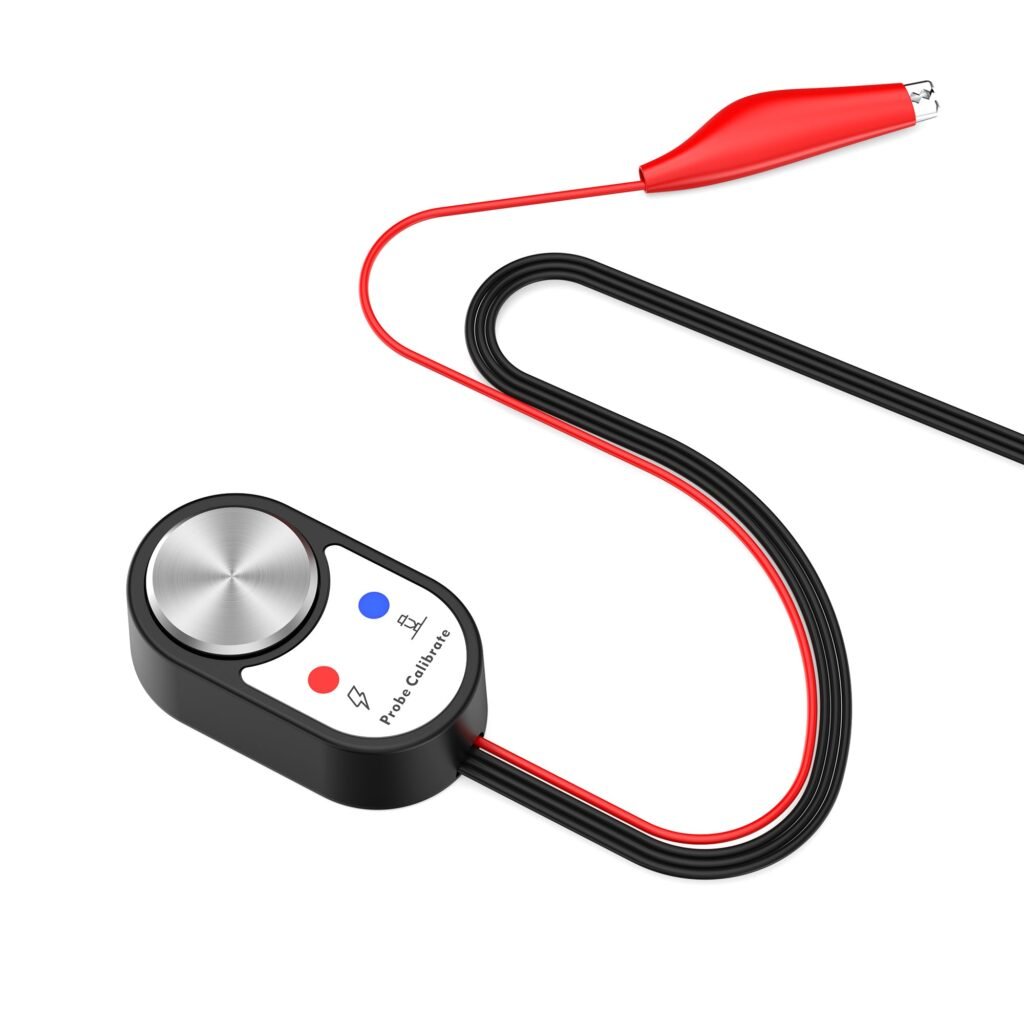
Twotrees CNC Router Photoelectric Z-Axis Tool Setter
Same MPG handwheel functionality as the primary listing — useful as a spare or for another CNC station.
Overview
The Twotrees Photoelectric Z-Axis Tool Setter is a small accessory intended to simplify Z-axis zeroing on the Twotrees TTC6050 CNC router. Rather than using the old paper-under-the-bit trick or manual probing, this device detects the tool position with a photoelectric sensor and signals the controller when contact is reached. It mounts magnetically, plugs into the router’s control board via a 3‑pin connector and comes with a 1m extension cable and two LED indicators to show power and completion status.
The idea is straightforward: speed up setup, reduce guesswork and get more consistent first-pass cuts. The Twotrees unit is designed specifically for the TTC6050 ecosystem, so it targets owners of that model who want an OEM-style, plug-and-play tool setter without having to cobble one together from third‑party parts.
Who is this best for?
This tool setter is aimed primarily at Twotrees TTC6050 users who want a simple, low-cost way to automate Z-zero calibration. It’s a sensible add‑on for hobbyists and light‑duty professional users who value repeatability and time-savings during setup, especially if they run small batches or frequently change tools.
It’s less suitable for people who do large-format work or use non-TTC6050 machines — the unit is specified for the Twotrees router and its electrical/connector layout — or for those who need advanced probing features such as multi-point surface mapping, touch plate functionality for conductive materials, or sub-micron accuracy. If you already own a more feature-rich aftermarket probe, this simple photoelectric setter may not add much to your workflow.
Key features
- Paper-free Z-axis zero calibration using a photoelectric sensor — removes the need for the paper test method.
- Magnetic mounting — quick to place and reposition on metal workbenches or fixtures.
- Dual LED indicators — clearly shows power and when tool setting is complete for visual feedback.
- 1m extension cable — offers flexible reach to the CNC control board without stretching the wiring.
- Plug-and-play 3‑pin connector — designed for fast installation on the Twotrees TTC6050 control board.
Practical evaluation
Because Twotrees supplies this accessory for a single machine model, the practical value of the tool setter depends heavily on whether you use the TTC6050. For owners of that router, the setter offers an off-the-shelf way to remove one of the small but repetitive friction points in everyday CNC work: finding the correct Z-zero quickly and reliably.
Installation is intended to be simple. The magnetic mounting lets you position the device close to the workpiece without permanent fixtures, and the 3‑pin plug keeps wiring tidy. The dual LEDs provide an immediate status readout so you don’t have to hover over the controller display to know whether the probe has been triggered.
Operationally, the photoelectric sensing approach has both strengths and limits. It’s fast, consistent and doesn’t rely on electrical conductivity between the tool and a touch plate, so it can work with non-conductive bits and non-conductive workpieces. That said, photoelectric detectors are sensitive to the immediate environment: high dust levels, fine chips, smoke or reflective surfaces can affect performance in some conditions. Many woodworkers and hobbyists operate in fairly clean setups where this is not an issue, but heavier workshop environments or jobs that generate lots of airborne material might require careful positioning or more frequent cleaning of the sensor.
Also worth noting is the physical size and placement: the setter is designed to sit on a magnetic surface near the workpiece. If your workbench or jigs are non-magnetic, or you use sacrificial spoilboards that are thicker or mounted on non-metal supports, the magnetic mounting may be less convenient unless you add a small ferrous plate or use an alternative mounting method.
Strengths
- Designed for the TTC6050: plug-and-play convenience removes guesswork about compatibility and wiring.
- Paper-free probing: faster and more repeatable than the paper-under-the-bit manual method.
- Simple, compact and lightweight: easy to store and carry between jobs or machines (if you have multiple TTC6050s).
- Compared status LEDs: handy visual feedback reduces trips to the control panel during setup.
- Relatively low cost entry point into automated Z-zeroing for users who don’t need advanced probe features.
Limitations
- Machine-specific compatibility: advertised for the Twotrees TTC6050 only — not universally compatible with other controllers without modification.
- Photoelectric sensor limitations: dust, chips, reflective surfaces or heavy contamination can affect sensing reliability in some environments.
- Magnetic mounting constraints: requires a magnetic surface for the simplest installation; workaround needed for non-magnetic workbenches.
- Feature set is basic: it provides single-point Z-origin setting but lacks advanced probing, surface mapping and conductivity-based detection found on higher-end probes.
- Limited publicly documented specifications: you should check the retailer page for details about warranty, included accessories and exact technical notes before purchase.
Pricing and value
Twotrees lists this accessory at a modest guide price. At that level it represents a low-cost way to remove a small but repetitive source of error and time waste in CNC setups. For hobbyists who routinely change bits or perform frequent setups, the minutes saved on every job add up quickly — and consistent Z-zeroing reduces the risk of shallow or deep first cuts caused by an incorrect origin.
Value depends on how much you appreciate convenience and repeatability. If you only run occasional one-off jobs and are comfortable with the paper method or manual probing, the setter may be an optional luxury rather than a necessity. Conversely, if you produce multiple parts, run short batches, or have an otherwise tidy and repeatable workflow, the setter can be a sensible investment compared with the cost and complexity of building a custom probe or purchasing a third-party professional probe system.
Because stock levels and promotions can change, it’s sensible to check the retailer before you buy — especially if you need one quickly for a project or want to compare shipping and warranty options.
Alternatives and considerations
If the Twotrees Photoelectric Z-Axis Tool Setter doesn’t quite fit your needs there are a few paths to consider.
- Generic touch plates and conductive probes: These are available from a range of suppliers and work by detecting electrical contact between the cutter and the plate. They often integrate with a wider range of controllers but need the bit and workpiece to be conductive or to have a reliable earth reference. They can also be used to map multiple points for slight surface irregularities.
- Aftermarket non-contact probes: Higher-end probes, including inductive or capacitive sensors and industrial laser or optical probes, offer more advanced feature sets such as finer precision, repeat detection and less sensitivity to chips — but they typically cost more and may require controller compatibility checks or additional mounting hardware.
- DIY solutions: Some hobbyists build their own probe setups from readily available sensors and small electronics. These can be cost-effective and flexible, but they require time and basic electronics skills and often lack official support or warranty.
- Software-assisted methods: Certain CAM and controller packages include routines for automatic probing or surface mapping that work with existing hardware. This route may require pairing your machine with a compatible probe or using a control board that supports the feature set.
Which option is best depends on your priorities: budget, ease of installation, the materials you work with, and whether you anticipate needing advanced probing features. For owners of the TTC6050 who want convenience and simple automation, the Twotrees unit is the most straightforward choice. If you run mixed machinery or expect to expand to multi-point surface compensation, shop for a probe with the specific features you’ll need and confirm controller compatibility first.
Final verdict
The Twotrees Photoelectric Z-Axis Tool Setter is a focused, practical accessory for TTC6050 owners who want an easy, low-cost way to remove a repetitive setup step from their workflow. It brings a plug‑and‑play approach to Z-zeroing, a helpful visual status LED and the convenience of magnetic mounting — all in a compact package. For hobbyists and light professionals who work in relatively clean environments and value quick, repeatable tool setting, it’s a worthwhile add-on.
It’s not a universal probe and it won’t replace more sophisticated multi‑point or conductivity-based probing systems. If you need advanced surface mapping, extreme precision beyond typical hobby/prosumer needs, or guaranteed compatibility with many different controllers, you should look at higher-end probes or generic aftermarket options. Equally, if your bench or fixtures are non-magnetic you’ll want to plan for a mounting workaround.
Overall, this Twotrees tool setter represents sensible value for TTC6050 users seeking simplicity and reliability at a low entry cost. Before you buy, double-check the retailer page for current availability, exact specs, shipping and warranty details so you know what’s included with your purchase.
Note: offers, prices and stock can change. Check the retailer page for the latest information before buying.
Ready to check Twotrees CNC Router Photoelectric Z-Axis Tool Setter?
Check the latest offer before buying, then return to the main comparison if you want to compare it against the other shortlisted options.
Compare this with the full shortlist
Return to the full comparison guide to see how this product compares against the other shortlisted choices.