
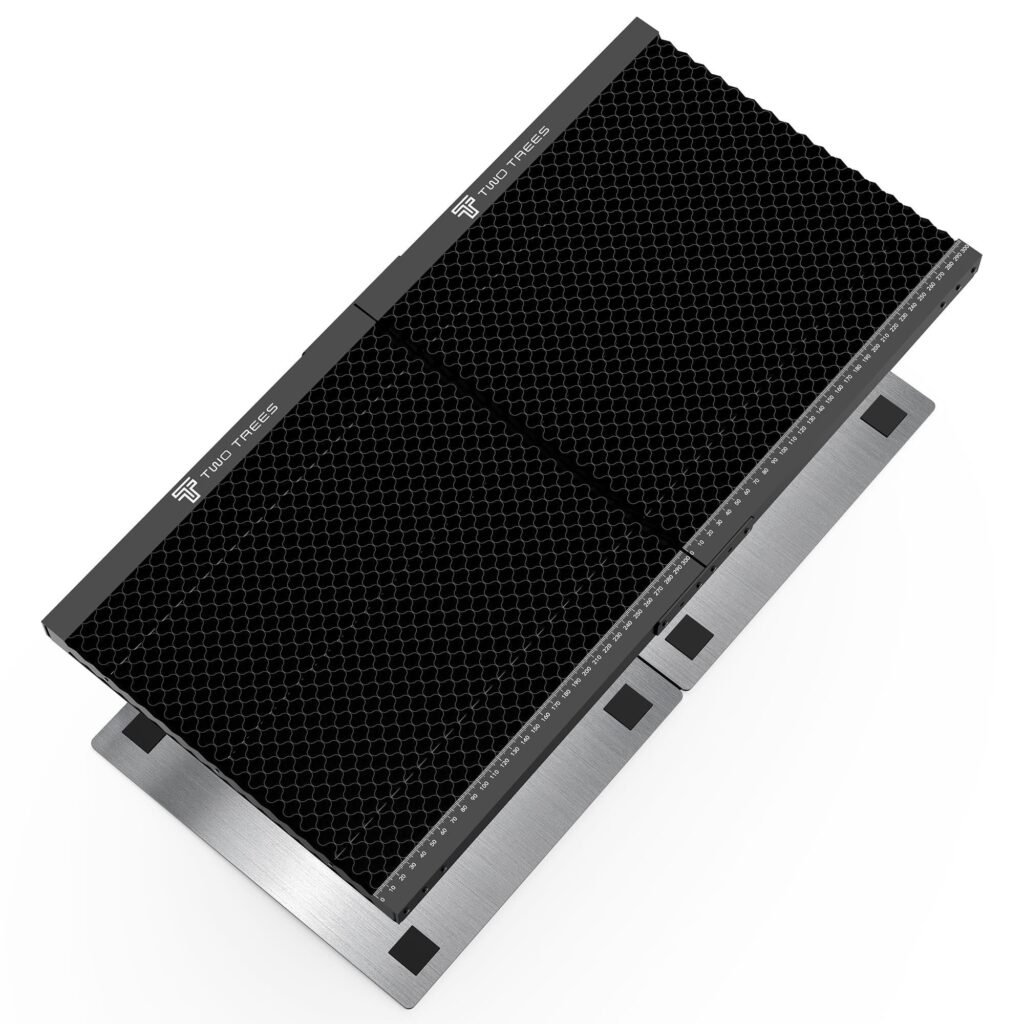
Twotrees Spliced Honeycomb Panel Workbench Size 300*300*22mm -…
Spliced honeycomb panel from Twotrees sized 300×300×22mm — a breathable work surface to improve cut quality and reduce back‑burn.
Overview
The Twotrees Spliced Honeycomb Panel is a purpose-built support surface for desktop laser engravers and small cutters. At 300 × 300 × 22 mm it’s aimed at machines with small beds or modular workspaces where you need a lightweight, rigid grid to hold thin material during cutting or engraving. The honeycomb construction lets air and debris escape beneath the workpiece and reduces the amount of material in contact with the laser, which in turn helps to limit scorching and improve edge quality on cuts.
This review pulls together the panel’s key attributes, practical uses, limitations and buying considerations so you can decide whether it’s the right accessory for your machine and workflow. For specifics such as the exact material composition and detailed mounting instructions, check the official product listing or the retailer page before you buy.
Who is this best for?
The Twotrees honeycomb panel is aimed at hobbyists and small‑scale makers who regularly cut or engrave thin materials — think card, thin plywood, acrylic sheets, leather, paper and similar stock commonly used in DIY and small production runs. It’s particularly useful if you’re noticing heat‑related blemishes on the underside of cuts or want cleaner edges without switching to sacrificial boards every time.
It also suits anyone who needs a portable, replaceable bed surface for modular workbenches or machines where you want to be able to remove, swap or trim the support to fit a particular project. If your machine bed is small or you run a desktop laser, the 300 × 300 mm size will fit many common setups. However, it’s less appropriate if you work with heavy or thick materials that need more support, or if your machine has a non‑standard mounting arrangement that prevents easy installation.
Key features
- Honeycomb structure: Perforated grid reduces contact points, improves airflow and helps prevent back‑burn on cut edges.
- Compact dimensions: 300 × 300 × 22 mm — suited to small beds and modular setups.
- Spliced construction: Built to be flat and stable while remaining lightweight.
- Lightweight but rigid: Gives firm support for thin materials without being cumbersome to handle.
- Replaceable and trimmable: Can be trimmed or replaced as it wears, rather than having to replace an entire bed.
- Designed for desktop laser cutters and engravers: Intended to be a direct accessory for hobbyist machines.
Practical evaluation
Although I don’t claim hands‑on testing here, the design principles behind honeycomb panels are well established and the Twotrees model follows those conventions. The honeycomb pattern is effective because it reduces the reflective surfaces and contact points beneath the workpiece, letting smoke and debris escape. That reduces the tendency of the laser to cause scorching or speckled marks on the underside of cuts — especially useful when working with light‑coloured or delicate materials where blemishes are more noticeable.
At 22 mm thick the panel balances rigidity with a low profile, so it should support thin sheets well while maintaining a compact footprint. The spliced construction aims to keep the panel flat; flatness is important for repeatable focus and consistent cutting results. Because it’s relatively light, it’s easy to lift out and replace — an advantage if you switch between jobs or want to rotate multiple panels to manage wear.
Two practical points to consider before you order: mounting and material compatibility. Some machines have proprietary or unusually sized mounting points, so you may need to trim the panel or fashion a simple subframe to secure it. The product description advises checking material specifics on the retailer page — that’s important because resistance to solvents, adhesive residue and high heat varies depending on what the panel is actually made from. Honeycomb panels can collect soot and resin from some materials, so plan for periodic cleaning or replacement.
Cleaning is straightforward in principle but needs care. Blowing out debris with compressed air, brushing gently and wiping down surfaces where permissible will keep the honeycomb cells clear. Avoid aggressive solvents unless the supplier confirms they’re safe for the panel material. If you often cut resinous materials such as certain rubbers or heavily lacquered woods, expect the cells to build up residue over time and be prepared to replace the panel when cleaning no longer restores performance.
Strengths
The Twotrees honeycomb panel brings several practical benefits for small‑scale laser work:
- Cleaner cut edges: By allowing air and debris to escape, the honeycomb reduces heat reflection and localised scorching, which translates to neater cuts and less finishing work.
- Reduced scorch marks: Fewer contact points mean less char on the underside of the workpiece — particularly important with light or thin materials.
- Replaceable, not sacrificial: Compared with a wooden sacrificial board that you have to replace or sand down frequently, a dedicated honeycomb panel is easier to swap and maintain.
- Compact and lightweight: Makes it easy to use with portable or modular setups, and to lift in and out of machines for cleaning or rotating.
- Modular trimming: The panel can be trimmed to fit non‑standard beds, which adds flexibility for retrofitting on different machines.
Limitations
No accessory is perfect for every use case. Here are the main limitations to bear in mind with this panel:
- Not for heavy or thick workpieces: The honeycomb is designed for thin materials. If you regularly cut thick slabs or heavy parts, you’ll need additional under‑support to avoid sagging or poor focus across the cut.
- Single size only here: This listing covers a 300 × 300 mm panel. If you have a larger bed, you’ll need multiple panels or a different product that matches your machine dimensions.
- Residue buildup: Honeycomb cells can trap soot, melted material and resin from certain stock. That means cleaning and occasional replacement are part of ownership.
- Mounting quirks: Some machine beds use non‑standard fixings. You may need to trim edges or fabricate simple brackets to secure the panel in place — nothing complex, but it’s an extra step.
- Material specifics matter: The product page should be checked for the panel’s exact construction and chemical resistance if you use solvent‑based cleaning solutions or work with chemically active materials.
Pricing and value
The listed guide price for this Twotrees honeycomb panel is USD 61.00 — use this as a reference and check the official listing for the current price and availability. Whether it represents good value will depend on how you work and what you’d otherwise use as a bed surface.
For hobbyists who would otherwise rely on disposable sacrificial boards or low‑quality grids, a dedicated honeycomb panel can save time and reduce waste. It’s also more convenient than continually replacing a wooden board and typically gives better edge quality. If you’re producing finished parts or selling items where cut appearance matters, the incremental cost of a honeycomb support can pay off in reduced rework and better product presentation.
Compare the cost to aftermarket options such as commercial aluminium slat beds, full‑sized honeycomb beds and sacrificial MDF boards. Slat beds and professional aluminium grids cost more but can be better for heavier work. MDF sacrificial boards are cheaper initially but require frequent replacement and can trap more smoke residue. The Twotrees panel hits the middle ground for small‑scale use: more durable and tidy than sacrificial boards, but without the expense of a full professional bed.
Alternatives to consider
It’s useful to know the common alternatives so you can match the accessory to your workflow:
- Sacrificial boards (MDF or plywood): Cheap and simple; you can cut into them without worrying about the bed. Downsides include frequent replacement, smoke absorption and less clean cut edges.
- Aluminium slat beds: Slat beds give excellent support and are robust for heavier materials. They tend to be more expensive and can reflect heat differently, which may show on some cuts.
- Full‑size commercial honeycomb beds: These are ideal if you work on larger machines and want professional grade airflow and support across the entire bed. They’re costlier and less practical for small desktop units.
- Cutting mats and vacuum tables: Vacuum tables hold material flat but are a very different solution, more complex and expensive. Cutting mats are useful for hobby work but don’t help with airflow or back‑burn.
If your priority is minimising underside burn and producing neater cuts on small pieces, the Twotrees panel is a sensible, lower‑cost way to achieve that. If you need to work with heavier or larger sheets, consider a slat bed or full honeycomb bed that matches your machine’s dimensions.
Installation and maintenance tips
Here are practical tips to get the best from the panel and extend its service life:
- Check dimensions first: Measure your bed and any mounting points before ordering. The 300 × 300 mm size fits many small machines but confirm clearance for head travel and clamps.
- Plan for trimming: If your machine needs edge clearance or a custom fit, the panel can be trimmed. Use appropriate cutting tools and protect the cell structure from deformation while you work.
- Secure it flat: Ensure the panel is flat and immobilised in the bed so the laser focus remains consistent across the work area. Shims or simple clips can help on machines without dedicated fixings.
- Keep it clean: Use compressed air to blow out loose debris, and brush gently to remove soot. Avoid harsh solvents unless the manufacturer confirms they’re safe for the panel’s material.
- Rotate panels: If you have multiple panels, rotate them to spread wear and get more life from each piece.
- Replace when worn: When accumulated residue, burn marks or deformation start to affect cut quality, replace the panel. It’s cheaper and faster than fighting inconsistent results.
Final verdict
The Twotrees Spliced Honeycomb Panel is a practical, well‑targeted accessory for hobbyists and small workshops using desktop laser engravers and cutters. Its honeycomb structure does the job it’s intended for: improving airflow beneath the workpiece, reducing contact points and helping to prevent underside burning and rough edges on cuts. The compact 300 × 300 × 22 mm size fits many small beds and is handy for modular setups where panels may need to be swapped or trimmed.
It’s not a one‑size‑fits‑all solution. If you routinely work with heavy or thick materials, or have a large machine bed, you’ll need something more robust or larger. Expect routine cleaning and occasional replacement if you cut resinous or heavily lacquered materials. Also check the retailer listing for detailed material composition and compatibility, particularly if you plan to clean with solvents.
Overall, for small‑bed laser users who want a cleaner, repeatable cutting surface without the mess and waste of sacrificial boards, this Twotrees panel is a sensible choice. It offers clear practical advantages in edge quality and maintenance while being light and easy to handle — a useful upgrade for anyone who cares about consistent results from their desktop laser work.
Note: offers and prices can change — check the official product listing for the latest information before you buy.
Ready to check Twotrees Spliced Honeycomb Panel Workbench Size 300*300*22mm – 300*300*22MM?
Check the latest offer before buying, then return to the main comparison if you want to compare it against the other shortlisted options.
Compare this with the full shortlist
Return to the full comparison guide to see how this product compares against the other shortlisted choices.