
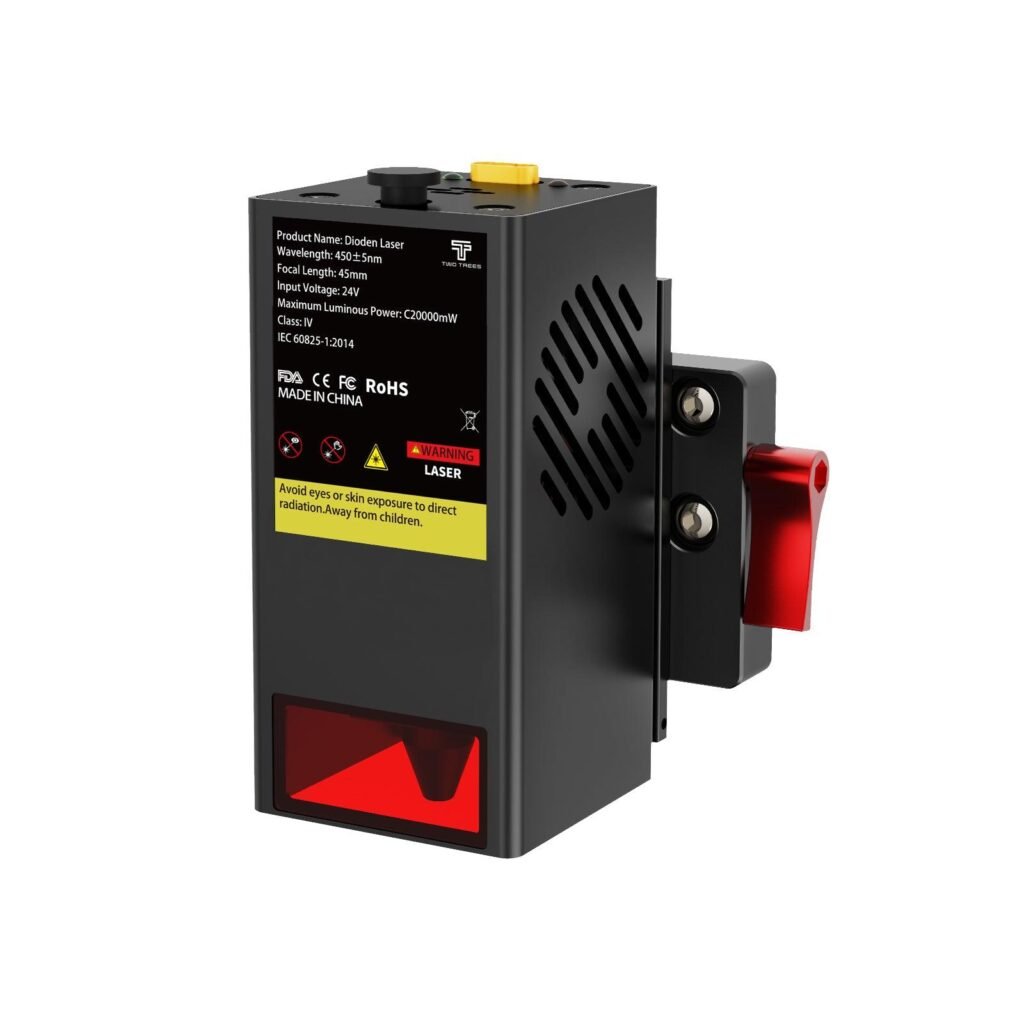
Twotrees TC20 Laser Module for TTC450 Pro /…
TC20 20W laser module from Twotrees — a higher‑power upgrade to add cutting and detailed engraving to supported TTC machines.
Overview
The Twotrees TC20 is a 20W laser module designed as an upgrade for a handful of Twotrees CNC/laser platforms, notably the TTC450 Pro, TTC450 Ultra, TTC6050 and TTC‑H40. It’s positioned as a way to extend the capability of those machines — shifting them from simple engraving and light marking to genuine cutting and higher‑resolution engraving on materials such as wood, plywood, acrylic, leather and paper.
The package includes the laser module itself, installation accessories and a manual, and Twotrees engineers the module for direct integration with their supported frames. On paper the TC20 looks like a useful route for makers, educators and small businesses that want to consolidate tools rather than buying a second dedicated machine. That said, a higher‑powered laser brings a set of practical responsibilities: installation, firmware compatibility, cooling and safety all need to be planned for before you click buy.
Who is this best for?
The TC20 is aimed at people who already own — or plan to buy — a compatible Twotrees machine and want more cutting and engraving capability than a low‑power diode provides. Typical users include hobby makers who want to work with thicker woods or acrylic, small design studios or micro‑manufacturers producing small batches of items, and educational workshops that plan to teach laser cutting and engraving (with appropriate supervision and safety protocols).
This isn’t a plug‑and‑play universal module for every desktop CNC: it’s a targeted upgrade. If you don’t own one of the supported Twotrees frames, or you need a standalone laser cutter with fully enclosed safety features and certification, the TC20 may not be the right route. Equally, if you’re after large‑format industrial cutting or heavy duty production, a gantry‑style industrial laser or a CO2 cutter would remain more appropriate.
Key features
- 20W laser output — Intended to deliver stronger cutting power and finer engraving detail than typical low‑power diode modules.
- Designed for specific Twotrees models — Engineered to integrate with TTC450 Pro, TTC450 Ultra, TTC6050 and TTC‑H40 frames.
- Material compatibility — Aimed at work on wood, plywood, acrylic, leather, paper and similar substrates commonly used by makers.
- Installation kit and manual — Sold with installation hardware and documentation to help fit it to supported machines.
- Consolidates tools — Lets users expand a CNC’s function without purchasing a separate laser machine.
Practical evaluation
Because the TC20 is an accessory rather than a full machine, the practical experience of owning one depends heavily on the host machine and how you plan to use it. The main draw is obvious: a stronger diode gives you cutting and higher‑resolution engraving that low‑power heads struggle to achieve, opening up thicker woods, some plastics and more detailed artwork.
Installation is intended to be straightforward on supported Twotrees machines, and the fact Twotrees makes both the host frames and the module is a real advantage — you generally avoid the fitment headaches and mechanical adaptation that come with aftermarket modules. The included installation hardware and manual should get you started, but buyers should be prepared for some hands‑on setup. That may include mechanical mounting, electrical connections, and basic firmware or configuration changes to the host controller; the manual will be the source of truth here.
On the software side, expect to confirm that the machine firmware recognises the module and that your workflow software (job preparation, power/speed settings and so on) is set up for laser output rather than routing or spindle control. Some machines require a different driver or a firmware tweak to correctly handle laser firing and PWM control — check the Twotrees documentation and community resources before you buy.
Heat and power are also practical considerations. A 20W diode generates more heat and draws more current than the small hobby modules. Ensure your machine’s power supply and cooling arrangements can cope, and follow Twotrees’ guidance on cooling requirements. Many users add forced air cooling or an auxiliary fan to keep the laser diode and its driver within safe operating temperatures during longer jobs.
Safety is an absolute priority. A 20W diode is significantly more hazardous than low‑power modules: it can cause serious eye and skin injury, and it produces combustible fumes when cutting materials such as wood and acrylic. Plan for enclosure or clear sight‑line controls, laser safety goggles suitable for the laser wavelength, and proper ventilation or fume extraction to remove smoke and vapours. Some jurisdictions have regulation or certification requirements for laser operation in public or educational settings; check local rules before using the module in those environments.
Strengths
- Meaningful capability upgrade — The TC20 steps up cutting and engraving power compared with typical hobby diode modules, letting you work with thicker wood and achieve finer engraved detail.
- Designed for Twotrees hosts — Since it’s engineered by the same manufacturer that makes the compatible machines, physical fitment and integration are simpler than many third‑party modules.
- Consolidates workshop tools — For users who already own a compatible Twotrees machine, the TC20 can avoid the need to buy a separate laser cutter for many projects.
- Broad hobby and small business utility — Targets common maker materials (wood, plywood, leather, acrylic, paper), which suits craft, prototyping and small‑scale production work.
- Packaged with hardware and manual — Includes the parts you need to install it on supported frames, not just the module on its own.
Limitations
- Not universal — The TC20 is designed for specific Twotrees models. It is not a universal drop‑in for every CNC or laser frame; confirm exact model compatibility with the seller or manual before buying.
- Higher cost — It’s often sold as a premium upgrade, so expect a higher price compared with basic spare parts or entry‑level diode modules.
- Safety and legal obligations — A 20W laser increases risk substantially. Users must implement appropriate safety measures, ventilation and shielding, and check any local regulations that cover laser operation in workshops, schools or public spaces.
- Power and cooling demands — The module requires more power and better cooling than low‑power heads; ensure the host machine’s PSU and thermal management are adequate.
- Possible firmware/configuration changes — Some host machines may need firmware or configuration adjustments to work properly with the module; this can be a technical hurdle for newcomers.
Materials and performance expectations
Twotrees lists common materials the TC20 is intended to cut and engrave: wood, plywood, acrylic, leather and paper. That matches the expectations for a higher‑power diode laser in this class — it broadens the envelope of workable materials compared with low‑power hobby modules, but it doesn’t mean it will replace a CO2 laser or industrial cutter.
Think of the TC20 as enabling small‑to‑medium cuts and fine engraving on familiar maker materials. Exact cutting depth, speed and edge quality will depend on the material, thickness, focus and cutting passes. Users can expect better engraving resolution for detailed artwork and, with the right settings, the ability to cut through thinner sheets of plywood and acrylic that a 5–10W module would struggle with. But do not assume industrial‑level throughput or the ability to slice very thick hardwood or metal — those are outside the realistic scope for diode modules of this class.
Installation and setup advice
If you’re planning to fit a TC20, start by reading the included manual and Twotrees’ online support material. Confirm the module’s mechanical mounting points line up with your frame and that the power connector and control signals match your host controller. If in doubt, contact Twotrees support for clarification.
Before first use, set aside time for a careful calibration: align the laser, focus it correctly for cutting and engraving tasks, and create or use tested parameter charts for each material (power/speed settings and number of passes). Make incremental test cuts on scrap material to dial in safe and effective settings rather than trying to cut production pieces immediately.
Ventilation and fume control deserve a planning slot. Even cutting benign materials produces smoke and microscopic particulates. Add local extraction or an enclosure with filtered exhaust where possible, and never operate the laser in a closed room without extraction. For classroom or public settings, established safe practice includes interlocks, restricted access during operation and clear procedures for emergency shutdown.
Alternatives to consider
If you don’t already own a compatible Twotrees frame, consider whether a dedicated laser cutter or another brand’s module is a better route. Enclosed CO2 desktop lasers typically offer larger workable materials and different material compatibility (notably glass and some coated plastics) and often include standardised safety features. However, they also occupy more space and can be costlier.
For those committed to Twotrees frames but looking for a different power level, lower‑power diode modules are cheaper and easier to manage from a safety and cooling perspective, but they won’t cut through the same thicknesses or provide the same engraving fidelity. Weigh up whether frequent thicker cutting or higher‑quality engraving justifies the TC20’s step up in capability and cost.
Finally, some third‑party laser heads and manufacturers offer modules with different wavelengths or power delivery choices. The downside is that cross‑brand fitment can be tricky — mechanical, electrical and firmware mismatches are common. Buying within Twotrees’ ecosystem trades off some flexibility for a smoother integration and clearer support path.
Pricing and value
The TC20 is positioned as a premium upgrade for compatible machines. The guide price is listed at USD 399.00, which places it above basic hobby diode heads and in the territory of buyers who are serious about expanding their machine’s capability. Whether it represents good value depends on your needs: if you already own a supported Twotrees frame and you want the ability to cut thicker material and improve engraving detail, the TC20 can be a cost‑effective way to expand capability without buying a separate machine.
Do factor in auxiliary costs when assessing value. You may need to upgrade power supplies, add cooling fans, buy laser safety eyewear rated for the module’s wavelength, and install ventilation or extraction. If you’re in a school or commercial setting, allocate time and possibly budget for training, signage and any local compliance actions required for higher‑power laser operation.
Prices and special offers can change, so check the official product page and authorised retailers for current pricing, delivery options and any safety guidance that accompanies the product.
Final verdict
The Twotrees TC20 is a sensible, well‑targeted upgrade for people who own a compatible Twotrees CNC/laser frame and want to add meaningful cutting power and finer engraving. Its key strengths are the increase in capability over low‑power diode modules and the convenience of being designed by the same manufacturer that makes the host machines — that helps reduce fitment headaches and supports straightforward integration.
However, the TC20 isn’t for everyone. It requires a clear appreciation of the additional safety, cooling and power demands that accompany a 20W diode, and some machines may need firmware or configuration updates. For educational or public environments, legal and safety obligations may impose additional steps before operation. If you don’t own a compatible Twotrees frame, or you need an enclosed, certified laser cutter, a dedicated laser system or a different class of machine may be a better option.
In short: if you already use a supported Twotrees machine and are comfortable with the practical responsibilities of operating a higher‑power laser, the TC20 offers a credible way to expand your workshop capability without buying a second machine. If you’re new to lasers, or you need a turn‑key enclosed solution, consider the additional equipment and safety training you’ll need before committing.
Note: offers and prices can change, and local regulations or safety guidance may vary. Check the official product page and any local rules before buying and operating the TC20.
Ready to check Twotrees TC20 Laser Module for TTC450 Pro / TTC450 Ultra / TTC6050 / TTC-H40 – EU / For TTC450 Pro/TTC450 Ultra?
Check the latest offer before buying, then return to the main comparison if you want to compare it against the other shortlisted options.
Compare this with the full shortlist
Return to the full comparison guide to see how this product compares against the other shortlisted choices.