
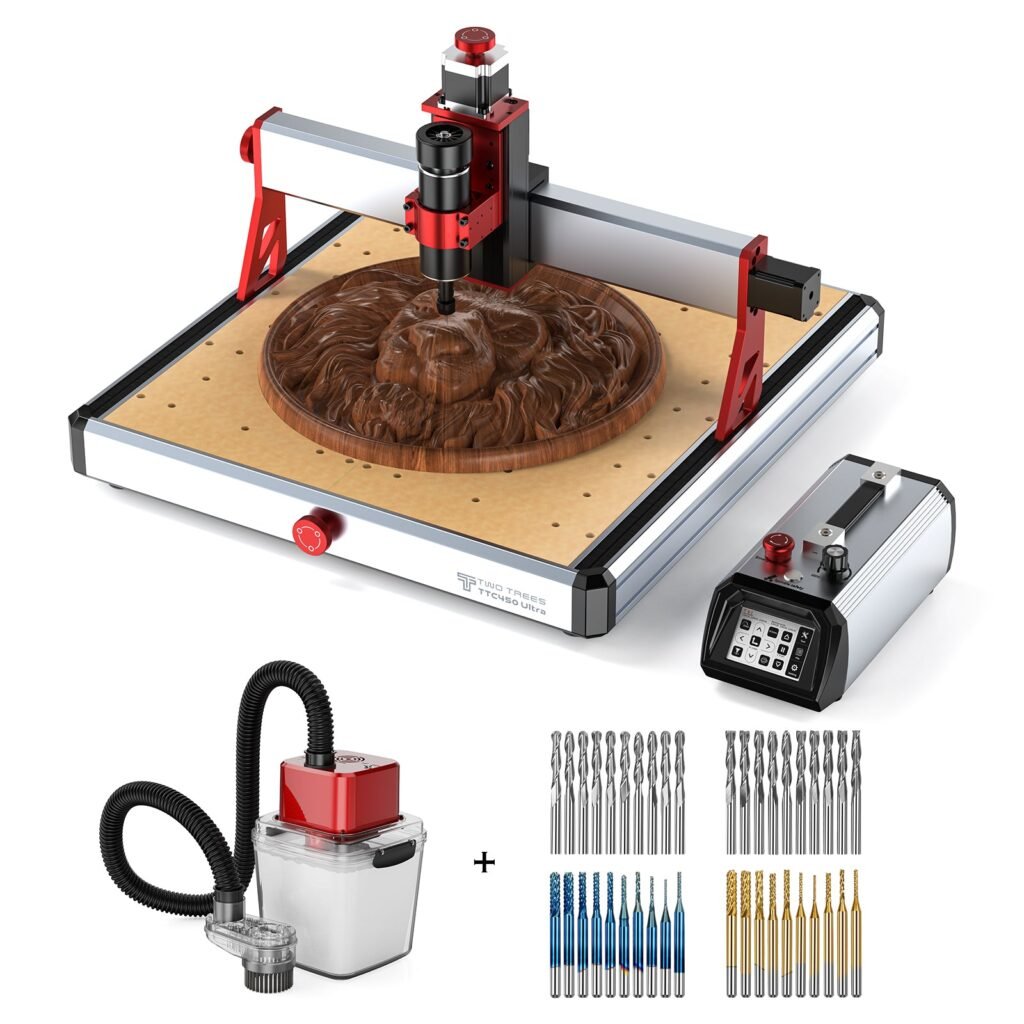
Twotrees TTC450 Ultra CNC Router Machine – US…
Same TTC450 Ultra machine but packaged with a vacuum cleaner and end mills — useful if you want a more complete setup out of the box.
Overview
The Twotrees TTC450 Ultra is a desktop CNC router that targets makers, hobbyists and small businesses that need a more capable cutting and engraving machine without moving up to an industrial frame. On paper it combines a relatively powerful 500W spindle (8,000–30,000 RPM), a generous 460×460×100mm work area, and claimed 0.05mm engraving precision. It also offers dual-mode operation for both CNC milling and laser engraving thanks to GRBL-compatible firmware, a sealed dustproof design for durability, and a compact 3.5‑inch touchscreen for local control.
These features make the TTC450 Ultra sound like a versatile shop tool: large enough for furniture accents and sign blanks, precise enough for detailed engraving, and built to tolerate workshop dust. This review examines those claims and gives practical guidance on how the machine might fit into different workloads and skill levels.
Who is this best for?
The TTC450 Ultra is aimed at several overlapping groups:
- Makers and DIY enthusiasts who want to move beyond small desktop routers and need a larger working area for bigger projects such as furniture components, signage or larger panels.
- Small businesses or craft sellers producing custom homeware, deep engravings, or short-run parts where a desktop footprint is preferred to a workshop-scale CNC.
- Hobbyists who want a dual-capability machine that can handle basic laser engraving as well as more demanding routing and light metalwork.
It is less likely to serve professional manufacturers that require heavy production throughput, certified machine documentation, or the highest-precision milling for aerospace or medical parts. Likewise, if you only need a small laser engraver or a very compact desktop mill, the TTC450’s footprint and capability may be more than you need.
Key features
Here are the headline features as supplied in product materials:
- 500W spindle, 8,000–30,000 RPM — marketed for cutting both metal and non-metal materials.
- Large working area: 460×460×100mm, which is noticeably bigger than many compact desktop CNCs.
- 0.05mm engraving precision stated by the manufacturer.
- Dual 12H linear rails for increased rigidity and stability of the gantry.
- Dual-mode operation (CNC + laser) under GRBL firmware — manufacturer notes this can be used without having to reflash firmware.
- 3.5‑inch IPS touchscreen for on-machine control.
- Sealed and dustproof design to reduce maintenance in a dusty workshop environment.
- Compatibility with a wide range of materials listed by the maker, including wood, acrylic, aluminium, stainless steel, carbon fibre, and PCB materials.
- Variants and accessories appear to be available (for example, US plug options and optional vacuum cleaner or end‑mill bundles). Check the retailer listing for specific package contents.
Practical evaluation
Without hands-on testing, the practical evaluation below interprets how the TTC450 Ultra’s specification is likely to translate into everyday use. This should help set realistic expectations and identify what to investigate further before buying.
Setup and ease of use
The TTC450 is described as having easy setup and an on-board 3.5‑inch touchscreen, which should make simple operations and jogging the spindle straightforward for beginners. GRBL compatibility also means the machine can be controlled from widely used CAM/CAD software and from standard G‑code senders, easing integration into existing workflows.
Nonetheless, expect a set-up process typical of desktop CNCs: bolting the machine to a stable surface, securing a spoilboard, setting mechanical end stops/home, and learning workholding techniques (clamps, t‑nuts, vacuum tables if supported). If you select a package with a vacuum cleaner or dust shoe, that will help, but you should verify the included accessories and any additional purchases required (collets, end mills, tangential cutters, clamp kits, etc.).
Materials and cutting capability
The 500W spindle and wide RPM range imply the TTC450 is intended to tackle a broad range of materials. For wood, acrylic and softer plastics it should be capable of clean, fast cuts. For aluminium and thin stainless steel, a stiff, accurately aligned machine plus the right end mills and conservative cutting parameters are needed; the quoted dual 12H rails and 0.05mm precision are encouraging in that regard, but actual metal‑cutting performance depends on feed rates, rigidity, tooling and fixturing.
Note that small desktop routers rarely match industrial machines for high‑speed metal machining. Expect to use lighter passes, suitable carbide tooling, and good chip evacuation (air or coolant strategies) when working metals. For PCB machining and fine engraving, the 0.05mm precision figure suggests it is capable of detailed results, again assuming proper tool choice and software setup.
Accuracy, rigidity and repeatability
The inclusion of dual 12H linear rails is worth highlighting. Heavier or stiffer rails improve the gantry’s resistance to flex during cutting, which helps with surface finish and dimensional accuracy—particularly on wider stock or when plunging. The claimed 0.05mm engraving precision positions the TTC450 as suitable for fine detail work, but as with any machine, actual repeatability will be influenced by assembly tolerances, belt/backlash management and how well the machine is mounted.
Buyers should budget time for calibration: checking and squaring the gantry, verifying spindle runout, and confirming axis steps under load. If you plan to use the TTC450 widely for tight‑tolerance parts, consider investing in a dial indicator and calibration tools or contracting a technician for initial setup.
Dust control and maintenance
A sealed and dustproof design is helpful in a woodworking environment; it reduces the ingress of abrasive dust into moving parts and electronics. However, dust control remains a priority. If your package includes a vacuum cleaner or dust extraction system, it will greatly reduce cleanup and protect bearings and rails. If not, plan to provide a competent dust extraction solution and to clear chips promptly during metal work to prevent recutting and tool damage.
Regular maintenance will include checking rail lubrication (if applicable), keeping the spindle collet clean, inspecting belts and couplings for wear, and ensuring electrical connections remain tight. Good workshop housekeeping and a maintenance routine will extend the machine’s working life.
Software and workflow
GRBL firmware is a common choice for hobby and prosumer CNCs because it supports standard G‑code workflows and integrates with many CAM programs and control senders. If you already have experience with GRBL or with CAM packages that export standard G‑code, adopting the TTC450 should feel familiar. If you’re new to CAM, expect a learning curve around feeds and speeds, toolpath strategies and file preparation for CNC versus laser modes.
Because the TTC450 supports both CNC and laser modes without re‑flashing (as stated by the manufacturer), it can be convenient for projects that require both engraving and milling. Confirm what laser power and safety features are present in the package you buy; laser modules and safety setups vary and you may need protective eyewear and enclosure considerations depending on laser class.
Strengths
- Large working area for a desktop machine — 460×460×100mm opens up projects that smaller routers can’t handle.
- Versatile spindle with wide RPM range — suitable for a broad range of materials from soft wood to light metalwork.
- Dual-mode CNC and laser capability — useful if you want both cutting and engraving in a single machine.
- Stiffer gantry design thanks to dual 12H linear rails — improves stability and potential accuracy.
- Sealed, dustproof design — reduces maintenance in a dusty workshop setting.
- User-friendly local controls via the 3.5‑inch touchscreen and GRBL compatibility for common CAM tools.
Limitations
- Manufacturer claims such as 0.05mm precision and “40% higher efficiency” should be treated as specification highlights rather than guaranteed real‑world results; actual performance depends on setup, tooling and operator skill.
- Despite the 500W spindle, serious metal machining requires attention to tooling, feeds and chip evacuation; this is not a substitute for a shop‑grade, coolant‑equipped industrial mill for heavy metal work.
- Small touchscreen controls are handy for basic tasks but complex jobs will still require a PC or laptop and CAM software for full capability.
- Package contents vary: check whether the listing includes a vacuum cleaner, end mills, collets or laser module. You may need to add consumables and accessories to get the machine ready for your projects.
- Noise and vibration will be factors—ensure a stable bench and consider vibration isolation if you need high precision or work in a tight home environment.
Pricing and value
The product is shown with a guide price of USD 897.00. Use that as a starting reference rather than a guaranteed street price; actual prices, discounts and availability vary by retailer and region. Also confirm which accessories are included in the specific listing you’re looking at—some packages include additional items such as a vacuum cleaner or starter end mill set, while others are sold as the bare machine.
When judging value, include the cost of essential extras that many users need: end mills (for different materials), collets and spares, clamps or a vacuum table, dust extraction, and perhaps an enclosure or boundary switches for laser safety. Factor in the time cost of calibration and learning if you’re new to CNC work; a small initial investment in a good starter tooling kit and a CAM course or tutorials can save time and produce better results sooner.
Overall value depends on how well the TTC450 matches your intended projects. For makers who want a larger desktop router with both milling and laser capabilities and who understand the need for proper setup and tooling, it can represent a competitive mid‑range option. For pure metal shops or production environments, a different class of machine may be better value in the long run.
Note: offers and prices can change — always check the retailer for the latest availability and the precise contents of the package you are buying.
Alternatives and what to compare
If you’re considering the TTC450 Ultra, here are some sensible comparison points and alternative directions depending on priorities:
- Workspace size: If you need more clearance in the Z‑axis for thicker stock, compare machines with deeper Z travel. If you mainly work on small items, a more compact and lower‑cost unit could be sufficient.
- Spindle power and cooling: For consistent metal cutting, look for machines with higher spindle power, sealed spindle bearings and, where appropriate, options for coolant or misting systems. Consider whether the machine’s spindle speed range and collet compatibility match the tooling you want to use.
- Build quality and rigidity: Machines with larger linear guides, ball screws rather than belts, or full steel frames will generally give better long‑term rigidity and finer surface finish for demanding work.
- Accessories and ecosystem: Some manufacturers offer modular add-ons—auto tool changers, vacuum tables, better control electronics or closed‑loop stepper/servo upgrades. Decide whether you want a platform that’s easy to upgrade over time.
- Laser vs CNC focus: If your work is primarily laser engraving or cutting thin materials, a dedicated laser cutter may be a simpler and more cost‑effective choice. The TTC450’s dual-mode convenience is attractive, but dedicated machines specialise better in one function.
When comparing specific models, make sure the comparison is apples‑to‑apples: check the actual included spindle, the type of linear motion system, and what fixtures and tooling are supplied.
Final verdict
The Twotrees TTC450 Ultra positions itself as a capable and flexible desktop CNC for makers and small businesses. Its large work area, 500W spindle, dual‑rail gantry and the option to switch between CNC and laser modes make it an appealing all‑rounder for users who want more than a tiny desktop router but who aren’t ready to step up to a large industrial machine.
Strengths include the larger cutting envelope, an emphasis on rigidity with dual 12H rails, and a dustproof design that suits a woodworking environment. The GRBL compatibility and touchscreen make it accessible for hobbyists who are comfortable learning CAM software, while the spindle specification suggests potential for light metalwork when combined with the right tooling and conservative cutting strategies.
However, buyer expectations should be realistic. The machine is a prosumer tool, not an industrial mill. The quoted precision and efficiency claims are useful indicators but not guarantees of performance in every shop. If you plan to cut aluminium or stainless steel heavily or require certified production tolerances, consider a higher‑specification machine or plan for workflow and tooling that compensate for the limits of a desktop router.
For many makers, the TTC450 Ultra will be a compelling choice: it offers a roomy work area, useful features, and flexibility at a price point that sits between basic hobby routers and full‑sized shop CNCs. Check the specific retailer listing for the exact package contents and current pricing, and budget for tooling, dust extraction and time to tune the machine for your projects.
If you want a versatile desktop CNC that can grow with your skills and projects—but understand the usual caveats about setup and tooling—the TTC450 Ultra is worth a close look.
Ready to check Twotrees TTC450 Ultra CNC Router Machine – US / Vacuum Cleaner + End Mills / None?
Check the latest offer before buying, then return to the main comparison if you want to compare it against the other shortlisted options.
Also featured in
This product also appears on these price comparison pages:
Compare this with the full shortlist
Return to the full comparison guide to see how this product compares against the other shortlisted choices.