
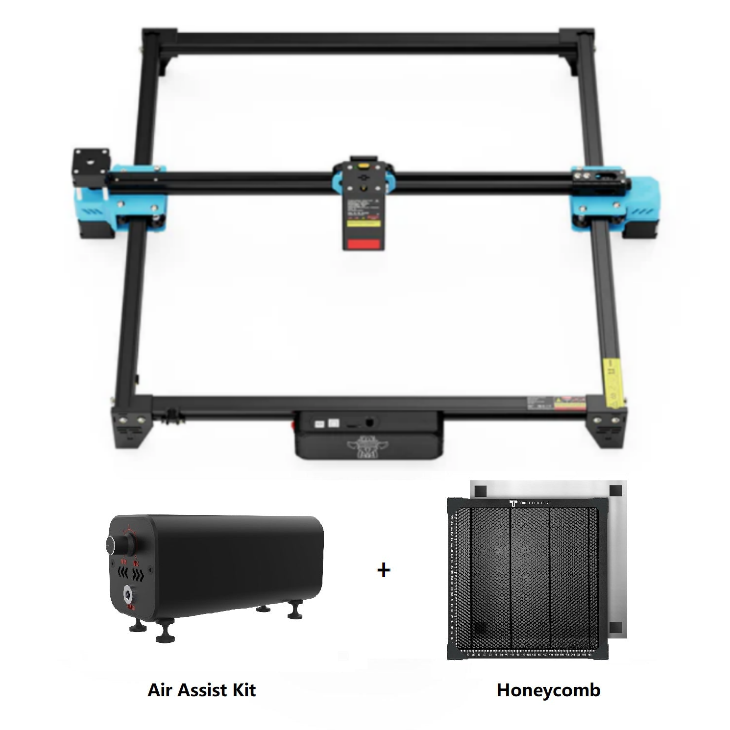
Twotrees TTS-20 Pro 20W Laser Engraver Machine +…
20W laser engraver bundle with honeycomb bed and air assist for cleaner cuts and improved engraving quality across wood, acrylic, leather and similar materials.
Overview
The Twotrees TTS-20 Pro bundle brings together a 20W diode laser module, a honeycomb workbed and an air‑assist kit in one package. That combination is aimed at makers, educators and small production users who want fewer separate purchases and a quicker path to engraving and light cutting on a desktop‑friendly machine. The TTS‑20 Pro supports mainstream control software such as LightBurn and LaserGRBL, which helps grease the workflow from design to production.
This review looks at what the Twotrees bundle actually gives you, where it fits in the market of compact 20W diode lasers, and practical buying considerations. The goal is to help you decide whether the Twotrees approach — a machine plus key accessories sold together through Twotrees’ official channel — is the right starting point for your projects.
Who is this best for?
The Twotrees TTS‑20 Pro is aimed mainly at hobbyists and small businesses who plan to do a lot of desktop engraving and some light-to-medium cutting. It’s a good fit for:
- Makers who want a near‑complete kit and fewer aftermarket accessory purchases.
- Small shops producing signs, personalised gifts, trophies or short production runs where a larger CO2 system would be overkill.
- Educators or workshop coordinators who need a controllable, widely supported software workflow (LightBurn, LaserGRBL) that students or users can learn easily.
- Users who prefer buying through an official Twotrees store for fulfilment and support consistency in the US market.
It’s not ideal if you need heavy cutting capability through thick acrylic, metal engraving beyond surface marking, or a fully enclosed, industrial‑grade extractor and filtration system — those are outside what a 20W diode laser commonly achieves.
Key features
- 20W diode laser module — Positioned for engraving and light‑to‑medium cutting on common non‑metal materials.
- Large desktop work area — The machine offers a working area around 418 × 418 mm, enough for signs, panels and multiple smaller items on a single pass.
- Honeycomb workbed included — Helps airflow under the material, reduces scorching from reflected heat and provides more reliable support for cutting tasks.
- Air‑assist kit included — Blows smoke and debris away from the cut, reducing scorching and improving edge finish; helpful for cutting tasks and finer engraving.
- Software compatibility — Works with LightBurn and LaserGRBL on Windows and macOS, which are both widely used in the maker community and small production environments.
- Bundle approach — Sold as a kit through Twotrees’ official channels for users who want the additional accessories bundled and prefer that fulfilment route.
Practical evaluation
Because the TTS‑20 Pro is sold as a bundle that already includes the honeycomb bed and air‑assist, it reduces the friction that many new buyers face: sourcing the right sized bed, fitting an air‑assist and trying to match parts. That convenience is the machine’s main practical advantage.
The working area of roughly 418 × 418 mm makes the TTS‑20 Pro genuinely useful for desktop projects. You can lay out multiple small plaques, badges or parts at once, which helps throughput without needing to micro‑optimise placement. For hobbyists who engrave signage, wooden boxes, leather patches or acrylic panels, the bed size is practical and versatile.
Compatibility with LightBurn and LaserGRBL matters in real terms. LightBurn is the more feature‑rich application and widely adopted among users who need vector cutting, raster engraving and advanced control; LaserGRBL is a popular free alternative that handles a lot of common workflows. Having both supported means you can adopt workflows that suit your skill level and budget.
Including the honeycomb bed changes daily use. Honeycomb beds minimise the surface area touching the underside of the workpiece, improving airflow and reducing back‑scorching — particularly important when cutting through thin wood or acrylic. The air‑assist kit is another practical improvement: it helps clear smoke and small particles from the laser path, improving cut quality and reducing the amount of cleaning or rework required after a pass.
Operationally, remember that a 20W diode laser is powerful for many hobby and small business tasks but it’s not a direct replacement for a high‑power CO2 system. Expect reliable engraving on wood, leather, some coated metals (for marking only) and plastics, and light cutting on thin materials. For thicker materials or industrial cutting tasks, this class of diode laser reaches practical limits.
Strengths
- Ready‑to‑run bundle: One of the clearest benefits is that the TTS‑20 Pro reduces the initial accessory hunt. The honeycomb bed and air‑assist are often purchased separately, and having them included means less setup time and fewer compatibility worries.
- Usable work area: The 418 × 418 mm bed is larger than many desktop engravers in the budget to mid‑range bracket, offering flexibility for multi‑piece jobs and larger single pieces without stepping up to a bigger machine.
- Well‑supported software: Compatibility with LightBurn and LaserGRBL makes the TTS‑20 Pro easy to integrate into existing workflows. Both programs are commonly used and documented, so finding tutorials, settings and community help is straightforward.
- Good edge quality potential: The combo of honeycomb bed and air‑assist helps improve cut edges and reduce burning, which results in better finished pieces out of the box.
- Official channel fulfilment: Buying the US variant through Twotrees can make shipping, returns and support simpler for US buyers compared with third‑party listings.
Limitations
- Cutting and material limits: A 20W diode laser is not a magic solution for thick or hard materials. Don’t expect to cut thick acrylic reliably or cut metals beyond shallow marking without additional processes or consumables.
- Fume management needed: While the air‑assist helps the cut quality, you still need a proper extraction or ventilation system for smoke and fumes — especially when working with plastics, coated materials or treated woods.
- Assembly and alignment: Bundles reduce accessory purchases but you still need to assemble, align and calibrate the machine. That takes time and a little mechanical patience; it’s not always solvable by following a single quick start guide.
- Ongoing costs: Consumables, replacement parts and maintenance add up over the lifetime of an engraver. Replacement diodes, lenses, belts and consumables such as honeycomb cells or air tubing should be factored into long‑term cost of ownership.
- Seller variations: Delivery times, warranty terms and support inclusions can differ by region and seller. The US Twotrees variant provides a consistent route for American buyers, but check what’s included in your region before purchase.
Pricing and value
The TTS‑20 Pro bundle is positioned as a convenience play: you pay for a machine and critical accessories together rather than buying a base unit and sourcing add‑ons separately. For buyers who value setup simplicity and fewer compatibility decisions, that has clear value. The included honeycomb bed and air‑assist would otherwise be extra purchases and can quickly add to overall cost and setup time.
That said, price‑sensitive buyers who are comfortable sourcing parts separately may find cheaper base machines and the possibility of aftermarket accessories for less money. The real value question is whether the time and compatibility assurance the bundle provides outweigh potential savings from piecing together parts yourself. For many hobbyists and small business owners, the time saved and reduced troubleshooting can be worth the premium.
Note: the guide price listed with this product can change and offers or shipping costs vary by region. Always check the current price and delivery terms before committing to buy.
Alternatives to consider
When comparing the Twotrees TTS‑20 Pro, it’s worth looking at machines that take a different approach — either as lower‑cost base units that require aftermarket add‑ons, or as alternative vendors selling a standalone 20W machine.
- Standalone 20W desktop machines (other vendors): Some brands sell the bare machine at a lower headline price, but you’ll likely need to add a honeycomb bed, air‑assist, and possibly an exhaust system. That route gives flexibility to customise your setup and can save money if you already have compatible accessories.
- Higher‑power CO2 systems: If your priority is cutting thicker acrylic and continuous high throughput, a small CO2 machine may be a better fit — though they are larger, pricier and need more infrastructure (ventilation, space).
- Lower‑power diode engravers: If your work is mostly delicate marking and you don’t need cutting power, a lower‑wattage diode system can be cheaper to run and safer in some workshop environments.
Specifically in the context of the Top 20W comparison mentioned earlier, the VEVOR 20W machine is a direct alternative that adopts a standalone approach. Comparing a Twotrees bundle to a VEVOR standalone lets you weigh the convenience of included accessories against the flexibility and potentially lower sticker price of a machine‑only option. Consider what you value most: immediate out‑of‑the‑box completeness, or the option to customise cost and accessories yourself.
Final verdict
The Twotrees TTS‑20 Pro bundle is a sensible choice for buyers who want a compact, desktop‑sized 20W laser with key accessories included. The honeycomb bed and air‑assist are practical additions that improve everyday results and reduce the time spent sourcing compatible parts. Combined with a roomy 418 × 418 mm working area and support for LightBurn and LaserGRBL, the package is well targeted at makers, small production users and educators.
However, don’t expect this to replace higher‑power industrial lasers for thick cutting or heavy metal work. You’ll still need proper ventilation and an understanding of material limits. If you’re comfortable building out a system, finding an alternative 20W base unit and buying accessories separately may save money; if you value a quick path to productive engraving with fewer compatibility questions, the Twotrees bundle is an appealing option.
In short: the TTS‑20 Pro is a pragmatic, ready‑oriented choice for desktop engraving and light cutting. Its biggest selling point is convenience — the included honeycomb and air‑assist remove two common early pain points for new owners. Check local delivery, warranty terms and current pricing before purchasing, as offers can change between regions and sellers.
Note: offers and prices can change — check the current listing and shipping options for your region before buying.
Ready to check Twotrees TTS-20 Pro 20W Laser Engraver Machine + Honeycomb + Air Assist Kit – US?
Check the latest offer before buying, then return to the main comparison if you want to compare it against the other shortlisted options.
Compare this with the full shortlist
Return to the full comparison guide to see how this product compares against the other shortlisted choices.