
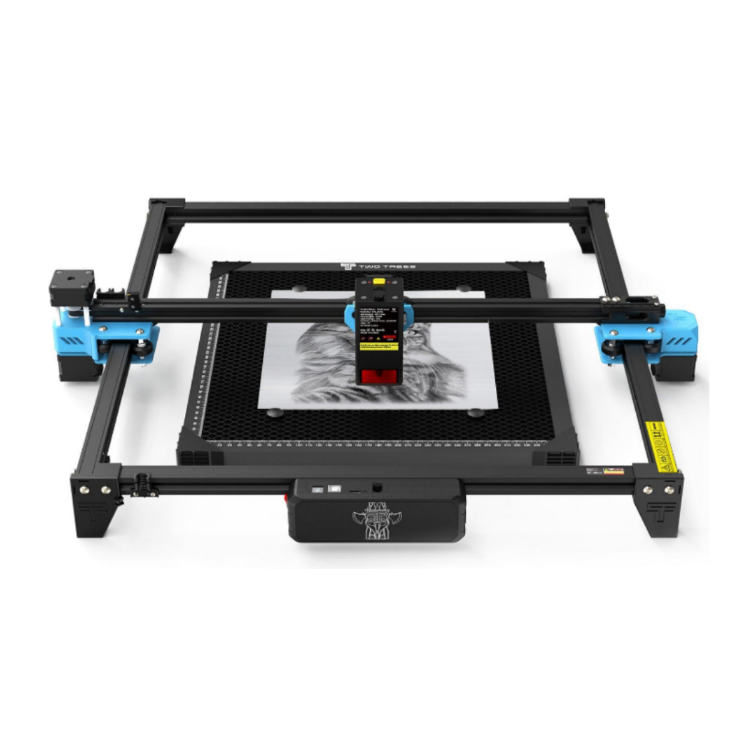
Twotrees TTS-20 Pro 20W Laser Engraver Machine -…
Balanced 20W desktop engraver with a 418×418mm bed and high‑speed engraving for workshops and makers.
Overview
The Twotrees TTS‑20 Pro is positioned as a versatile 20W diode desktop laser aimed at makers, educators and small businesses. With a roomy 418×418mm working area and an emphasis on high engraving speed and a fine laser spot, it’s pitched as an all‑rounder for everything from signage and personalised gifts to prototype marking. The machine sits between compact hobby lasers and higher‑power cutters: it’s not intended to replace a mains‑powered CO2 cutter for heavy fabrication, but it promises a useful balance of bed size, detail and throughput for many workshop tasks.
This review pulls together the TTS‑20 Pro’s key attributes and practical buying considerations. We haven’t carried out hands‑on testing ourselves; the observations here are derived from the product facts and practical guidance you’ll need to decide whether the TTS‑20 Pro suits your projects and workspace.
Who is this best for?
The TTS‑20 Pro targets a clear set of users. It’s best for:
- Makers and hobbyists who want a larger bed than compact desktop lasers offer, without stepping up to industrial equipment.
- Small business owners producing signage, engraved gifts, promotional items or low‑volume prototypes where crisp detail and decent throughput matter.
- Educators running workshops or classroom projects that require a machine with a forgiving working area and compatibility with common control software.
If you primarily need deep cutting of thick hardwoods, acrylics or metal marking in volume, a higher‑power CO2 or fibre laser would be a more suitable choice. Equally, if bench space is very tight and you only need occasional tiny engravings, a more compact hobby model could be a better fit.
Key features
- 20W diode laser — Suitable for engraving a wide range of common materials and light cutting tasks. The 20W rating positions it as a capable diode unit rather than a high‑power cutter.
- Spacious 418×418mm working area — Large enough for medium to fairly large projects: signs, multiple small parts, or several keepsakes in a single run.
- High maximum engraving speed — Designed for efficient throughput, which helps when running small business jobs or batch engraving.
- Ultra‑fine laser spot size — A small spot supports fine detail and crisp text, useful for graphics, small faces and intricate designs.
- Software compatibility — Compatible with common laser control software, offering flexibility to use established workflows and file formats.
- Desktop footprint — Sized to sit on many workshop benches while still offering a larger bed than entry‑level machines.
Practical evaluation
Think of the TTS‑20 Pro as a practical workshop tool that balances size, resolution and speed. The 418×418mm bed is one of the device’s strongest selling points: it opens up project possibilities that smaller, more common 300×300mm beds can’t easily handle. You can lay out multiple items to engrave in one pass or work on single larger pieces without constantly repositioning material.
The 20W diode laser won’t match the cutting depth of higher‑power CO2 systems, but it’s broadly capable for typical maker tasks: engraving hardwoods, plywood, leather, anodised or painted metals (for marking), certain plastics and foams, and light cutting through thin woods and card. The ultra‑fine spot means text and detailed artwork should reproduce cleanly, although as with all lasers, the best results depend on dialling in speed, power and focus for each material.
High engraving speeds are attractive for productivity, but they come with trade‑offs. Faster passes reduce run time but can make fine detail harder to capture unless you tune settings carefully. If you plan to run lots of detailed portrait work or very fine halftone engraving, expect to spend time testing to find the sweet spot between speed and quality.
Software compatibility is a practical advantage. If you already use standard control packages, the TTS‑20 Pro should fit into established workflows and make file preparation simpler. Bear in mind the usual caveats about firmware updates and driver compatibility — double‑check that the software you prefer is supported and that the machine’s firmware is kept up to date via the retailer or manufacturer.
Finally, the machine’s open‑frame desktop form factor suits many hobby workshops, but it does place responsibilities on the user for safety and environmental control. A well‑ventilated space and suitable personal protective measures are essential.
Strengths
- Large working area: 418×418mm gives more flexibility than many desktop lasers and reduces the need to jig or reposition items during a run.
- Good balance of detail and speed: The fine laser spot and high top speed let you produce crisp engravings while keeping throughput reasonable for small business use.
- Software flexibility: Compatibility with common control packages means you’re less likely to be locked into proprietary tools.
- Accessible price-to-capability ratio: The TTS‑20 Pro aims to deliver useful workshop capability at a price point that will appeal to makers and small business owners.
- Desktop-friendly footprint: Fits on many benches while still offering a sizeable bed.
Limitations
- Cutting depth is limited: As a 20W diode, it’s not the best choice for deep cuts in thick hardwoods or heavy acrylics compared with CO2 cutters.
- Open‑frame design: Offers less intrinsic containment for fumes, smoke and debris. Proper ventilation and a suitable workspace are essential for safe operation.
- Accessories and bundles vary: Exact contents — such as risers, rotary attachments or enclosures — depend on retailer bundles. If you need a rotary or enclosed operation out of the box, check carefully before buying.
- Tuning required: High speeds can require extra tuning to maintain the finest detail; expect to spend time calibrating focus, power and speed for different materials.
- Local support considerations: After‑sales support and local service options can vary by seller; check what’s available in your area before committing to purchase.
What you’ll need to consider before buying
There are several practical points to think through before deciding on the TTS‑20 Pro.
Workspace and ventilation
The open frame design makes ventilation a priority. Laser engraving and cutting produce fumes and fine particulates that should not be allowed to accumulate. You’ll need either a dedicated extraction system, an air filtration unit suitable for laser fumes, or to situate the machine where you can vent fumes outdoors safely. Consider noise and filter maintenance when planning ventilation.
Safety and PPE
Even low‑power lasers can be hazardous to eyes and skin. Use protective eyewear rated for the laser wavelength, and do not leave the machine unattended while running active cuts. Keep fire‑risk materials and flammable liquids away from the machine, and have a small extinguisher or blanket rated for workshop fires within reach.
Material testing and workflow
Spend time testing materials and documenting your best settings. Diode lasers react differently to natural woods, painted surfaces, plastics and composites. A simple spreadsheet of speed, power and pass counts for common materials will save time and avoid wasted material in production runs.
Accessory needs
Decide whether you’ll need a rotary attachment, height riser, enclosure or additional air assist. These can be sold separately or in retailer bundles. If you plan to engrave cylindrical objects or thicker materials regularly, factor those costs into the total purchase price.
Pricing and value
The listed guide price for the TTS‑20 Pro is USD 399.00; actual prices, bundles and availability vary by retailer. At that price band the machine aims to offer a strong mix of bed size, engraving detail and speed that compares favourably with many entry‑to‑mid level desktop lasers.
Value depends heavily on what you intend to do with the machine. For engraving and light cutting where detail and throughput matter, the TTS‑20 Pro can be a cost‑effective option. If you need deeper cutting capability or a fully enclosed, ventilated system out of the box, the additional cost of a CO2 setup or a machine bundled with enclosure and extraction will factor into the overall value proposition.
Because accessory bundles vary, watch for sellers that include risers, rotary kits or enclosures as part of a package if you need those items. If you’re buying from overseas, also allow for shipping, import duties and local warranty considerations when calculating final cost.
Note: offers and prices change; always check the retailer page for current pricing and availability before buying.
Alternatives to consider
While the TTS‑20 Pro occupies a useful niche, it isn’t the only option. If you want to weigh alternatives, consider these broad paths rather than specific models, since your choice should reflect power, bed size and accessory needs:
- Higher‑power diode or small CO2 machines: If you need deeper cutting of thicker woods and plastics, a more powerful diode unit or a small CO2 laser will offer better material penetration. Expect larger initial outlay and possibly a bigger workshop footprint.
- Smaller desktop engravers: For limited bench space and occasional small engravings, compact 300×300mm or smaller engravers can be cheaper and easier to accommodate, though they restrict the size of single‑piece work.
- Enclosed or industrial hobby systems: If safety, fume control and unattended operation are priorities, look for machines that come with an enclosure and integrated extraction. These are often more expensive but reduce the need for external extraction solutions.
When comparing alternatives, use the same decision points: bed size, laser power and real‑world cutting needs; accessory availability and cost; software compatibility; and support/warranty options in your region.
Final verdict
The Twotrees TTS‑20 Pro is a sensible mid‑range desktop laser for makers and micro‑businesses that need a larger working area and a focus on engraving detail and throughput rather than maximum cutting power. Its 418×418mm bed and fine laser spot are strong selling points for anyone producing signage, personalised items or prototypes that benefit from both size and resolution.
That said, it’s important to enter this purchase with realistic expectations. The 20W diode laser is not a replacement for a high‑power CO2 cutter when it comes to deep cuts in thick or dense materials. The open‑frame design also means you’ll need to plan for ventilation, safety eyewear and possibly additional accessories such as a rotary attachment or enclosure if your workflow requires them.
If your projects lean towards mid‑sized workpieces, detailed engraving and batch throughput — and you are prepared to manage ventilation and accessory choices — the TTS‑20 Pro offers a compelling combination of bed size, speed and price. Check the retailer for bundle options, clarify what’s included, and confirm local support and warranty terms before buying.
Quick recap: a practical, well‑balanced 20W desktop laser with a large bed and good detail for makers, educators and small businesses. Great for engraving and light cutting tasks but not the tool for deep, heavy cutting work; you’ll want to plan for ventilation and possible add‑ons depending on your use case.
Remember: product availability and pricing change—check the retailer page for the latest offers and the exact bundle contents before you buy.
Ready to check Twotrees TTS-20 Pro 20W Laser Engraver Machine – UK / None / None?
Check the latest offer before buying, then return to the main comparison if you want to compare it against the other shortlisted options.
Compare this with the full shortlist
Return to the full comparison guide to see how this product compares against the other shortlisted choices.