
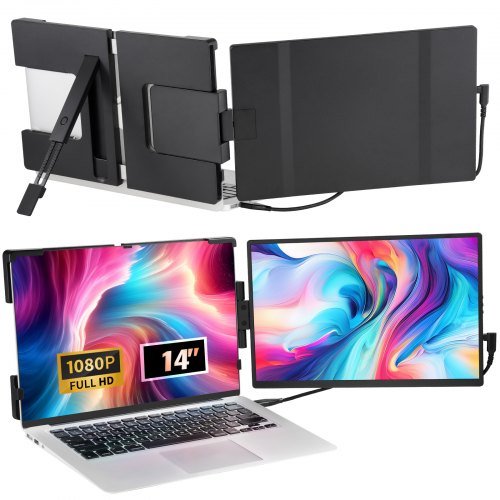
VEVOR Portable Laptop Screen Extender
VEVOR Portable Laptop Screen Extender, 14" FHD 1080P IPS Dual Extended Monitor for 13"-17" Laptop, Swivel Portable Monitor USB-C/USB-A/Mini HDMI Port, Compatible with Mac/Wins/And…
Overview
The VEVOR 14″ Portable Laptop Screen Extender is a slim, travel-friendly secondary display intended to clip on or sit alongside 13–17″ laptops. At 14 inches with a 1920×1200 IPS panel, a 60Hz refresh rate and 300cd/m² brightness, it’s pitched at people who want more screen real estate for productivity, light multitasking or portable setups on the go. Connectivity includes two USB‑C ports and a mini HDMI input, and the screen rotates through 210° for flexible positioning.
This review looks at what the monitor offers, who will get the most from it, and the practical considerations to bear in mind before you buy. The technical facts here are drawn from the product specification — we don’t claim hands‑on testing — but aim to help you decide whether this style of portable monitor suits your workflow.
Who is this best for?
The VEVOR 14″ portable extender is aimed chiefly at laptop users who need a compact, lightweight second screen without committing to a full desktop monitor. Typical users include:
- Remote workers and students who want a straightforward way to add a second window for documents, messaging apps or research.
- Salespeople or consultants who need a portable display to show slides or spreadsheets while visiting clients.
- Content creators who require an extra reference screen for timelines, notes or chat while working on a primary laptop screen.
It’s not primarily a gaming monitor — its 60Hz refresh rate and 72% NTSC colour gamut suggest a focus on office and general multimedia use rather than fast‑paced gaming or colour‑critical photo and video editing.
Key features
- 14″ IPS display with 1920×1200 resolution — slightly taller than standard 1080p for extra vertical space.
- Brightness around 300cd/m² and a 1000:1 contrast ratio, offering a balanced, usable image in typical indoor lighting.
- Colour gamut listed as 72% NTSC — adequate for general media and office work, though not aimed at professionals requiring wide colour accuracy.
- Ports: 2× USB‑C and 1× mini HDMI, giving multiple ways to connect laptops, phones, consoles and other devices.
- Swivelling design with 210° rotation, allowing the screen to be angled or positioned to the user’s preference.
- Lightweight at about 1.2kg (2.6lbs) and thin profile making it easier to carry alongside a laptop.
- Includes a package of accessories; actual contents and any bundled extras can vary by retailer.
Practical evaluation
What the headline specs tell you is useful, but the real decision comes down to how the monitor will work in day‑to‑day use. Because we haven’t personally tested this unit, this section outlines practical implications based on the product design and specifications so you can picture how it fits into your setup.
Setup and connectivity
Multiple ports are one of the monitor’s strengths. Two USB‑C ports mean you can connect modern laptops and some Android phones with a single cable for video and power, provided those devices support USB‑C DisplayPort Alternate Mode. The mini HDMI port offers a simple way to hook up older laptops, a Nintendo Switch or other HDMI devices. That variety maximises compatibility across different devices, but you should check your laptop’s output capabilities — not all USB‑C ports carry a video signal.
Expect a straightforward plug‑and‑play experience on most systems. If your laptop requires drivers or particular settings to use a second screen, the retailer page should clarify any additional steps. Also check whether the monitor draws power over USB‑C from your laptop or needs a separate power supply; listings sometimes vary on power delivery and bundled cables.
Portability and build
At about 1.2kg and less than a centimetre thick, the VEVOR extender is genuinely portable. The swivelling hinge and 210° rotation help position the screen either beside your laptop or at an angle for sharing with someone opposite you. That flexibility is handy for short meetings or hot‑desking.
However, portability always involves trade‑offs. Smaller displays mean smaller text and toolbars, and ergonomics will depend on how you prop or clip the screen to your laptop. If you need a larger desktop replacement or spend long hours doing colour‑sensitive work, a larger, fixed monitor may be more comfortable.
Image quality and everyday use
The 1920×1200 resolution on a 14″ panel gives a crisp image with a little extra vertical space compared with 16:9 1080p panels. For spreadsheets, coding or side‑by‑side documents, that can be an advantage. The IPS panel should deliver decent viewing angles and consistent colour across the screen, while 300cd/m² brightness is ample for indoor use.
But the listed 72% NTSC gamut and 1000:1 contrast ratio suggest modest colour reproduction and contrast performance compared with higher‑end portable screens. For general productivity, web browsing, video calls and casual streaming this won’t be a concern. For professional photo or video work, you’d likely want a panel with wider colour coverage and factory calibration.
Speakers and extras
The specification mentions speakers as “NG”, which is often shorthand for “not good” or “not included” in some listings — check the retailer page for clarity. In practice, many portable monitors either omit speakers or include very small ones that are adequate for voice calls but not for immersive audio. If sound quality matters to you, plan to use headphones or external speakers.
Accessory bundles can include protective cases, cables and utility clips; however, these items vary between sellers. Before buying, check which cables are included — particularly a USB‑C cable capable of video, if that’s how you intend to connect.
Strengths
- Compact and genuinely portable: thin profile and low weight make it easy to carry with a laptop bag.
- Flexible connectivity: two USB‑C ports plus mini HDMI provide compatibility with a wide range of devices.
- Helpful resolution and taller 1920×1200 aspect for productivity tasks, giving more vertical space than 1080p.
- Swivelling hinge and 210° rotation allow adaptable positioning for different working angles and sharing views.
- Neutral, practical specification makes it a sensible option to compare against similar portable monitors when shopping.
Limitations
- Colour gamut and contrast are modest — not aimed at professional colour grading or print‑accurate workflows.
- 60Hz refresh rate means it won’t match high‑refresh gaming monitors; it’s designed for productivity and general multimedia use.
- Speaker situation unclear in the specification; assume onboard audio will be basic unless the retailer confirms otherwise.
- Accessory and warranty details can vary by seller — you’ll need to check the retailer page for precise inclusions and support terms.
- As with any portable monitor, ergonomics and comfort depend on how you mount or prop the screen alongside your laptop — consider a stable stand or a laptop riser for longer sessions.
Pricing and value
The VEVOR 14″ portable extender is positioned as a mid‑range portable monitor: it offers the essentials most people need to extend a laptop screen without the premium price of professional colour‑accurate displays. The listed guide price is USD 144.99. Prices and stock can change, so check the retailer for the current offer and any additional costs such as shipping or extended warranty options.
To judge value, weigh how frequently you’ll use a second screen away from a desk. If you need occasional extra screen space for emails, meetings and reference material, a compact portable monitor like this tends to be good value. If you need top‑tier colour, higher refresh rates or built‑in battery life for completely cable‑free use, you’ll want to compare alternatives that explicitly advertise those strengths.
Alternatives to consider
If the VEVOR checks most of your boxes but you’re still shopping around, consider the following alternative directions rather than specific models:
- For colour work: look for portable monitors with higher colour gamut coverage (sRGB/AdobeRGB coverage figures) and factory calibration if you do photo or video editing.
- For gaming: consider portable screens with 120Hz or higher refresh rates and low response times if you play fast competitive titles on a console or laptop.
- For fully mobile use: some portable monitors include a built‑in battery so you can use them without being tethered to a power source — useful for presentations or long travel days.
- For a larger workspace: if you mostly work from a desk, a larger 24–27″ desktop monitor will be more comfortable for prolonged use and easier to configure ergonomically.
Final verdict
The VEVOR 14″ Portable Laptop Screen Extender is a sensible, no‑nonsense option for anyone who wants a compact second display for productivity, meetings and light multimedia. Its combination of a 1920×1200 IPS panel, multiple ports and a swivelling design makes it versatile and broadly compatible with modern devices.
It isn’t aimed at colour professionals or high‑end gaming — the 72% NTSC gamut and 60Hz refresh rate reflect that focus — but for students, remote workers and travellers needing extra screen real estate, it represents a practical choice. Do check the retailer page for the exact accessory bundle, speaker inclusion and up‑to‑date pricing or availability before you buy. Offers and stock can change, and some specification details (such as included cables and warranty length) are often set by the seller.
If you want a lightweight, portable way to add a second monitor to a 13–17″ laptop, the VEVOR is worth comparing alongside other portable monitors in the same class. Make sure your laptop’s USB‑C port supports DisplayPort Alt Mode if you plan to use a single‑cable connection, and consider whether you need better colour accuracy, higher refresh or a built‑in battery from your portable monitor choice.
Note: prices, stock and offers can change. Check the retailer page for the latest information before making a purchase.
Ready to check VEVOR Portable Laptop Screen Extender, 14" FHD 1080P IPS Dual Extended Monitor for 13"-17" Laptop, Swivel Portable Monitor USB-C/USB-A/Mini HDMI Port, Compatible with Mac/Wins/Android/Switch/PS5?
Check the latest offer before buying, then return to the main comparison if you want to compare it against the other shortlisted options.
Also featured in
This product also appears on these price comparison pages:
Compare this with the full shortlist
Return to the full comparison guide to see how this product compares against the other shortlisted choices.