
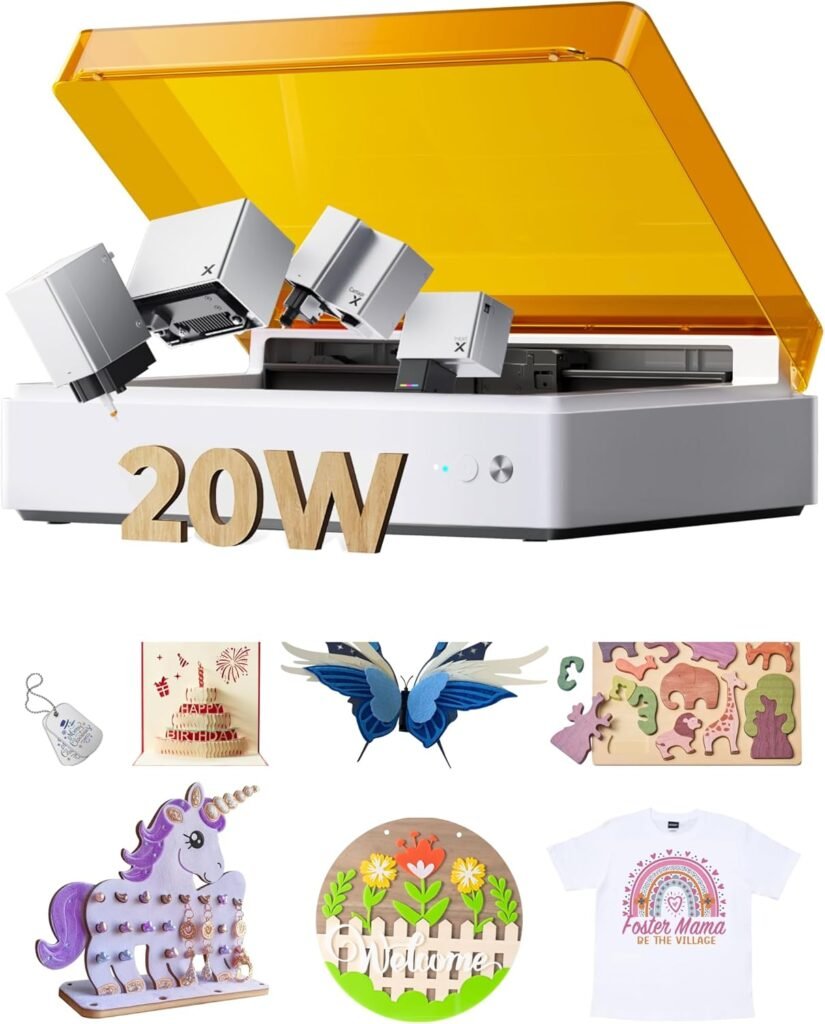
xTool M1 Ultra 20W Laser Engraver & Cutter
4-in-1 desktop machine combining laser, inkjet, blade cutter and pen drawing for makers who want one device for multiple craft tasks.
Overview
The xTool M1 Ultra is pitched as an all‑in‑one desktop craft machine: a 4‑in‑1 unit that combines a 20W laser module for cutting and engraving with inkjet printing, blade cutting and pen drawing. In theory that lets you print graphics, add drawn details, blade‑cut shapes and laser‑engrave or cut the same piece without swapping tools or changing workstations. It’s a concept designed for hobbyists, gift makers and small businesses that want flexibility for personalised products and short production runs while keeping footprint and workshop clutter down.
This review looks at what that multi‑tool approach actually means in practice, who will benefit most, where the limitations lie and how the M1 Ultra fits into the market of desktop creative machines. I’ve drawn only on the product information supplied by the manufacturer and retail listings — there’s no claim of hands‑on testing here. Still, combining four different output methods in one box raises practical questions about setup, workflow and running costs, so those are the topics I focus on.
Who is this best for?
The M1 Ultra is aimed at people who need flexibility. Good fits include:
- Personal makers who want to produce personalised gifts (engraved wood, printed cards with laser details, pen‑drawn accents).
- Small businesses and micro‑shops running short production batches of nameplates, small signs, jewellery blanks, or bespoke promotional items.
- Hobbyists and crafters who value the convenience of a single desktop machine that can switch between printing, cutting and engraving.
It’s less suitable for those who need high throughput, very large working areas or heavy industrial cutting. Likewise, if you only need one capability — for example just laser cutting — buying a single‑purpose machine may be cheaper and simpler in the long run.
Key features
From the available product details, the M1 Ultra’s headline features are:
- 4‑in‑1 functionality: laser engraving & cutting, inkjet printing, blade cutting and pen drawing in one desktop unit.
- 20W laser module intended for cutting and detailed etching across a broad range of materials.
- Manufacturer claims compatibility with over 1,000 materials, giving broad creative flexibility.
- Compact desktop footprint built for hobbyists and small workshop spaces.
- Workflow features and unified controls designed to simplify setup and operation across the different toolheads.
Those features are strong on paper: a built‑in printer alongside a reasonably powerful laser and mechanical toolheads opens creative workflows that are awkward when using separate machines (for example, printed graphics that are then laser‑cut to shape, or laser‑etched surfaces with hand‑drawn details applied afterwards).
Practical evaluation
Combining multiple toolheads into a single machine is a compelling idea because it reduces the need to register and align work between separate devices. If the M1 Ultra’s workflow tools do what they promise, you could set up a job that prints a design, switches to pen mode for hand‑drawn accents, then laser‑engraves or cuts the same piece with consistent registration. For makers producing personalised products — name badges, custom coasters, promotional items — that can save time and reduce error.
That said, multi‑tool machines introduce complexity. Each toolhead has different consumables and maintenance needs: ink cartridges and print heads for the inkjet; blades for the cutter; pens for drawing; and the laser consumables and safety procedures. Ongoing costs will therefore be a mix of replacement inks, blades and pens plus any laser‑specific items (filters, focal lenses, replacement modules if applicable). Prospective buyers should budget for these running costs in addition to the purchase price.
Another practical point is the desktop footprint. The M1 Ultra is described as compact, which is a benefit for hobbyists and small workshops. However, desktop size also limits the maximum material dimensions and production volume. If you plan to process large sheets or run long, continuous production, a bench or floor‑standing system with a larger bed will be more appropriate.
The 20W laser module is a useful mid‑range choice for hobby and small‑business applications. It’s powerful enough for cutting thin woods, acrylics and for detailed engraving on many substrates, but it still won’t match industrial laser cutters designed for thick‑material or high‑volume work. Importantly, laser safety and ventilation are considerations: even with lower‑power desktop lasers, fumes from engraving certain materials can be hazardous, and appropriate extraction or working in a well‑ventilated area is essential. Check the manufacturer’s guidance on ventilation and material safety before you start any projects.
Strengths
- Multi‑tool flexibility: The obvious advantage is being able to print, draw, blade‑cut and laser‑engrave the same workpiece without moving it between different machines. For mixed‑media projects this reduces alignment headaches and speeds up iterative work.
- Broad material support: The manufacturer claims compatibility with 1,000+ materials. That suggests you’ll be able to experiment with common craft materials — paper, card, leather, wood, acrylic and coated metals for engraving — keeping creative options open.
- Desktop footprint: Compared with industrial equipment, the M1 Ultra saves space. That matters when your workspace is limited or you want a machine that can sit on a bench in a home studio.
- Workflow focus: Unified controls and workflow features are designed to simplify setup, which can be a big plus for users who are less confident with complex registration and machine calibration.
- Good for personalised gifts and short runs: For small batches and bespoke items the convenience of a single machine that can finish a product end‑to‑end is compelling.
Limitations
- Higher upfront cost than a single tool: Because it combines multiple functions, the M1 Ultra will generally cost more than a single‑function machine. If you only need one capability, a dedicated device could be more cost‑effective.
- Consumables and maintenance: Expect ongoing costs for inks, blades and pens in addition to any laser maintenance. Owning the machine involves managing multiple types of consumables and replacement parts.
- Learning curve: Managing different toolheads and their settings takes time. Beginners should be prepared to learn about print colour profiles, blade depth and pressure, pen selection, and laser power/speed settings for different materials.
- Not for heavy industrial use: The desktop format limits material size and production volume. If you need to cut thick materials, very large sheets or run high‑volume production, a larger, single‑purpose laser system will be better.
- Specification and availability may vary: Product configurations and available accessories can change between retailers. It’s important to confirm exact specifications and compatibility before buying.
Pricing and value
Exact pricing varies by retailer, configuration and optional accessories, so you should check the official xTool site or authorised sellers for the latest offers. On value, the M1 Ultra’s proposition depends on how much you will use each of its functions. If you regularly need printed graphics plus laser engraving and blade cutting, the combined capability can be a genuine time‑ and space‑saver compared with buying separate machines and registering work between them.
However, if one function will dominate your use case — for example, you only plan to laser‑engrave — a dedicated laser engraver may be a better long‑term investment because of lower initial cost and simpler maintenance. Also factor in consumable costs (ink, blades, pens) and any required accessories such as ventilation or extraction for safe laser operation. Those recurring expenses make a meaningful difference to the total cost of ownership over time.
Another value consideration is support and software. Workflow features sound useful, but the real benefit depends on how well the software integrates all four toolheads and how easy the learning curve is. If your projects rely on advanced colour management or precise registration, ask about software capabilities and whether firmware or software updates are provided by the manufacturer.
Alternatives to consider
If you’re attracted to the idea of the M1 Ultra but it doesn’t quite fit your budget or workflow, here are a few alternative approaches to consider — without naming specific models since availability and specs change frequently:
- Dedicated desktop laser engraver/cutter: If laser work will be your primary use, a single‑function unit gives you a simpler setup and may cut or engrave faster for thicker materials. These machines are often cheaper and have a mature ecosystem of accessories and community support.
- Inkjet printer + desktop cutter: For printed, cut‑to‑shape items such as stickers, labels or printed cards, pairing a separate high‑quality inkjet printer with a small desktop plotter/cutter can be an efficient route. This keeps print quality high while offering precision cutting.
- Modular multi‑tool systems: Some manufacturers offer modular platforms where you can add or remove heads as needed. That approach can spread cost over time and allows you to start with one core function and add tools later.
- Outsourcing: For occasional or one‑off jobs that need industrial‑grade cutting, using a local laser cutting bureau or print shop can be cheaper than buying a multi‑function machine and managing consumables and maintenance yourself.
Final verdict
The xTool M1 Ultra 20W positions itself as a flexible, space‑saving solution for makers and small businesses that want printing, drawing, blade cutting and laser engraving in one desktop package. For the right user — someone who regularly combines these techniques on small to medium workpieces, and values streamlined registration between steps — the convenience of a unified workflow can outweigh the higher purchase price and the complexity of multiple consumables.
On the other hand, the trade‑offs are real. The all‑in‑one approach brings added upfront cost, ongoing expenses for ink and blades, and a learning curve to manage four different toolheads. The desktop format limits material size and production throughput, and the 20W laser, while versatile, won’t replace large industrial cutters for demanding jobs.
If you’re building a small personalised‑product business or enjoy mixed‑media craft projects and want a single machine that handles the whole process from print to finish, the xTool M1 Ultra is worth close consideration. Make sure to check the latest specifications, available accessories and any required safety or ventilation equipment from authorised sellers before buying. If your needs are narrower or heavily volume‑oriented, compare single‑function alternatives or outsourcing options to see which path gives you better value.
Note: Offers, configurations and prices change — always check the manufacturer or authorised retailers for current availability and up‑to‑date pricing before making a purchase.
Ready to check xTool M1 Ultra 20W Laser Engraver & Cutter, 4-in-1 Desktop Craft Machine | inkjet printing, blade cutting, pen drawing, support 1000+ materials, DIY gift making,small business product, easy operation?
Check the latest offer before buying, then return to the main comparison if you want to compare it against the other shortlisted options.
Compare this with the full shortlist
Return to the full comparison guide to see how this product compares against the other shortlisted choices.