
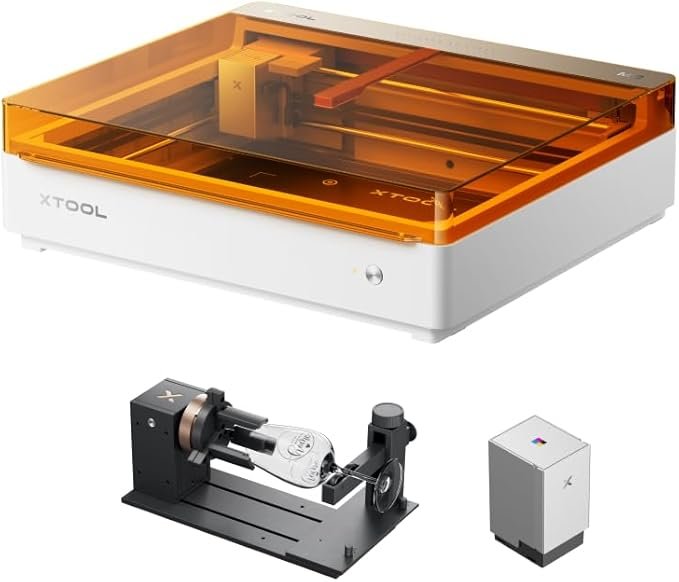
xTool M2 10W Diode Laser Engraver and Cutter…
10W diode desktop laser with dual cameras, expandable with inkjet and rotary modules — user-friendly for home studios and small businesses.
Overview
The xTool M2 bundle combines three capabilities in a single desktop package: a 10W diode laser for marking, detailed engraving and light cutting; a CMYK inkjet module for full‑colour printing on compatible surfaces; and the RA3 Lite smart MagSwap rotary attachment for accurate work on cups, bottles and other cylinders. That trio is aimed squarely at hobbyists, personalised‑gifts sellers and small shops that need flexibility rather than industrial throughput.
This is not a review based on hands‑on testing, but an editorial appraisal built from the product information supplied by the manufacturer and commonly known characteristics of the components involved. If you’re considering the M2 bundle, treat this as a practical guide to what the package offers, where it will shine and the trade‑offs to expect before you click buy.
Who is this best for?
The xTool M2 bundle is a sensible match for a few clear user types:
- Hobbyists who want a single machine that can engrave, add full‑colour prints and handle cylindrical objects without buying separate devices.
- Small business owners who make personalised items — mugs, small wooden signs, phone cases, leather goods — and want the flexibility to add colour artwork as well as laser engraving in limited runs.
- Makers and crafters with a compact workspace: the M2 is described as desktop‑friendly, so it fits home studios or small workshops where floor space is at a premium.
It’s less suited to industrial users who need heavy‑duty cutting, very high throughput or fully enclosed, production‑grade systems. Likewise, if your work relies entirely on deep, thick material cutting, a higher‑power CO2 laser or industrial unit would be more appropriate.
Key features
Here are the core elements that define the M2 bundle and what each one brings to the table:
- 10W diode laser module — Intended for marking, fine engraving and light cutting. Diode lasers of this class typically excel at detailed work on materials such as wood, acrylic, leather and some coated metals for marking, but are limited for heavy, thick cutting tasks.
- CMYK inkjet printing module — Adds full‑colour printing capability to the machine. This lets you combine laser engraving with colour artwork and photographic prints on compatible surfaces, something lasers alone cannot do.
- RA3 Lite smart MagSwap rotary attachment — A MagSwap rotary is designed to make cylindrical engraving easier and more accurate. It lets the M2 handle cups, bottles and other rounded items without elaborate fixturing, widening the range of products you can produce.
- Compact, desktop format — The bundle is described as desktop‑friendly, suitable for small shops and home studios where space matters.
- Modular MagSwap design — Simplifies swapping attachments so you can move between flat engraving, rotary work and the inkjet module without a lot of downtime or fiddly reconfiguration.
Practical evaluation
Functionally, the M2 bundle is about flexibility. If your work benefits from switching between engraving, full‑colour printing and cylindrical marking, having everything on a single platform is a strong convenience. The inkjet module fills a practical gap: lasers are excellent for monochrome engraving and crisp marks, but they can’t produce full‑colour graphics. The CMYK unit lets you add photographic colour to products, making the unit more useful for personalised gifts and small branded runs.
On the laser side, a 10W diode is competent for sign‑making, decorative engraving, marking on coated metals and light cutting of thinner materials. Don’t expect deep kerf cutting on thick hardwoods or heavy‑duty sheet cutting that higher‑power CO2 lasers or fibre lasers deliver. The M2 is tuned toward precision, detail and speed for small pieces rather than industrial throughput.
The RA3 Lite rotary is a pragmatic inclusion. Cylindrical work typically requires separate fixtures or a third‑party accessory on many desktop lasers; having a manufacturer‑designed rotary that integrates with the MagSwap system reduces complexity and improves repeatability for small‑batch production of cups and bottles. Rotary engraving speed and accuracy depend greatly on correct alignment and the rotational device’s quality — the MagSwap approach aims to make that setup more straightforward.
As you’d expect from a multi‑tool bundle, there are practical trade‑offs. Adding an inkjet and rotary means more components to learn, more maintenance items (ink, printheads, rotary collars) and a steeper initial learning curve compared with a single‑purpose laser. You’ll need to understand which materials are compatible with the inkjet and what finishing steps, if any, the substrate requires. Similarly, safe use and adequate ventilation are non‑negotiable; even light cutting and engraving produce fumes and particulates that should be vented away from your workspace.
Finally, workflow integration matters. The idea of swapping between laser and print modes is attractive, but real‑world productivity depends on software support, reliable registration between print and laser passes, and consistent material behaviour. Check the latest compatibility and workflow guidance from xTool — successful mixed‑media work often hinges on small but important procedural steps.
Strengths
- Versatility in one package: Laser engraving, full‑colour inkjet printing and rotary work on cylinders all from the same base machine. That reduces the need to buy separate devices and simplifies your bench layout.
- Colour printing capability: The CMYK inkjet module broadens creative options and product types. If you sell personalised gifts, the ability to add photographic or multi‑colour artwork is a real advantage.
- Rotary support included: The RA3 Lite rotary makes cylindrical engraving practical without hunting for third‑party fixtures, improving setup speed and repeatability.
- Desktop convenience: The M2 is designed for small studios and home workshops, offering a compact footprint compared with larger, industrial machines.
- MagSwap modularity: A user‑friendly system for changing attachments reduces downtime and lowers the barrier to using multiple accessory types.
Limitations
- Not an industrial cutter: Diode lasers in this power class are for light cutting and engraving. If you need heavy cutting or high‑volume production, a different platform is more appropriate.
- Inkjet surface restrictions: The CMYK module only prints on compatible surfaces. Expect to research and test substrates — not every material you can engrave will accept inkjet printing without preparation or a special coating.
- Added complexity: More modules mean more things to maintain, configure and learn. That’s fine for users who want flexibility, but novices should budget time to become proficient.
- Ventilation and safety: Even light cutting produces fumes. Proper extraction, eye protection and safe operating procedures are essential and may add to setup cost.
- Not a substitute for industrial throughput: If your business grows to demand high volumes, you may outgrow the M2’s desktop‑style capabilities and need to step up to production equipment.
Pricing and value
The bundle nature of this package means price varies with region, retailer and the exact configuration you choose. Bundles that include both the CMYK inkjet module and the rotary attachment are typically more expensive than the base laser alone, but they also consolidate functionality you might otherwise buy separately.
Value depends on how you plan to use the machine. If you regularly produce personalised, colourised products and need cylindrical engraving, the combined cost of separate devices could be higher than buying this integrated bundle. Conversely, if you only occasionally need colour prints or rotary work, you might prefer to buy the base laser first and add modules later — depending on the vendor’s upgrade paths and modular pricing.
Bear in mind additional running costs: ink and printhead maintenance for the inkjet module, replacement parts for the rotary (rubber collars, chucks), consumables for laser work and ventilation equipment if you don’t already have proper extraction. Also factor in learning time: expect to invest hours in calibration and material testing before you get consistently clean results.
Prices and availability change frequently — always check the manufacturer’s site or authorised UK dealers for the latest figures and any configuration options that might suit your needs.
Alternatives to consider
If the M2 bundle sounds interesting but you’re weighing options, here are a few routes you might consider depending on priorities:
- Base laser only: If you don’t need colour printing or rotary work immediately, buying a laser‑only package reduces up‑front cost and complexity. You can add a rotary or inkjet later if the platform supports it and the upgrade path is affordable.
- CO2 or fibre lasers for heavy cutting: For users who need deeper cutting and faster throughput on thicker materials, a CO2 laser (for wood, acrylic and more) or a fibre laser (for metal marking/cutting) is a better technical fit — but they’re typically larger and more expensive.
- Separate inkjet printer + laser: Some small businesses keep a dedicated UV or flatbed printer for colour work and a separate laser for engraving; this can give higher colour fidelity or substrate flexibility than a small inkjet module, at the cost of extra space and investment.
- Third‑party rotary attachments: If rotary engraving is an occasional need, look at whether a simpler, lower‑cost third‑party rotary will fit your chosen laser. That approach can reduce spend but may not integrate as smoothly as a supplied MagSwap accessory.
Final verdict
The xTool M2 10W diode laser bundle with the CMYK inkjet module and RA3 Lite MagSwap rotary is a compelling proposition for anyone who needs a single, compact machine that can switch between engraving, full‑colour printing and cylindrical work. It’s designed with the small‑business and maker market in mind: flexible, space‑efficient and capable of producing a wide range of personalised items without investing in multiple separate devices.
Strengths are clear — the colour printing fills a practical gap lasers can’t cover, the rotary expands product possibilities, and the MagSwap design keeps the system relatively user‑friendly. The limitations are also straightforward: diode lasers aren’t built for heavy industrial cutting, inkjet printing requires compatible substrates, and the bundle increases the learning curve and maintenance overhead compared with a single‑function device. Safety and ventilation remain essential considerations regardless of how light the cutting appears.
If you run a small gifts business, make customised goods on demand, or want a versatile desktop machine for a home studio, the M2 bundle is worth strong consideration. It offers real flexibility and consolidates functionality that would otherwise require multiple purchases. If your needs are narrow — for instance, deep material cutting or high‑volume manufacturing — you’ll likely be better off with a different class of machine.
Remember: prices and bundles change, and material compatibility notes or software updates can affect how a machine performs in your workflow. Check current availability and the manufacturer’s guidance before you buy, and plan for time to test and calibrate with the materials you intend to use.
Note: offers and prices can change — always verify current pricing and availability from the manufacturer or authorised dealers before purchasing.
Ready to check xTool M2 10W Diode Laser Engraver and Cutter Machine Bundle with CMYK Inkjet Printing Module & RA3 Lite Smart MagSwap Rotary Attachment?
Check the latest offer before buying, then return to the main comparison if you want to compare it against the other shortlisted options.
Compare this with the full shortlist
Return to the full comparison guide to see how this product compares against the other shortlisted choices.